Feature Highlight
AI-powered Asynchronous translation
Further expanding Stibo Systems' range of AI-powered offerings, STEP's asynchronous translation capabilities now support automated data translation into any language using AI. By configuring a connection between STEP and an Azure-hosted large language model (LLM) using asynchronous translation, users can now send translatable data to the LLM and receive translated content back rapidly, dependent on the size and complexity of the translations being processed.
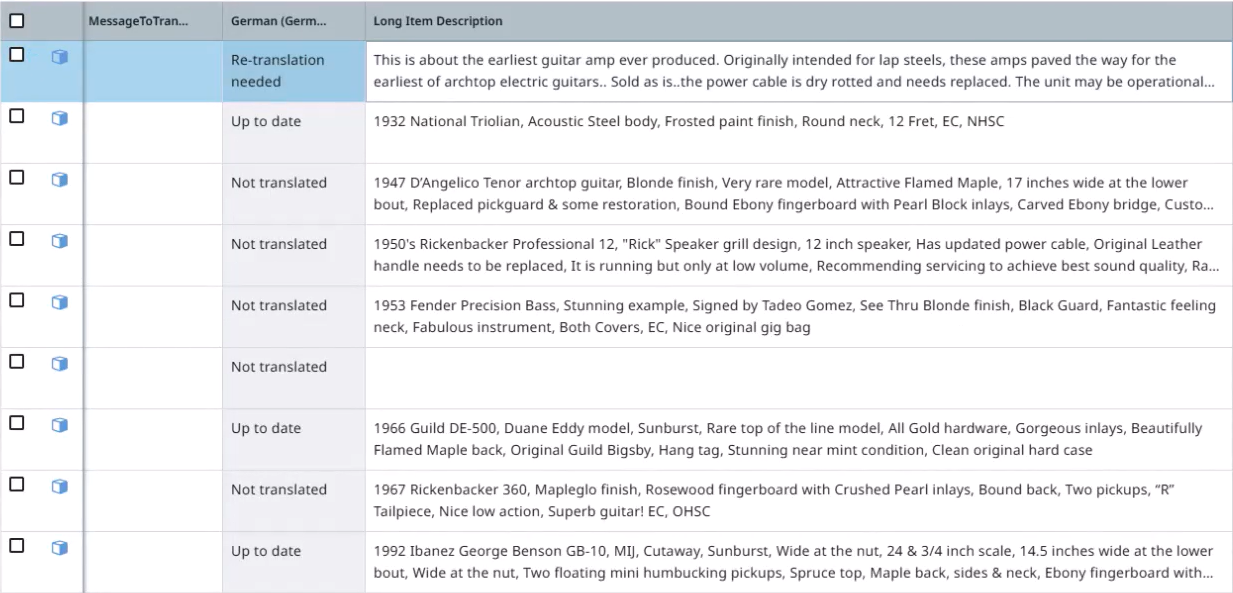
Previously, asynchronous translation only supported traditional translation methods, like translation agencies, which often entailed lengthy translation cycles and high costs. By leveraging AI with STEP's powerful asynchronous translation workflow, users can move objects through translation more quickly, at a lower cost, and reap the benefits of pushing translated product data to relevant markets faster than ever.
For more information on configuring asynchronous translation powered by AI, refer to the Configuring and Using Asynchronous Translation using AI topic.
Summary
The following enhancements and changes have been made as part of the 2025.4 update:
-
Microsoft Office asset documents no longer use LibreOffice to autogenerate a preview in the workbench or Web UI. Microsoft Office asset thumbnails now display an icon indicating the document type, such as .DOC, .XLS, or .PPT. This change improves resource consumption and stability. Refer to the Asset Previews in Web UI topic in the Web User Interfaces documentation.
-
Diagnostic file contents now automatically include additional business rule and calculated attribute information to assist in troubleshooting. Refer to the Send Diagnostics topic in the Administration Portal documentation.
-
STEP and SSUI technical users now have machine-to-machine integration functionality via the Control Service API. This new REST-based API gives access to Security Event Logs (available in the SSUI since the 2025.3 update) and JavaScript business rules logs (as defined in the JS Logs section of the Logs topic of the Administration Portal documentation). For full details, refer to the 'Control Service API' section of the Technical Documentation, available at [SaaS Environment URL]/sdk or accessible from the Start Page.
-
Users creating or scheduling a bulk update can now optionally skip the Preview step, which, depending on business rule configuration, can execute irreversible actions such as email notifications or REST calls. Refer to the Bulk Update Operations or the Scheduling Bulk Updates for Collections topics in the Bulk Updates documentation.
-
The STEPXML XSD is now updated to reflect inherited attributes on the data container type, enabling the STEPXML to be validated. Refer to the XSD link under the STEPXML section of the Technical Documentation, available at [SaaS Environment URL]/sdk or accessible from the Start Page.
-
Scheduled processes now support a configurable priority when using the One Queue background process execution mechanism. After a process is created, a priority can be assigned, which the One Queue scheduler uses to determine the execution order of waiting processes. This change ensures that these background processes start more promptly. Refer to the BGP One Queue topic in the System Setup documentation.
-
When the user aborts an in-progress BGP, it should now terminate more quickly. Any required data rollbacks performed by the system should also resolve faster.
These enhancements and changes are also included in the 2025.4 update and are described in the Details section that follows:
-
Workflow variables are now automatically limited to 1 MB to prevent excessively large values that can cause JavaScript business rules to fail.
-
Users can now search for an unlimited number of distinct facet values using Elasticsearch in the Web UI search screen.
Details
New size limit for workflow variables in JavaScript business rules
Bound workflow variables are workflow variables that are associated with an attribute. These workflow variables use the attribute's validation, potentially limiting the size of a value through the Maximum Value parameter. While it is common to use business rules to append text to a workflow variable value during processing, this can result in an excessively large value when the variable is unbound. Unbound variables are now limited to a size of 1 MB to improve business rule success rates.
In JavaScript business rules, setting workflow variable values on simple variables are now limited to 1 MB using setSimpleVariable(String variableID, String simpleValue). When a value larger than 1 MB is required, use getValue(String attributeID), which returns a value and requires that the variable is bound to an attribute, enabling attribute validation to constrain the value size limit.
For information, refer to the Workflow Variables topic in the Workflows documentation. Also refer to the Javadoc link under the Extension API section of the Technical Documentation, available at [SaaS Environment URL]/sdk or accessible from the Start Page.
Elasticsearch filtering enhancements
Beginning with the 2025.4 update, users can now search for an unlimited number of distinct facet values when filtering facets. Previously, this was set to a limit of 1,000 values. There remains a 1,000 value limit on what can be displayed at once when viewing a facet, but a message now notifies the user if the number of values exceeds 1,000. Note that the total count for each value in the dataset does not impact the display limit.
In addition to these changes, the 'Invert' function on the search screen has been removed.
For more information, refer to Search Screen Static Facets topic in the Web User Interfaces documentation.
Future Updates
Upcoming automation updates for Sustainability
Significant automation improvements are on the horizon for the Sustainability Data Management solution, with updates slated for the upcoming 2026.1 release.
Stibo Systems' Sustainability solution will roll out high-impact improvements related to easy management of ISO certifications, recycling standards, and assessment expirations in the spring of 2026 for all new installations.
For more information on our Sustainability offering, refer to the Introduction to Sustainability topic.