The recommended background process (BGP) execution mechanism is 'One Queue', which implements a priority parameter for BGPs and determines the order in which BGPs are handled. Waiting BGPs are prioritized for execution based on BGP priority, but also based on the user, process type, and creation time, in accordance with a round-robin scheduling algorithm.
Note: The following functionality is managed by a configuration property that is not available in the Self-Service UI. Contact Stibo Systems Support for assistance.
'One Queue' is used when the BackgroundProcess.Scheduler.PluginID configuration property is set as OneQueueBGPScheduler.
Important: Before applying 'One Queue' to a production environment, first apply and thoroughly test the background process execution mechanism on lower-level environments.
The following sections define the functionality available when using 'One Queue':
Priority Mechanism and Round-Robin Scheduling
When using the 'One Queue' background process execution mechanism, a priority can be set for event processors (EPs), integration endpoints (IEPs, both outbound - OIEPs and inbound - IIEPs), and scheduled processes. In addition, a round-robin scheduling algorithm is employed to ensure that no single user or process type consumes a disproportionate number of resources.
Priority Mechanism
A BGP can be started if a system has enough resources available. Examples of resources are heap memory, CPU capacity, and the number of BGP workers. This mechanism selects BGPs to start across all BGPs waiting to be executed.
Each environment has a fixed number of 'BGP workers' available for processing BGPs. The number of available BGP workers is determined automatically, depending on the environment size. Individual BGP workers poll the list of waiting BGPs at regular intervals and start as many processes as capacity allows. Waiting BGPs are prioritized for execution according to a round-robin scheduling algorithm that considers the BGP priority, user, process type, and creation time ('Start at' for scheduled BGPs).
Poller processes for IEPs and BGP scheduler processes (BGP type 'Schedule') bypass the prioritization and are always allowed to run.
Note: New 'One Queue' background processes can only start when there is adequate heap memory. By default, at least 10 percent of the total amount of heap memory on an environment must be available to start a new background process. When 20 percent of the total amount of heap memory is free, new BGPs are started without restraint.
When the 'One Queue' mechanism is enabled:
-
BGPs assigned to queues and the degree of parallelism for the queues on existing configurations are ignored. Refer to the Parallel Processes section below for more information.
-
Queues cannot be specified for IEPs and EPs.
-
The 'Queue Info' BGP editor tab is not displayed. It is only available on systems using the legacy 'Multiple Queues' mechanism.

-
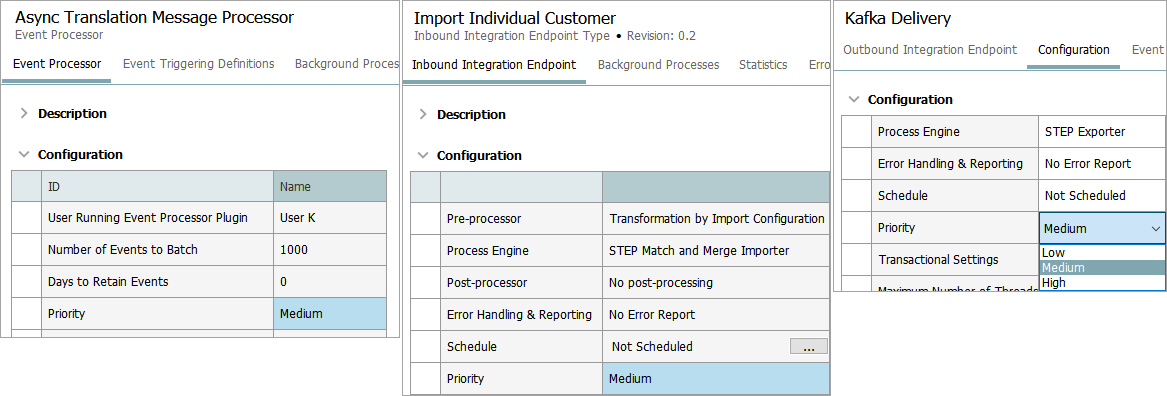
Background process priority is displayed in the Configuration section of EPs and IEPs. Priority can be set via the 'Edit Configuration' link (which opens the wizard) for EPs and IIEPs; for OIEPs, set the priority directly in the editor via a dropdown. For scheduled processes, priority can be set via the Background Process editor, detailed in the Priority Parameter Setting section below.
Round-Robin Scheduling
The round-robin scheduling algorithm ensures both efficiency and fairness in BGP processing by distributing available capacity equitably across different users and process types, and by starting the oldest processes each group first. Specifically:
-
High-priority processes are started first. Process types set with 'High' priority are run before types with 'Medium' or 'Low' priority.
-
Users and process types are handled equitably. When multiple processes have the same priority, no single user or process type can dominate the queue. Processes are handled in a balanced manner to distribute the available capacity fairly.
-
Within each group, the oldest process is started first. Multiple processes of the same type are started in the order they were created, following a predictable first-in, first-out (FIFO) approach.
The round-robin approach prioritizes processes by urgency, distributes capacity equitably across users and process types, and handles same-type processes in the order they were created.
Background Process Execution Overview
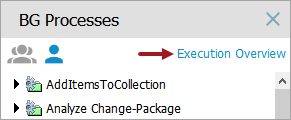
Admin users with the 'View Background Processes of Other Users' setup action (explained in the Action Sets topic) can monitor the execution of background processes via the 'Execution Overview' link available on the BG Processes tab in the workbench.
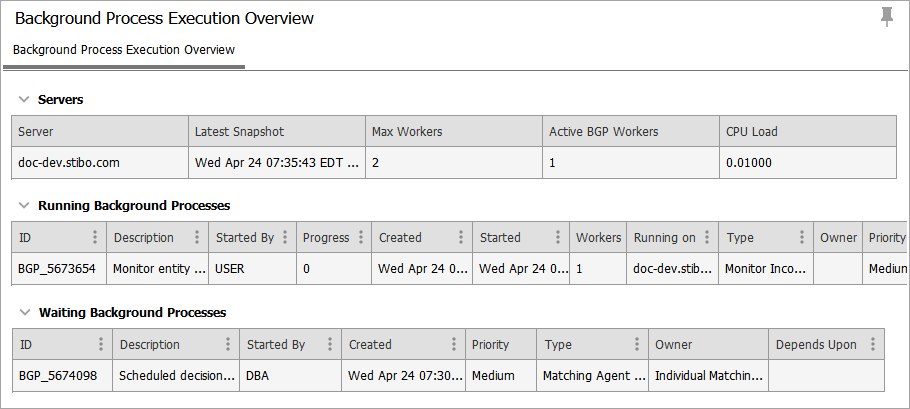
The 'Background Process Execution Overview' includes sections for Worker Nodes, Running Background Processes, and Waiting Background Processes.
Hover over the process ID column to display a tooltip that provides information on the processing order.
Note: The overview is automatically updated every 60 seconds. A user can also refresh the data using the general workbench 'Force Reload' button ( ) or by clicking the 'Execution Overview' link again.
Worker Nodes
The Worker Nodes section of the Background Process Execution Overview includes the nodes that are available with details about the number of active processes, and the scheduler status.
The 'Scheduler Status' column shows if the system is 'Ready' or 'Awaiting processing capacity' and the number of seconds it has been waiting. When the system is waiting on processing capacity, this can indicate constraints in available workers, heap memory, or CPU resources. For additional details on the 'Awaiting processing capacity' message submit a ticket on the Stibo Systems service portal.
Running Background Processes
The Running Background Processes section shows the BGPs currently being executed by STEP. The following is a list of the columns associated with Running Background Processes:
-
ID – The ID of the BGP with a link displayed when hovering.
-
Description – The BGP Description with a link displayed when hovering.
-
Started By – ID of the STEP user who started the BGP.
-
Progress – BGP Progress.
-
Created – Time that the BGP was created. For scheduled EP BGPs, this shows the 'Start at' time.
-
Started – Time that the BGP was started.
-
Workers – The number of BGP workers used for executing the BGP. This can be more than one for BGPs using the parallel execution / multithreading framework. Refer to the Parallel Processes section below for more information.
-
Running on – The environment executing the BGP.
-
Type – The background process type.
-
Owner – The IIEP, OIEP, EP, or setup entity that created the BGP.
-
Priority – The priority of the BGP.
Waiting Background Processes
The Waiting Background Processes section shows the BGPs waiting to be executed. The columns shown are:
-
ID – The ID of the BGP with a link displayed when hovering.
-
Description – The BGP Description with a link displayed when hovering.
-
Started By – ID of the STEP user who started the BGP.
-
Created – Time that the BGP was created. For scheduled EP BGPs, this shows the 'Start at' time.
-
Priority – The priority of the BGP.
-
Type – The background process type.
-
Owner – The IIEP, OIEP, EP, or setup entity that created the BGP.
-
Depends Upon – IDs of BGPs that potentially block the execution when the BGP depends on other BGPs to complete before they can start.
Priority Parameter Setting
Waiting BGPs are prioritized for execution based on BGP priority, but also based on the user, process type, and creation time, in accordance with a round-robin scheduling algorithm.
Choose a method to set BGP priority:
-
When configuring EPs, IIEPs, and OIEPs, users with maintain permissions can set a Low, Medium, or High priority in the applicable wizard. The default value is 'Medium.'
-
For IIEPs and OIEPs, this is the priority of BGP Workers created by the endpoints.
-
For EPs, this is the priority of the BGP associated with the event processor.
-
-
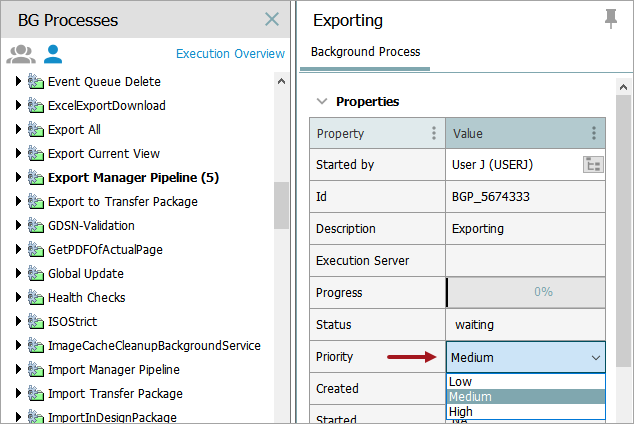
Users with the 'Manage Background Process Execution' setup action (explained in the Action Sets topic) can set the priority of waiting BGPs and scheduled BGPs directly in the workbench Background Process editor. This allows admin users to make ad hoc changes to prioritize waiting BGP processes or scheduled BGP processes. By default, BGPs other than EPs and IEPs have priority level 'Medium.'
Important: It is recommended to initially leave all EP and IEP priority settings at their default 'Medium' value. This means that BGPs created and/or managed by these configuration types have the same priority as user-initiated BGPs (and BGPs created or managed by other EPs or IEPs). A change in priority to 'Low' or 'High' is only recommended when it is verified that a specific integration or background process should always have lower or higher priority than other BGPs being executed on the system.
Parallel Processes
The One Queue scheduler mechanism does not honor the degree of parallelism / number of threads per queue set via the configuration properties for processes supporting parallel execution (multithreading).
The One Queue background process (BGP) execution mechanism handles parallel processing based on the BGP type:
-
'Data Profiler Parallel' and inbound integration endpoint (IIEP) BGPs dynamically scale parallel threads to manage fluctuating resource demand. This maximizes the use of available processing capacity without manual tuning, reduces operational effort, and thereby supports predictable execution of business‑critical workloads.
-
Outbound integration endpoint (OIEP) BGPs allow the user to specify the maximum number of worker nodes to use for processes started by the endpoint. This option limits the number of workers only and cannot be used to increase the number beyond what the environment allows.
-
All other multi-threaded BGPs can initially be inactive even though they have been claimed by a worker node and appear in the 'Running Background Processes' section (with a status of 'running'). This occurs when the worker node does not have the desired number of BGP workers available. In this case, no new BGPs will start until the desired number of workers is available, and the multi-threaded process can start.