The Send Diagnostics tab allows users to send system information to Stibo Systems. As this information is often necessary for Stibo Systems to assist in troubleshooting and support situations, it is a convenient way to send all necessary data.
Important: When submitting an issue to Stibo Systems Support — whether for general system troubleshooting, performance issues, or assistance with problems identified through healthchecks — a diagnostics package should accompany the request to ensure that all relevant information is captured and reported at the time the issue occurs.
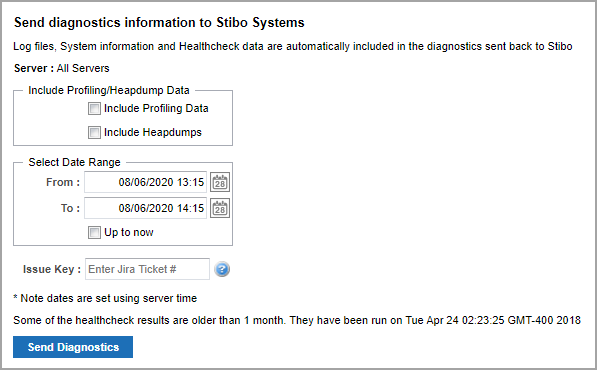
Log files, business rule and calculated attribute information, system configuration, and healthcheck data are always included in the diagnostic package if available. Profiling and heapdump data can be quite large and are therefore not included by default. However, these can be selected for inclusion using the Include Profiling Data and Include Heapdumps checkboxes.
The From and To fields specify the interval for which the diagnostic data should be sent. It defaults to one hour prior to the current time, which is generally a good interval to use. Take care not to select an excessively large interval due to the amount of data that would be sent.
The Issue Key field is optional and can be used to specify a Stibo Systems Service Portal issue that the diagnostic data is relevant for by typing an exact match to an existing Stibo Systems Service Portal issue.
To send diagnostics to Stibo Systems, make the appropriate selections in the available parameters and click Send Diagnostics. A diagnostics package is automatically sent to Stibo Systems routinely to support internal analysis of feature usage.