Summary
System updates are your first line of defense against security threats while also boosting performance, ensuring compatibility, and unlocking exciting new features that add value to your digital experience. Regular updates not only protect your data and keep your system running smoothly, but they also give you access to innovative tools and capabilities that can enhance your productivity and user experience.
Important: Customer action may be required.
-
Before updating to 2026.2 from an older version, be aware of system changes. The list that follows may not be comprehensive; however, along with the full update note-set, it provides a starting point for update evaluation.
-
Every update includes the latest security enhancements, including upgrades to third‑party libraries. Before updating, customers are strongly advised to test integrations, extensions developed using the Extension API, and customizations maintained by Stibo Systems — especially those that rely on external libraries. Depending on the nature of the security enhancements, development work may be required to ensure compatibility.
-
Review the 2026.2 STEP Client Requirements topic, which can be found in the System Update and Patch Notes section.
-
Users should be familiar with two online help topics (License and Component Lifecycle and Deprecations and Lifecycle Changes) that provide more details about deprecations, other lifecycle changes, etc.
-
All feature updates are exclusive to SaaS customers, and on-premises installations are not supported.
Details
Updates to Azure OpenAI integration configuration
Part of the Azure OpenAI integration configuration has changed with the 2026.2 update.
For customers running the Azure OpenAI integration, a URL in the REST Gateway integration endpoint required to enable the integration has changed. Previously, the URL was this:
https://[your-resource-name].openai.azure.com/openai/deployments/[deployment-id]/chat/completions
Now, the URL must be updated by shortening it to this:
https://[your-resource-name].openai.azure.com
This is now the only endpoint that needs to be configured to enable the Azure OpenAI integration, with GPT-5 mini being the default AI model used. Users may elect to use additional AI models, but rather than configuring an endpoint for each model, they can now add the desired model(s) via business rules.
Additionally, the AI Text Generation Gateway Authentication Function must be amended. The line in the JavaScript function pertaining to “api-version” (row 3 in the screenshot below), must be removed.
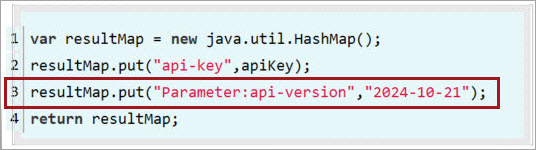
For more information on configuring the Azure OpenAI integration, refer to the updated Azure OpenAI Integration topic.
Continued visual consistency improvements
Logout menu, typography, and color scheme changes have been implemented to visually align the design of the items available on the Resources section of the Start Page. These updates create a unified look across the platform, providing a more cohesive user experience.
One Queue background process execution mechanism
The One Queue background process execution mechanism is now activated by default on STEP 2026.2 and later. The legacy multiple queue mechanism will remain in use only when queue configurations exist, such as specific queue sizes. If no queue configurations are in place, but the legacy multiple queue mechanism is still required, submit a ticket in the Stibo Systems Service Portal. For more information, refer to the BGP One Queue topic in the System Setup documentation.
Asynchronous translation updates
With the 2026.2 update, enhancements have been delivered for the asynchronous translation that will eventually affect current async translation configurations. As outlined in detail in the General Enhancements and Changes update note, default handling of reference metadata attributes has been updated, and these changes impact how async translations are processed. The present way of processing reference metadata attributes will remain as-is; users updating to 2026.2 will have no changes to their async translation processes. When ready to take advantage of the benefits that result from these improvements (e.g., reduced translation file size, more granular control, among others), users can add the UseLegacyTranslation property, set it to 'False', and review the configuration information outlined in the Asynchronous Translations topic. The legacy functionality will remain available for the near term, but will be phased out in a future release. Contact your Account Manager or Customer Success Manager with any questions about next steps.
STEPXML schema changes from 2026.1 to 2026.2
No STEPXML schema changes were made from 2026.1 to 2026.2.
Functionality desupported / removed / discontinued
-
The 'assetloader' component and the 'Hotfolder with Metadata' receiver are deprecated because they use the Legacy Asset Importer Processing Engine. This component and receiver will continue to function for customers who already use them; however, customers should consider the recommended IIEP - Configure Asset Importer Processing Engine and the recommended Hotfolder Receiver Using Meta Files.
-
InDesign 2024 (version 19) has been deprecated. Support for InDesign 2026 (version 21) was added with the previous (2026.1) update.
Functionality to be desupported / removed / discontinued
-
In the upcoming 2026.3 STEP update, the 'Basic Authentication' method of configuring PDX delivery methods will be removed for implementations of PDX Syndication integration endpoints, but will remain for existing implementations, ensuring no disruptions of functionality. New implementations will use token-based authentication for configuration of delivery methods as token-based authentication is more secure. Existing implementations may also change to token-based authentication if desired. Instructions on how to make the change will accompany the 2026.3 update.
-
STEP support for Web UI integration with the analytics platforms Qlik and Tableau will end with the 2026.3 release, slated for this fall. Two components in the Web UI that enable integrations with Qlik and Tableau, the Analytics Widget and the Analytics Screen, will be deprecated with the next release and eventually removed. Contact your Account Manager or Customer Success Manager with any questions about how to make the transition as smooth as possible.
End-of-life schedule for STEP updates
All feature updates are exclusive to SaaS customers.
Below is a table outlining the end-of-life schedule for the STEP updates shown. Dates in parentheses represent target dates for future updates, providing customers the information needed to plan ahead. In future updates, additional dates will be added as available.
Important: Refer to the updated STEP Update Information topic in the System Update and Patch Notes section for more information about quarterly update target dates and support end dates for future updates.
Important: Future dates are subject to change. As part of Stibo Systems' commitment to becoming a best-in-class SaaS company, and in alignment with our continuous delivery model, each release is supported for nine months.
|
Update |
Testing Period |
Available From |
Mandatory Update to Production Refer to the 'Continuous Updates' email from Stibo Systems for exact dates and further details. |
End of Life |
|---|---|---|---|---|
|
2026.1 |
March 2026 - June 2026 |
March 25, 2026 |
June 12, 2026 |
December 18, 2026 |
|
2026.2 |
June 2026 - September 2026 |
June 17, 2026 |
September 18, 2026 |
March 17, 2027 |
|
2026.3 |
(September 2026 - December 2026) |
September 23, 2026 |
December 3, 2026 |
June 23, 2027 |
|
2026.4 |
(December 2026 - March 2027) |
December 9, 2026 |
March 19, 2027 |
September 8, 2027 |
|
2027.1 |
(March 2027 - June 2027) |
March 24, 2027 |
June 11, 2027 |
December 22, 2027 |
|
2027.2 |
(June 2027 - September 2027) |
June 16, 2027 |
September 17, 2027 |
March 15, 2028 |
|
2027.3 |
(September 2027 - December 2027) |
September 22, 2027 |
December 3, 2027 |
June 21, 2028 |
|
2027.4 |
(December 2027 - March 2028) |
December 8, 2027 |
Friday prior to the 2028.1 update (March 2028) |
September 6, 2028 |
Customers should update as soon as possible to the latest version of the Stibo Systems Enterprise Platform (STEP). If you have questions and/or need to receive help and guidance on how to update to a supported version, submit an issue within the Stibo Systems Service Portal. Also, refer to the SaaS 'How To' videos located on the Stibo Systems Service Portal for information about updating your version via the SaaS Self-Service UI.
Software errors reported for the versions shown above may be rejected once support ends, and issues in progress for those updates will be closed. It is not possible to extend the support services for desupported versions.
Online Help / Documentation Changes
With every update, documentation updates occur. In addition to online help that is updated as part of the projects listed in this update note set, users should be aware of the following documentation updates when updating to 2026.2:
-
The ProductGen AI documentation has expanded significantly. Topics describing the solution now provide users with a comprehensive overview, primary use cases, recommended practices, AI integrations with STEP, and AI usage monitoring. To review these topics, refer to the Artificial Intelligence in STEP topic, and all topics in the Artificial Intelligence in STEP documentation.
-
The Workbench Launcher Guide has been updated and moved from the Start Page to online help. Refer to the new STEP Workbench Launchers topic in the Getting Started documentation.
-
Update notes for unsupported past versions of STEP will no longer display in current documentation. Additionally, over the coming weeks and months, the complete set of documentation for unsupported versions will be removed as options when users select the 'Choose Version' option on the Stibo Systems Product Documentation start page.
For further details on the following updates in documentation, refer to the Updates to Stibo Systems Online Help Documentation topic in the 2026.2 Update Notes set.
-
Online help usability enhancements introduce more focused search filtering and improved navigation features.
-
The Product Data Exchange (PDX) documentation is now part of the Stibo Systems Online Help Documentation.
-
The left navigation has been reorganized to display all of Stibo Systems' documentation.
-
The Stibo Systems Online Help documentation no longer includes PDFs, and is now published exclusively on the online documentation site. It will now be updated more frequently and will reflect the most current product changes.