The 'Environments' section provides an overview of the STEP environments configured for your account. The environments are presented in a table, as shown in the screenshot below.
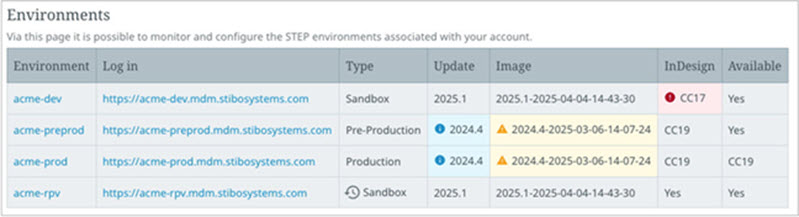
The table includes the following information:
-
Environment – The environment name as a link.
-
Log in – A link to the STEP environment's home page for accessing the workbench, Web UIs, and other information.
-
Type – The environment type for the listed environment: Sandbox (the two types are defined below), Pre-Production, or Production.
-
Update – The STEP version that is currently used on the environment. If a new update is available, an information icon (
 ) is displayed next to the current update. Hover over the icon to display a popup message with the new update that is available.
-
Image – The STEP SaaS image that is currently used on the environment. Different images based on the same STEP update can have different component versions and hotfixes included. If a maintenance image is available, an information icon (
 ) is displayed next to the current image. Hover over the icon to display a popup message with the maintenance image that is available and the date it will be automatically applied if the environment is not updated to that image or a newer image prior to the Planned Maintenance window date or Pre-Maintenance window date for lower-level environments.
-
InDesign – When STEP server-side publishing through InDesign is in use, the current InDesign server version is displayed throughout the UI. An information icon (
) is displayed when a new compatible InDesign server version is available. An error icon ( ) is displayed if InDesign server version is not compatible with the current STEP version.
-
Available – An automatically generated value based on whether the STEP environment can currently be used or not. When the environment is available, the value is 'Yes'. When the environment is not available, you can track the progress of an update or a maintenance activity with the following values: 'No (stopping)', 'No (starting up)', and 'No (retrying startup due to failure)'.
The two types of sandbox environments are:
-
Sandbox – this is a non-production environment with limited capacity in terms of performance and storage, that does not have an expiration date. Use these systems for long-term testing and verifying configurations before moving the functionality to a higher-level environment. Request a sandbox from Stibo Systems Support.
-
Update preview sandbox – this is a user-created non-production environment which is available for seven (7) days. The environment name includes '-rpv'. A clock icon (
 ) displays and hovering over the icon shows when the environment expires. Refer to the 'Update preview sandbox' section for more information.
Environments details page
Clicking an Environment link displays the SSUI Environments - General Tab page, which provides users with information about their STEP environment. Users can perform activities that would otherwise require Stibo Systems Support assistance. At the top of the page, the breadcrumbs display the name of the selected environment.
The page is organized into tabs. The available tabs depend on the environment type. The following topics describe the functionality available for each tab.