The 'Configuration files' tab allows for file management of the sensitive files that are required for some delivery, receiver, and gateway options. This method of uploading sensitive files includes encryption and improves security over the SFTP method of file storage.
To use configuration files:
-
Add sensitive file(s)
-
Add relevant configuration properties
-
In workbench, select the option supplied by the configuration property
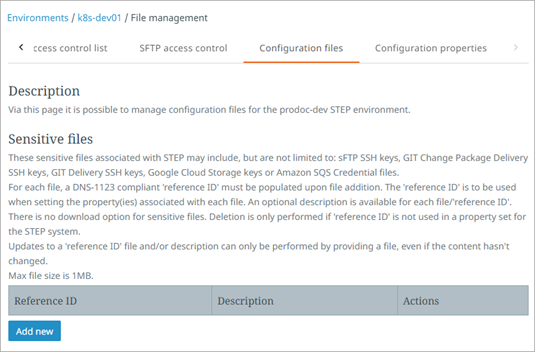
Sensitive Files
Sensitive files can be managed for the following data exchange options. For each option, the workbench parameter is listed along with the required configuration property that can be set on the self-service 'Configuration properties' tab:
-
SFTP Delivery Method: 'SSH private keys' parameter uses the SFTP.SshPrivateKey.Location.[n] property
-
Change Package Git Delivery Method: 'SSH private keys' parameter uses the ChangePackageGitDelivery.SshPrivateKeyUri.[n] property
-
Git Delivery Method: 'SSH private keys' parameter uses the GitDelivery.SshPrivateKeyUri.[n] property
-
Google Cloud Storage gateway: 'connection key' parameter uses the BlobStorage.Google.Secret.ConnectionKeyPath.[n] property
-
Amazon SQS Receiver or Delivery Method: 'credential file' parameter uses the SQSCredentialsPath property
-
Kafka Receiver or Delivery: 'SSL Keystore Location' and 'Truststore Location' parameters use the Kafka.SSLKeyStoreLocation.[n] and Kafka.SSLTrustStoreLocation.[n] properties
To add a sensitive file:
-
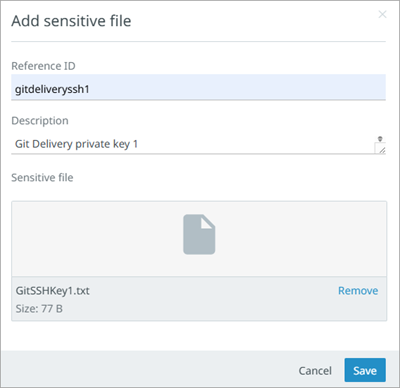
Click the 'Add new' button to display the 'Add sensitive file' dialog.
-
Complete the 'Add sensitive file' dialog parameters:
-
Add a 'Reference ID' that complies with DNS-1123, specifically, is a maximum of 63 characters, only has lowercase alphanumeric characters or the dash character (-), and that starts and ends with an alphanumeric character. Other symbols or white space is not allowed. The 'Reference ID' is used in the related properties on the 'Configuration properties' tab.
-
Add useful description text.
-
Add a file with a size of less than 1MB.
-
-
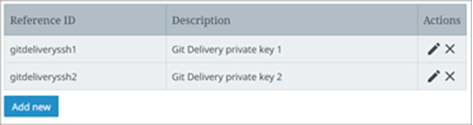
Click the 'Save' button and then click the 'Close' button to add the file to the list.
Note:
-
Files can only be deleted when the 'reference ID' is not present in any configuration property.
-
When a file is used on a configuration property, click the edit button to change the description text. When editing the description, you must select the sensitive file again, even if the content is unchanged. You may also select a different file if necessary.
-
Uploaded files cannot be downloaded or viewed.
-
-
When the sensitive file has been uploaded, set the relevant property on the 'Configuration properties' tab.