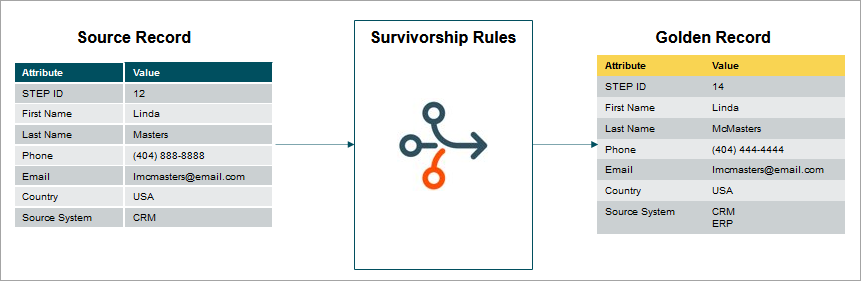
In match and merge, survivorship rules promote information from exactly one source to exactly one target by comparing information from the source with information from the target and writing the relevant updates to the target.
- In the match and merge IIEP and match and merge web service endpoint, information is promoted from incoming entities to existing or newly created golden records.
- In the matching event processing and in the clerical review Web UI, information is promoted from non-surviving golden records to surviving golden records as those records are merged.
- In the unmerge Web UI actions, as the association between source records and golden records are changed, the content of the resulting golden records is resolved.
For more information, see the Configuring Survivorship Rules topic here.
Match and Merge Survivorship During Unmerge
Survivorship rules in unmerge run to:
- Suggest the values to survive on the golden record that were present before unmerge but exist after a number of sources have been removed from it.
- Suggest the values to survive on a new golden record created by unmerging a number of sources.
- Suggest the values to survive on a reactivated golden record after moving a number of sources to it.
Updating a Golden Record Created through Unmerging
The unmerge process is done when erroneously flagged duplicates are merged together. In this use case, the corrected golden record, created by removing the false sources, is updated based on the values selected for survivorship.
- In the unmerge UI, a user removes a number of source records and golden records that do not belong to the record.
- The algorithm removes values originating from the removed sources since those values no longer belong on the golden record.
- The algorithm attempts to restore the cleaned values from revision history, applying the value as it was before it was set to the now cleaned value. This step does not happen for multivalued references and data containers.
- Finally, the algorithm applies survivorship for all available source records to the golden record. These applications of survivorship rules will function as 'Match and Merge Survivorship update - when import merges with existing record.'
Using Survivorship Rules within the Unmerge Process
If using a golden record that was created from unmerging individual sources, the process uses survivorship rules like in the previous golden record updating scenario.
- In the unmerge UI, the user removes a number of sources form a golden record to create this new golden record.
- The unmerge algorithm sorts the source records associated with the new golden record by the time of editing the records and applies the changes, starting with the oldest source.
- The survivorship of the oldest source, when applied, works like the 'Match and Merge Survivorship when Import creates new record' operation.
- The newer source records, when applied, work like 'Match and Merge Survivorship update - when import merges with existing record' operation.
Unmerging a Golden Record from Another Golden Record
- In the unmerge UI, the user removes a falsely merged golden record from another golden record using the unmerge UI.
- The unmerged golden record is reactivated and it is assumed to have the attribute values it had when it was merged.
- The algorithm removes any values that originated from removed sources since those values no longer belong on the reactivated golden record.
- The algorithm attempts to restore the cleaned values from revision history, applying the value as it was before it was set to the now cleaned value. This step does not happen for multivalued references and data containers.
- The algorithm applies survivorship rules for all available source records to the golden record. The application of survivorship rules functions as 'Match and Merge Survivorship update - when import merges with existing record' operation.
For more information on unmerge, see Match and Merge Clerical Review - Unmerge topic here.
Trusted Source
Trusted source survivorship rules trust some source systems over others. The rule is configured with a list of the available source systems in the sequence of trust. The systems with lower trust rankings do not overwrite values set by higher trust systems.
Note: Since STEP is considered the ultimate trusted source for trusted source rules, manual edits on a golden record are never overwritten.
The source system information is an integral part of match and merge and is defined in the component model. For more information on how source information is tracked in match and merge, see the Match and Merge Traceability topic here.
Important: Information from a source outside the list of trusted sources is regarded as untrusted and as such, that information is not copied to the golden record during trusted source survivorship.
For trusted source, match and merge is limited in that it cannot take the value from a less trusted source. The value from a more trusted source disappears from the source record it came from since that information is not available during the survivorship evaluation.
Most Recent
The 'Most Recent' survivorship rule strategy lets the most recent data from all contributing records survive to the final golden record.
The 'Most Recent' record can be qualified either by the revision date in STEP or by a 'Last Edited' date attribute. The latter makes it possible to promote data based on the time of edit in source systems.
In match and merge, 'Most Recent' is differentiated if a given value on an existing golden record comes from a source system or not. If the value does not come from a source system, the revision date is always used to determine the most recent value, making it possible to do manual edits. This logic applies to the object name, attribute values, references, data containers, attribute values on data containers, attribute values on references, and references on data containers.
In the 'Match and Merge Importer' IIEP as well as in the 'Match and Merge Web Service Endpoint,' it is possible to promote the deletion of attribute values on existing golden records by sending an empty value element in the STEP XML. For example, the following STEPXML would void the 'FirstName' attribute value:
<Value AttributeID=”FirstName”></Value>
Match and Merge Business Action Rules
Solutions commonly include special rules for survivorship and can be implemented via business actions that run as survivorship rules.
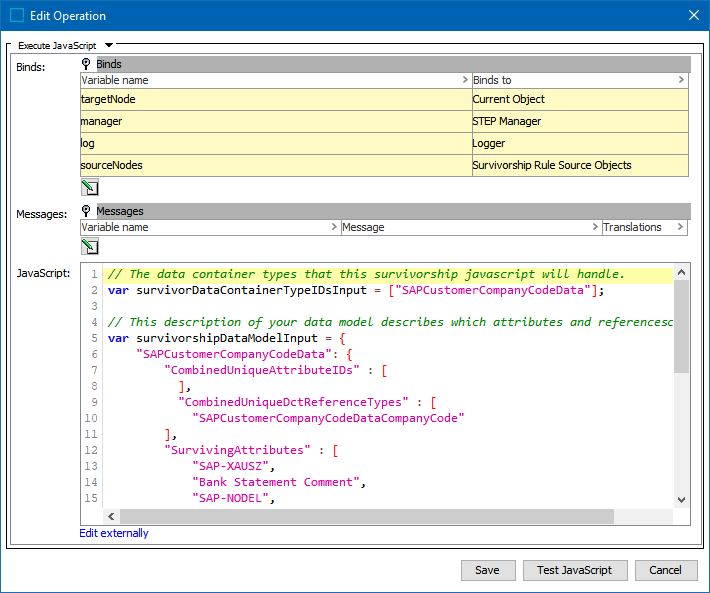
Note: A survivorship rule should only update values owned by the golden record itself. This includes attributes on the golden record, data containers on the golden record, and references from the golden record. This does not include references to the golden record, as reference are typically owned by their source node.
In match and merge, the survivorship rules always compare one source object against the golden record at a time. When merging multiple golden records from the clerical review task list, or unmerging multiple golden records in the unmerge screen, all survivorship rules are applied between the survivor and one source record before being compared to the next source record.
Business action survivorship rules in match and merge can use the following binds defined in the online help Resource Materials documentation:
-
Survivorship Rule Source Objects Bind topic (here)
-
Match and Merge Survivorship Context Bind topic (here)
For more information, see the Business Actions topic in the Business Rules documentation (here)
Note: In match and merge survivorship rules, source records and the target golden record are in the system as non-persistent objects. Many of the operations available in the API are not applicable to non-persistent objects and will fail. Examples of operations that cannot be used successfully are approval and workflow-related operations. Operations related to reading and modifying attributes values, references, and data containers can be used successfully.
In match and merge, it is not possible to implement a trusted source pattern with the business action survivorship rule as the source information for an existing value on the golden record is not available in the JavaScript API.
Match and Merge Web Service Endpoint
When using a SOAP web service endpoint for a match and merge solution (defined in the Web Service Endpoint - Match and Merge topic of the Data Exchange documentation here), JavaScript business actions can be used for survivorship rules. By default, when multiple JavaScript survivorship rules are to be run during matching, if a rule fails with an exception, rules that already completed without error are not rolled back and the rules following the one that failed are not run at all.
To change this functionality and ensure all changes are rolled back on a SOAP web service, a property can be added to the sharedconfig.properties file that sets parallel configuration to commit after each job. Because this setting can negatively impact performance, you must contact Stibo Systems Support for activation.