The Match and Merge Survivorship Context bind can help JavaScript developers to establish if a survivorship rule is executed in a 'merge' context or not. This bind helps developers to compare two nodes or data containers and returns the one with the most recent changes. The bind contains the following methods, which are all explained in further details in the Javadoc.
- isMerge() - returns whether or not the target is in merge context or not. The function returns true when merging of existing golden records or when the match and merge importer associates an incoming Entity with an existing golden record by match scoring above the auto-link threshold. The function returns false when updating an existing golden record with the STEP object ID or Source Record ID during import via Match and Merge Importer.
- Get node where the specified attribute has the most recent value update.
- Get data container where the specified data container attribute has the most recent value update.
- Get node where the specified data container type has the most recent value update.
- Get node where the specified reference type has the most recent value update.
-
Get data container where the specified reference type has the most recent update.
The bind can be found within the 'Binds to' dropdown, as shown below.
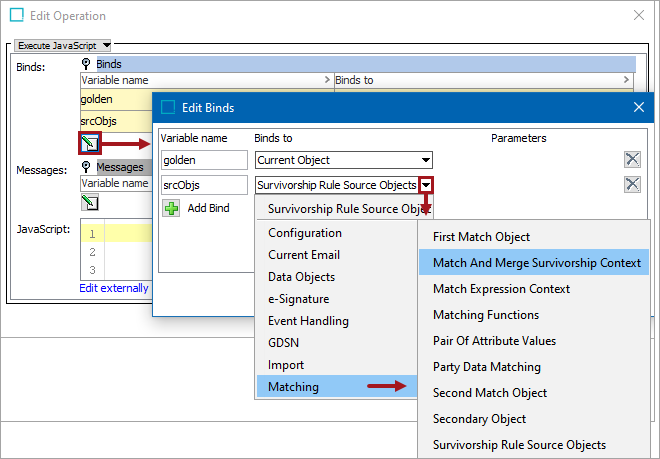
Configuration
To use any bind:
- Create a business rule as defined in the Creating a Business Rule or Library topic here.
- Edit the business rule as defined in the Editing a Business Rule topic here.
- In the Edit Operation dialog, add the bind to a business rule, as defined in the Adding a Bind topic in the Reference Materials documentation here.
- In the Edit Operation dialog, optionally add Messages, as defined in the Adding a Localized Business Rule Message topic here.
- In the Edit Operation dialog, add JavaScript to call the bind.
Example
The following is an example JavaScript that uses this bind.
Important: The example scripts should not be used as-is without thorough testing, including updating the script to match object and link types that exist on your system. JavaScript variable names are case-sensitive.
log.info("isMerge status true/false? : " + SSRUtil.isMerge());
//Itereate over number of sources
var iter1 = sources.iterator();
while(iter1.hasNext()) {
var source = iter1.next();
//Node getMostRecentNodeAttribute(Node target, Node source, Attribute attribute, Attribute lastEditDateAttribute, boolean incomingEmptyValues)
var testNode = SSRUtil.getMostRecentNodeAttribute(target, source, manager.getAttributeHome().getAttributeByID("Weight"), manager.getAttributeHome().getAttributeByID("MostRecentDateAttribute"), false);
log.info(" ID of the Most Recent SSR testNodes : " + testNode.getID());
}