The Survivorship Rule Source Objects bind can be used from business actions referenced from a 'business action survivorship rule' to access the source object for a golden record. The Current Object bind is always the target (surviving) golden record. For the 'merge approach', this is the only way to access source records from a survivorship rule business action.
Match and Merge Considerations
-
The data type of the Survivorship Rule Source Objects bind is java.util.Set<com.stibo.core.domain.Node>.
-
In the execution of survivorship rules, the 'Set of Nodes' always contains exactly one entity.
-
For the Match and Merge Importer, the one entity represents the incoming message.
-
For a Merge Golden Record merge, in the matching event processor and in a clerical review merge from Web UI, the one entity represents the non-surviving golden record.
-
For clerical review tasks that are comprised of more than two golden records, each of the non-surviving golden records are merged into the surviving golden record sequentially. This results in exactly one entity in the Survivorship Rule Source Objects bind of type 'Set<Node>'.
The bind can be found within the 'Binds to' dropdown, as shown below.
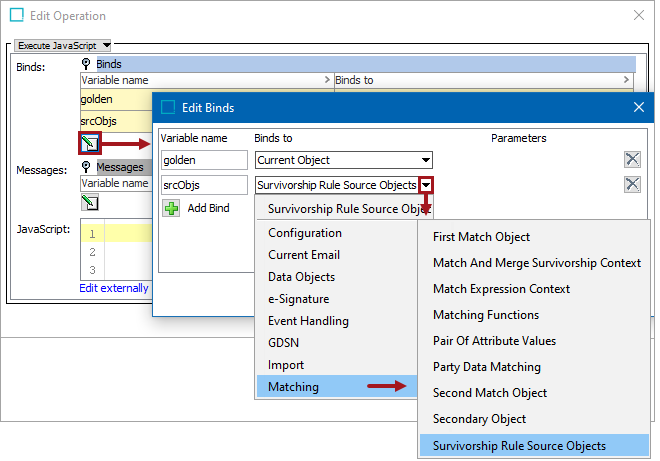
Configuration
To use any bind:
- Create a business rule as defined in the Creating a Business Rule or Library topic here.
- Edit the business rule as defined in the Editing a Business Rule topic here.
- In the Edit Operation dialog, add the bind to a business rule, as defined in the Adding a Bind topic in the Reference Materials documentation here.
- In the Edit Operation dialog, optionally add Messages, as defined in the Adding a Localized Business Rule Message topic here.
- In the Edit Operation dialog, add JavaScript to call the bind.
Example
The following is an example JavaScript that uses this bind.
Important: The example scripts should not be used as-is without thorough testing, including updating the script to match object and link types that exist on your system. JavaScript variable names are case-sensitive.
var attr = golden.getManager().getAttributeHome().getAttributeByID('YOUR_OWN_ATTRIBUTE_ID_HERE');
var goldenValue = golden.getValue(attr.getID()).getSimpleValue();
var hasGoldenValue = (goldenValue != null);println("golden value ".valueOf() + goldenValue + " has gv: " + hasGoldenValue);
for (var it = srcObjs.iterator(); it.hasNext();) {
var src = it.next();
var value = src.getValue(attr.getID());
var srcValue = value.getSimpleValue();
var hasSrcValue = (srcValue != null);
println("src value: ".valueOf() + srcValue);
if (hasSrcValue) {
if (!hasGoldenValue || java.lang.Integer.parseInt(goldenValue) < java.lang.Integer.parseInt(srcValue)) {
println("updating golden value to: " + srcValue);
golden.setSimpleValue(attr, srcValue);
goldenValue = srcValue;
}
}
}