The image deduplication process can include the following parts:
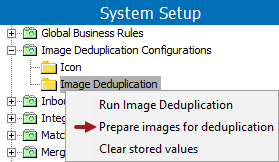
Preparing images for deduplication evaluates all images and assigns a pHash.
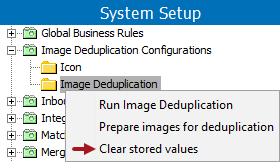
Clearing stored values allows you to remove unnecessary pHash values.
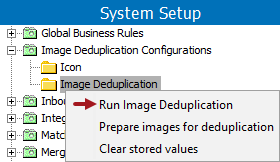
Running Image Deduplication allows you to verify the auto-handling and/or clerical review settings meet your expectations for identifying a duplicate.
Changes made by the deduplication process are recorded on the asset object's Status tab under the Revisions flipper. For updates made during auto-handling, the user who executed the deduplication process is written in the User parameter. For changes made during the clerical review workflow, the user doing the workflow task is written in the User parameter. To write the same user for all image deduplication processing, create a STEP user specifically for image deduplication processing and log in as that user when doing any deduplication work.
Prerequisites
Before you can evaluate the results of the image deduplication process, you must:
For best results, test window size with a known set of duplicates to determine your acceptable level of accuracy compared to the performance level required.
To adjust the window size, in the sharedconfig.properties file on the STEP application server, add the case-sensitive ImageDeduplication.ImageDeduplicationWindowSize property and provide an integer. Changes to the properties file are implemented when the server is restarted. For example:
ImageDeduplication.ImageDeduplicationWindowSize=50
Important: As with any deduplication task aimed to delete redundant data, it is vital to first thoroughly test the process on a non-production system, such as a test environment. Metadata can and intentionally will be lost as a result of the deduplication handling process. There is no undo option, nor is there a recovery function. While restoring from a backup can be acceptable in a test environment, it is likely to cause an unacceptable amount of lost data in a production system.
The 'Prepare images for duplication' option is a manual way to run the deduplication algorithm and ensure that a pHash is assigned to each image in the selected classification. This option is expected to be used when you first activate image deduplication so that all existing images can be evaluated and have a pHash assigned. Assigning a pHash value is also included in the 'Run Image Deduplication' process, but increases the overall process time if a pHash value must be generated for many images. For details, see the Preparing for Deduplication section of the Handling Duplicate Images topic here.
Note: To decrease the time required for the initial 'Run Image Deduplication' process, run 'Prepare images for deduplication' when system use is low, for example, over night.
Use the following steps to prepare images for deduplication.
The 'Clear stored values' option removes all stored pHash values. This can be used when the classification selected in an image deduplication configuration changes, since the stored pHash values for the original classification are no longer required.
This option can also be used if the server crashes or there is some unexpected server error while storing pHash values, since the cache can be corrupted.
Once the values are cleared, use the 'Prepare images for deduplication' option to create new pHash values prior to running the image deduplication process.
Initially, running image deduplication should include testing to verify that the auto-handling and clerical review settings on the configuration correctly identify the expected duplicate images. Once the configuration is verified to meet the requirements, you will review the background process execution report to determine if images were auto-handled and/or sent to clerical review.
Note: When testing, it is a good idea to set the configuration for a single classification folder that contains a known set of images, for example, a predetermined number of actual duplicates or near matches. Evaluating the accuracy of the results is easier when you know what is expected. For more information, see the Deduplication Strategy outlined in the Handling Duplicate Images topic here.
Use the following steps to run an image deduplication configuration.
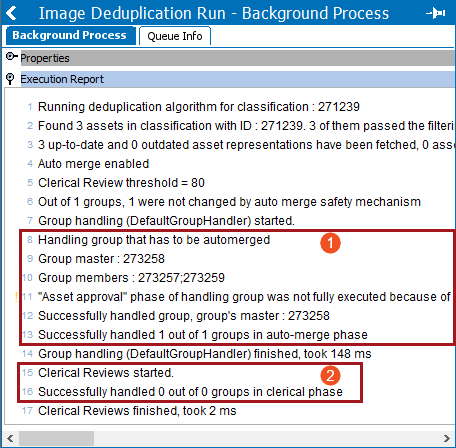
For example, in the image below:
Clearing Image Deduplication Metadata Attribute Values
While testing your image deduplication configuration, you may need to run deduplication multiple times on the same images to determine the settings that meet your requirements. Completing a deduplication run includes writing values to metadata attributes on images, and these values can prevent the image from being considered in a future deduplication run. Clearing the metadata values allows the images to be evaluated again.
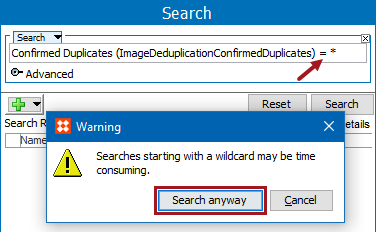
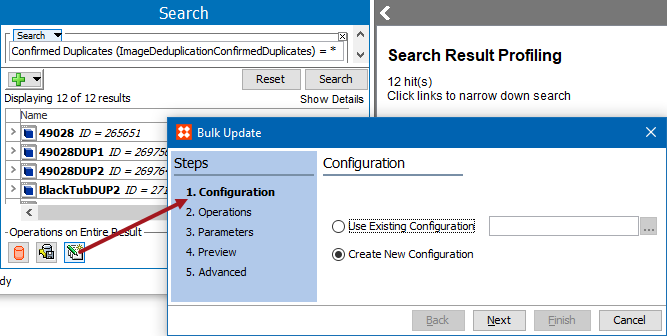
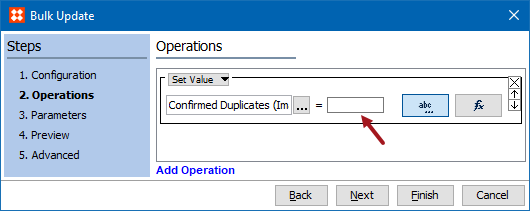
To clear the image deduplication attribute values, repeat the steps below for the following metadata attributes:
2019, Stibo Systems – Confidential