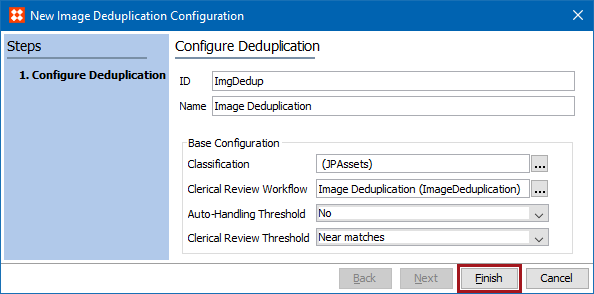
Creating an Image Deduplication Configuration defines the group of images that will be evaluated, as well as the workflow that is used for error handling and managing duplicate sets identified for clerical review, whether or not auto-handling is enabled, and the matching threshold for images sent to clerical review.
Prerequisites
Configuration
Use the following steps to create a new Image Deduplication Configuration.
Note: Hover over a parameter label to display information for its use.
 ) and choose the image classification that will be deduplicated. All images in the selected folder and its children will be considered. Click the Select button.
Note: If the classification on a saved configuration changes, you should clear the stored values, as defined in the Clearing Stored Values section of the Running the Image Deduplication Process topic here.
) and choose the image deduplication workflow. Click the Select button.Activating the image deduplication component creates an image deduplication workflow named 'Image Deduplication.' A custom workflow can also be used for image deduplication, provided it meets the requirements outlined in the Workbench Configuration section of the Configuring Web UI for the Image Deduplication Clerical Review Workflow topic here.
This parameter works together with the Clerical Review Threshold parameter below. See the following Threshold Settings section for details.
If any image in the group does not match the master pixel-to-pixel, the whole group is sent to clerical review, even with this 'No Clerical Review' selection.
This parameter works together with the Clerical Review Threshold parameter. See the Threshold Settings section below for details.
The Auto-Handling Threshold parameter and the Clerical Review Threshold parameter work together to determine how duplicates are identified and processed. The possible settings and results are defined in the table below.
For additional information, see the Handling Duplicate Images topic here.
|
Auto-Handling Threshold |
Clerical Review Threshold |
Result |
|---|---|---|
|
No |
No Clerical Review |
|
|
No |
Near Matches |
|
|
No |
Very Similar Images |
|
|
No |
Similar Images |
|
|
Yes |
No Clerical Review |
Otherwise, if more than one image remains that does not match pixel-to-pixel to the master, all images are sent to clerical review (even though the Clerical Review Threshold is set to 'No Clerical Review'). |
|
Yes |
Near Matches |
Otherwise, if more than one image remains that does not match pixel-to-pixel to the master, all images are sent to clerical review. |
|
Yes |
Very Similar Images |
Otherwise, if more than one image remains with a Hamming Distance = 1 or less but are not pixel-to-pixel matches to the master, all images are sent to clerical review. |
|
Yes |
Similar Images |
Otherwise, if more than one image remains with a Hamming Distance = 2 or less but are not pixel-to-pixel matches to the master, all images are sent to clerical review. |
2019, Stibo Systems – Confidential
 No image deduplication processing happens. An error is displayed when the configuration attempts to run.
 Only duplicate sets of images with a Hamming Distance = 0 are sent to clerical review.