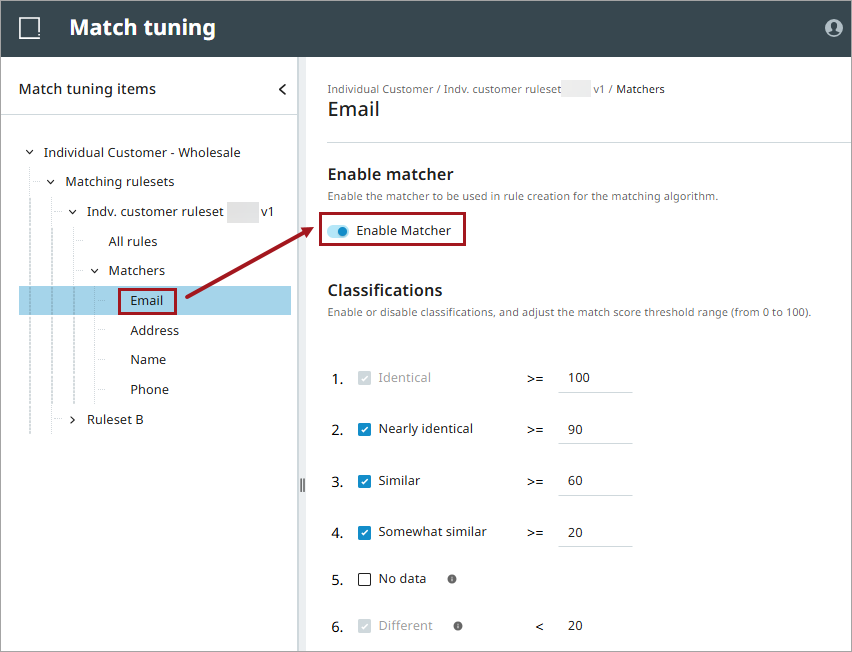
The ‘Matchers’ view in the 'Match tuning UI' is used to enable or disable matchers for a Matching Ruleset. For Similarity matchers, it is possible to adjust thresholds to determine how matcher scores are mapped to predefined classifications, such as 'Identical', 'Similar', or 'Different'.
Changes made in the 'Matchers' view directly affect the rule combinations shown in the ‘All rules’ view after it is updated by running the 'Sync & export pairs' action.
For more information, refer to the topics Match Tuning using Matching Rulesets and Match Tuning UI.
Enabling or Disabling Matchers
When creating a new ruleset, all matchers are enabled by default. If a matcher is later added to the 'Matching Ruleset Configuration' on the matching algorithm, it is disabled by default.
You can enable or disable a matcher by selecting it in the tree view in the 'Match tuning UI' and choosing 'Enable Matcher'.
Note: Enabling or disabling a matcher invalidates any existing decisions. Invalid decisions cannot be made valid again unless the matcher change is reverted. It is recommended to create a new ruleset and re‑add the decisions instead. In the 'All rules' table, invalid decisions are shown at the top of the table. For more information, refer to the topic All Rules.