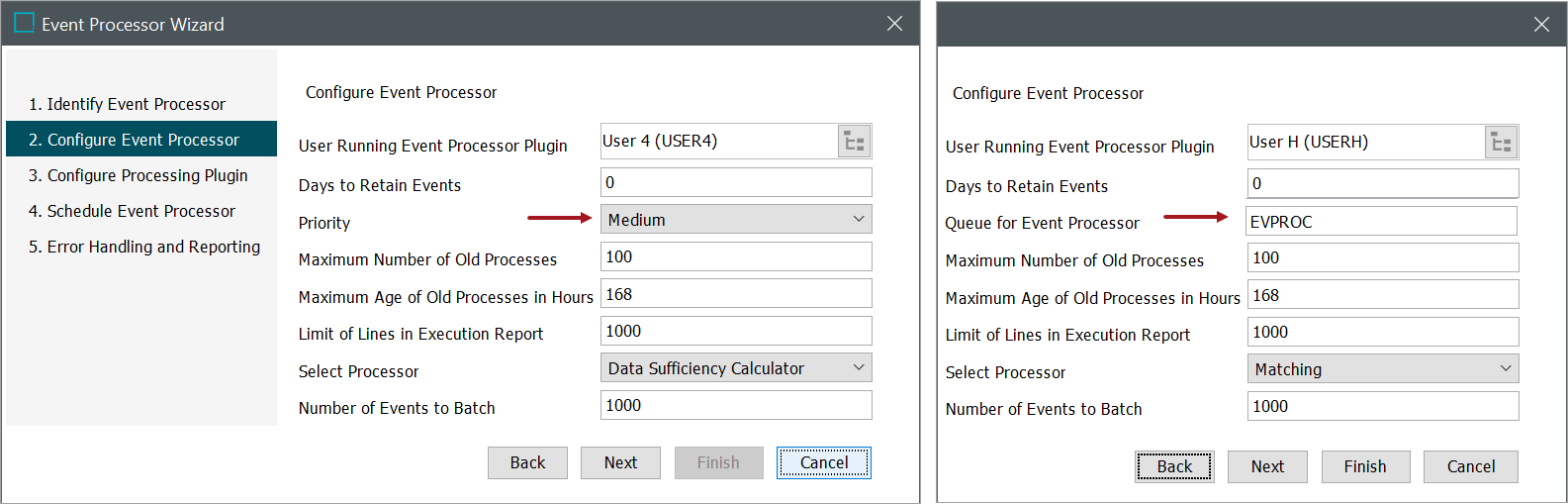
Configure the new event processor by populating the available parameters. Common setup is to use the default settings unless there is a valid reason to change them.
For more information on each of the parameters, refer to the Maintaining an Event Processor topic.
-
User Running Event Processor Plugin: Click the ellipsis button (
 ) to search or browse for a user.
Important: The privileges of the selected user determine which actions the Event processor can perform and what data can be processed. Common setup is to create a special system user for this purpose so that the effects of the event processor are easily identified.
-
Maximum Age of Old Processes in Hours: Specify the maximum age of ended processes that the system will keep.
-
Days to Retain Events: Optionally, specify a number of days (1-14) to keep processed events, after which time they are deleted. Stored events are available for reprocessing via an OIEP as defined in the Event-Based OIEP Event Actions topic. Common setup for this parameter is between 5 and 10 days. When this parameter is set to 0, processed events are not retained.
Note: When an event processor is imported using a STEPXML file or a change package, consider the following:
-
Creating a new object: Attempting to import a 'Days to Retain Events' value that is greater than 14 results in an execution log warning, and the value is automatically set to 14.
-
Modifying an existing object:
-
Attempting to update 'Days to Retain Events' to a value greater than 14 results in an execution log error and the update is not applied.
-
When the imported value for 'Days to Retain Events' is identical to the existing value (even if that value is greater than 14), 'Days to Retain Events' is unchanged and no warnings or errors are reported.
-
-
-
Priority: When the recommended 'One Queue' BGP execution mechanism is configured, waiting BGPs are prioritized for execution based on BGP priority, but also based on the user, process type, and creation time, in accordance with a round-robin scheduling algorithm. Refer to the 'Priority Mechanism and Round Robin Scheduling' section of the BGP One Queue topic in the System Setup documentation. The legacy 'Queue for event processor' parameter is not available.
Queue for event processor: Enter the name of a queue to process data from the event processor. This legacy option is not available when the recommended 'One Queue' background process (BGP) execution mechanism is configured. (Refer to the BGP One Queue topic in the System Setup documentation.) 'EVPROC' is the default, however entering the name of a new queue will result in the new queue automatically being created upon completion of the wizard.
-
Maximum Number of Old Processes: Specify the number of ended processes the system will keep.
-
Limit of Lines in Execution Report: Specify the maximum number of lines to store from the execution report in the log.
-
Select Processor: Choose from the available options, for more information, refer to the Processing Plugins topic.
-
Number of Events to Batch: Specify the batch size. The events are handled one by one but will be more effective and ensure increased performance by committing changes in larger batches. If you are experiencing slow processing times, try increasing your batch size.
-
Click the Next button to display the wizard step 'Configure Processing Plugin'. Refer to the EP - Configure Processing Plugin topic.