Summary
System updates are your first line of defense against security threats while also boosting performance, ensuring compatibility, and unlocking exciting new features that add value to your digital experience. Regular updates not only protect your data and keep your system running smoothly, but they also give you access to innovative tools and capabilities that can enhance your productivity and user experience.
Important: Customer action may be required.
-
Before updating to 2026.3 from an older version, be aware of system changes. The list that follows may not be comprehensive; however, along with the full update note set, it provides a starting point for update evaluation.
-
Every update includes the latest security enhancements, including upgrades to Third-Party Software Libraries (TPSLs). Before updating, customers are strongly advised to test integrations, extensions developed using the Extension API, and customizations maintained by Stibo Systems — especially those that rely on TPSLs. Depending on the nature of the security enhancements, development work may be required to ensure compatibility. To view the TPSLs used in STEP, refer to the topic Open Source Components in the Resource Materials documentation.
-
Review the 2026.3 STEP Client Requirements topic, which can be found in the System Update and Patch Notes section.
-
Users should be familiar with two online help topics (License and Component Lifecycle and Deprecations and Lifecycle Changes) that provide more details about deprecations, other lifecycle changes, etc.
-
All feature updates are exclusive to SaaS customers, and on-premises installations are not supported.
Details
Change to Java default locale provider
The STEP 2026.3 Update adopts the Java platform default locale data, based on the Unicode Common Locale Data Repository (CLDR), in place of the legacy COMPAT locale data provider previously set by default in JVM arguments. This change aligns STEP with current Java platform standards and prepares the system for a planned future move from Java 21 to Java 25, where COMPAT locale data provider is not supported.
Important: This change applies to all environments, not only those with customized java.locale.providers. Formatting for dates, times, and numbers may change if it relied on Java’s default locale patterns. For details, refer to the Java Default Locale Provider topic in the System Setup documentation.
New PIES version supported for AutoCare
PIES version 8.0 is now supported by the AutoCare solution. Additionally, logging has been improved for PIES imports, allowing users to track the file name, PIES version, and the number of products in the file after import.
Changes to quick links in New UI for STEP
New UI for STEP users will notice a difference in the quick links feature, which is found in the utilities toolbar via the quick links button. Whether quick links have been configured previously or not, the quick links button will now be displayed in the toolbar. When clicked, users will have access to Stibo Systems-provided links directly from the quick links dropdown menu. If quick links were configured before upgrading to 2026.3, the existing links will automatically be placed into a single system-generated link group. At least two separate sections will display in the dropdown: one containing their existing quick links and another containing the Stibo Systems-provided links. Administrative users can rename the system-generated link group as needed. For more information on this change, refer to the relevant update note in Developments in New UI for STEP.
Reference Views for an 'Attribute' Tab in New UI
Referenced objects can now be viewed in multiple ways in the 'Attribute' tab of a Details view of a perspective. This enhancement will improve navigation and relationship data visibility. For details, refer to the relevant update note in Developments in New UI for STEP
STEPXML schema changes from 2026.2 to 2026.3
The UserType has been extended with Agentic marker, refer to the XSD for more information.
Web UI functional capabilities or components that are: deleted, withdrawn, or superseded
-
STEP support for Web UI integration with the analytics platforms Qlik and Tableau has ended with the 2026.3 update. Two components in the Web UI that enable integrations with Qlik and Tableau, the Analytics Widget and the Analytics Screen, have been deprecated and will be removed in a future update. Contact your Account Manager or Customer Success Manager with any questions about how to make the transition as smooth as possible.
STEP functional capabilities or components that are: deprecated or discontinued
-
The 'Basic Authentication' method of configuring PDX delivery methods has been deprecated for new implementations of PDX Syndication integration endpoints, both inbound and outbound. All new implementations will use token-based authentication for configuration of delivery methods due to the added security token-based authentication provides. Existing implementations using basic authentication will continue to work, but if the endpoint must be reconfigured, the 'Basic Authentication' option will not be available. It is strongly recommended for those with basic authentication configurations to make the changes required to switch to token-based authentication in the near-term.
For information on how to set up token-based authentication for your PDX implementation, refer to the Token-based Authentication Function Example section of the PDX Base Setup topic.
End-of-life schedule for STEP updates
All feature updates are exclusive to SaaS customers.
Below is a table outlining the end-of-life schedule for the STEP updates shown. Dates in parentheses represent target dates for future updates, providing customers the information needed to plan ahead. In future updates, additional dates will be added as available.
Important: Refer to the updated STEP Update Information topic in the System Update and Patch Notes section for more information about quarterly update target dates and support end dates for future updates.
Important: Future dates are subject to change. As part of Stibo Systems' commitment to becoming a best-in-class SaaS company, and in alignment with our continuous delivery model, each release is supported for nine months.
|
Update |
Testing Period |
Available From |
Mandatory Update to Production Refer to the 'Continuous Updates' email from Stibo Systems for exact dates and further details. |
End of Life |
|---|---|---|---|---|
|
2026.1 |
March 2026 - June 2026 |
March 25, 2026 |
June 12, 2026 |
December 18, 2026 |
|
2026.2 |
June 2026 - September 2026 |
June 17, 2026 |
September 18, 2026 |
March 17, 2027 |
|
2026.3 |
(September 2026 - December 2026) |
September 23, 2026 |
December 3, 2026 |
June 23, 2027 |
|
2026.4 |
(December 2026 - March 2027) |
December 9, 2026 |
March 19, 2027 |
September 8, 2027 |
|
2027.1 |
(March 2027 - June 2027) |
March 24, 2027 |
June 11, 2027 |
December 22, 2027 |
|
2027.2 |
(June 2027 - September 2027) |
June 16, 2027 |
September 17, 2027 |
March 15, 2028 |
|
2027.3 |
(September 2027 - December 2027) |
September 22, 2027 |
December 3, 2027 |
June 21, 2028 |
|
2027.4 |
(December 2027 - March 2028) |
December 8, 2027 |
Friday prior to the 2028.1 update (March 2028) |
September 6, 2028 |
Customers should update as soon as possible to the latest version of the Stibo Systems Enterprise Platform (STEP). If you have questions and/or need to receive help and guidance on how to update to a supported version, submit an issue within the Stibo Systems Service Portal. Also, refer to the SaaS 'How To' videos located on the Stibo Systems Service Portal for information about updating your version via the SaaS Self-Service UI.
Software errors reported for the versions shown above may be rejected once support ends, and issues in progress for those updates will be closed. It is not possible to extend the support services for desupported versions.
Online Help / Documentation Changes
With every update, documentation updates occur. In addition to online help that is updated as part of the projects listed in this update note set, users should be aware of the following documentation updates when updating to 2026.3:
-
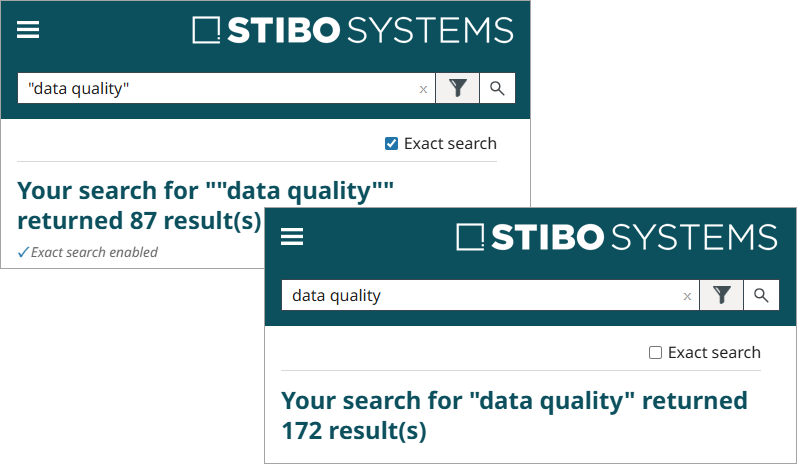
The online help website now includes improved search functionality. After performing a search, a new 'Exact Search' checkbox now displays in the upper right-hand corner of the search results page. Checking the box adds double quotation marks on either side of the search text and updates the results to show only exact-phrase and word-order matches; when unchecked, results also include near matches. For example, searching for 'data quality' with the 'Exact Search' checked highlights the exact term in each result, but a topic containing 'quality data' will not be included in the results unless 'data quality' also appears in the topic. Refer to the Welcome to Online Help topic for more search tips.
-
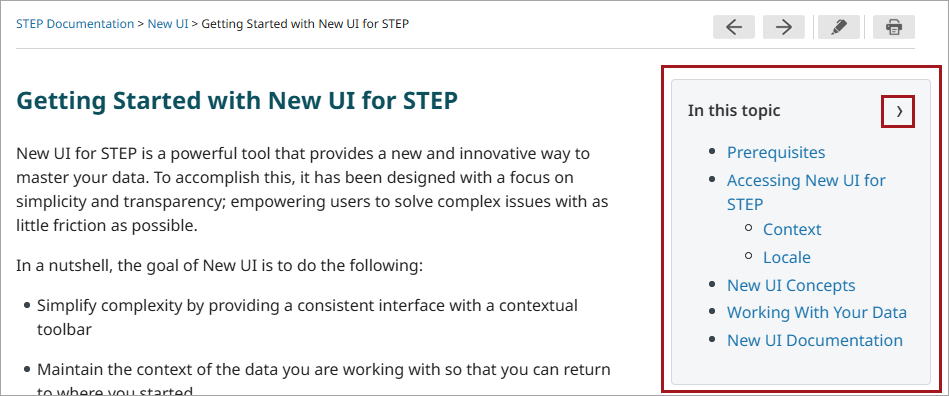
A topic-specific table of contents now displays at the top of each online help topic in a new 'In this topic' panel (shown in the large red box in the screenshot below). This panel provides users with an overview of the topic's subheadings and quick access to specific information within the topic. Click a link in the panel to auto-scroll to the selected heading. To copy a link to a section for sharing or saving, right-click the link and select 'Copy Link' from the menu. Click the '>' button (shown in the small red box in the screenshot below) to collapse the panel. For topics with no subheadings, the panel is automatically collapsed.
-
Online help is now configured with responsive styles for improved display on tablets and mobile devices.