'Similarity matchers' classify record pairs based on their degree of similarity. Matcher scores are mapped to a classification (such as 'Identical' or 'Similar') based on configured thresholds.
Classification Thresholds
Classification thresholds define how matcher scores are mapped to classifications.
By enabling or disabling classifications and adjusting their thresholds, you control the final distribution of the rules as shown in the 'All rules' overview.
Classifications are enabled or disabled by checking their corresponding checkboxes in the UI.
Default thresholds
-
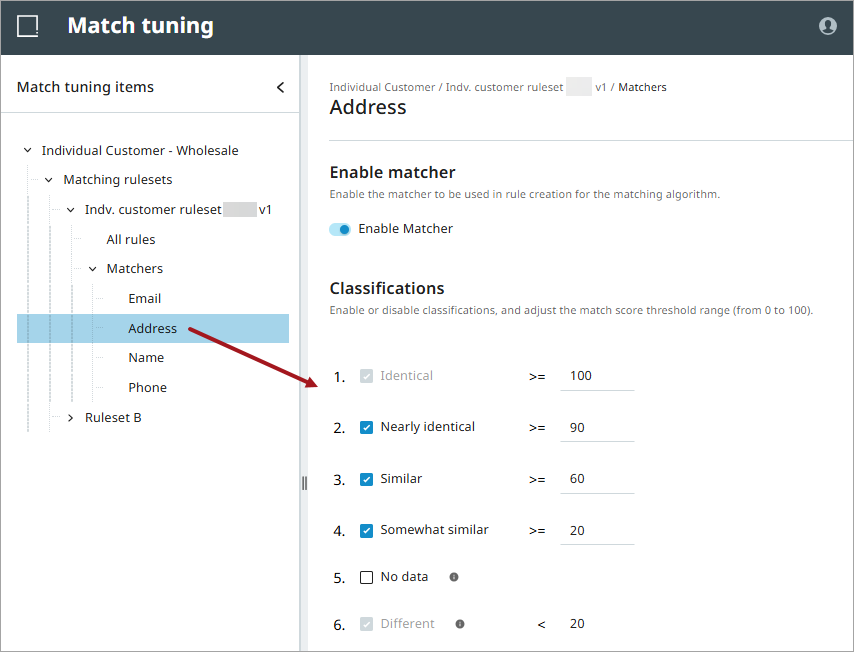
Identical >=100
-
Nearly Identical >=90
-
Similar >= 60
-
Somewhat Similar >=20
-
No Data
-
Different <20
Special cases
-
'Identical' and 'Different' are mandatory classifications and are always enabled.
-
'Different' automatically aligns with the lowest enabled threshold.
-
'No Data' is determined by the output of the data element configured in the Matching Ruleset, as described in the topic Match Tuning Configurations and Functionality. If one or both data elements return an empty value, then 'No Data' is detected, and the matcher score is ignored:
-
If 'No Data' is enabled, it is classified as 'No Data'.
-
If 'No Data' is disabled, it is classified as 'Different'.
-
Adjusting Thresholds
Adjusting thresholds lets you to fine-tune how records are grouped into combinations / rules. For example:
-
Scores above 90 can be classified as 'Nearly Identical'.
-
Scores above 60 can be classified as 'Similar'.
Thresholds can be adjusted for all classifications except 'Different', which always aligns with the lowest enabled classification.
For detailed threshold tuning, use the pair export in a spreadsheet, where you can sort on the relevant matcher scores. For details, refer to the topic Sync & Export Pairs.
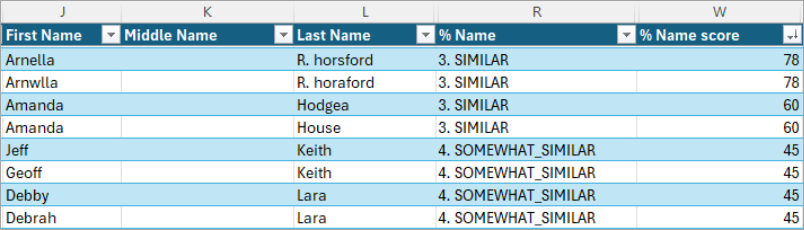
To adjust a threshold:
-
Click the threshold value.
-
Enter a value between 0 and 100.
-
Click outside the field to save the change.
The following example shows thresholds configured for an Address matcher.
For more information, refer to the topics Matcher Configuration and Match Tuning UI.