The initial configurations for 'Match Tuning Using Matching Rulesets' consist of the following steps:
-
Enable the Matching Ruleset object type
Enable the Matching Ruleset object type to store and manage rulesets associated with matching algorithms.
-
Assign user privileges
Configure the ‘Access Match Tuning’ privilege to control who can view and modify matching rules in the 'Match tuning UI'.
The configuration steps are described in more detail below.
Enable the Matching Ruleset Object Type
To use the Matching Ruleset, start by enabling the Matching Ruleset object type:
-
In the workbench, navigate to System Setup > Object Types and Structures > Basic Object Types > Matching Ruleset.
-
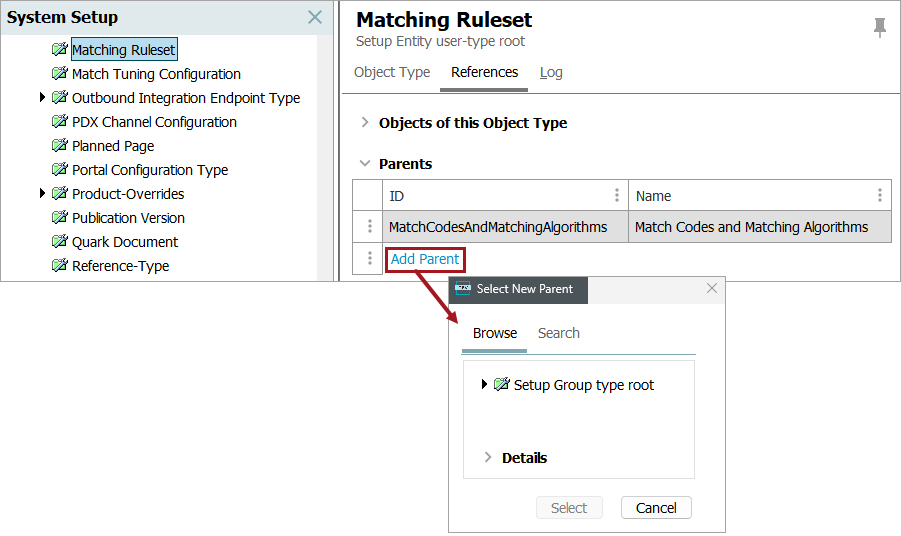
On the References tab, click the Add Parent link and select a parent for it.
Assign the Access Match Tuning Privilege
To control access to the Match tuning application, assign the required ‘Access Match Tuning’ privilege to authorized users.
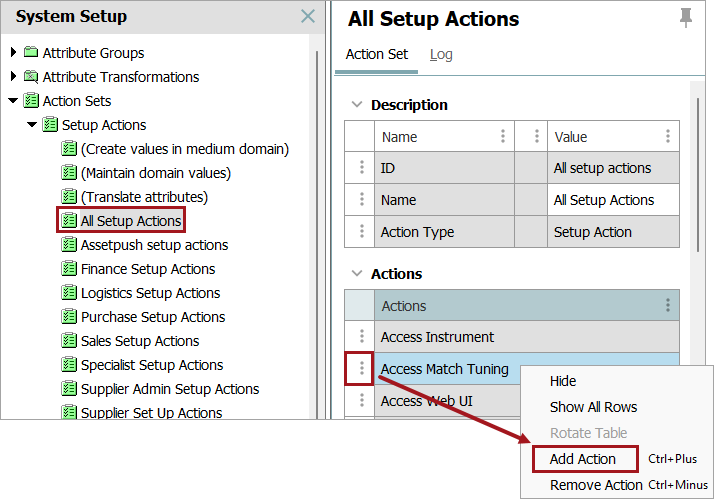
For information on making actions available to users, refer to the topic Working with Users.
For details about Matching Rulesets, refer to the topic Match Tuning using Matching Rulesets.