'Match tuning using Matching Rulesets' is an early adopter approach to match tuning that operates on golden record data. This topic describes the 'Match Tuning using Matching Rulesets' approach, where a data owner maintains decisions for rule combinations and activates a ruleset, while a super user maintains the underlying matching configuration.
Note: The Matching Ruleset feature is available through an early adopter program. As part of this program, Stibo Systems enables access to the match tuning user interface. To request access, contact simplifymatching@stibosystems.com.

Roles and Responsibilities
In the workbench, the super user prepares and maintains the technical foundation required for match tuning:
-
Configure match criteria building blocks, including data elements / normalizers, matchers, and match codes
-
Maintain 'Matching Ruleset Configuration' (which matchers participate in the rules generation)
-
Configure export attributes for pair review and analysis
-
Run 'Maintain Ruleset Tuning Data' to populate statistics and record pair data used for tuning
-
Promote validated configuration between environments, when required
In the Match tuning UI, the data owner defines match behavior based on business context:
-
Review generated rule combinations and their pair counts
-
Adjust matcher classifications and threshold values
-
Maintain decisions per rule combination (for example, 'Auto merge', 'Clerical review', or 'No action')
-
Activate a ruleset once outcomes are validated
This separation ensures that technical setup and business decisions are handled by the appropriate roles, improving governance, transparency, and outcome quality.
Maintaining Decisions based on Golden Record Pair Statistics
Statistics-driven tuning
'Match tuning using Matching Rulesets' generates golden record pair count statistics per rule combination, based on matcher score thresholds defined by the data owner. This helps teams focus their tuning efforts on the combinations with the greatest impact.
The pair export is particularly useful for diagnosing data‑related matching problems because it exposes representative record pairs. This makes it easier to identify patterns that can lead to inaccurate matching results, such as placeholders or anonymous values causing false positives, or data that requires standardization.
Maintaining decisions
In the Match tuning UI, data owners maintain decisions directly on generated rule combinations. Decisions define how matching outcomes are handled (for example, 'Auto merge', 'Clerical review', or 'No action'). Decisions can be added or removed as understanding of the data evolves. Inferred decisions are calculated automatically to help ensure consistency and coverage across related rule combinations.
When importing or exporting a Matching Ruleset, decisions are included.
Matching Ruleset Activation and Incremental Match Tuning
Once a ruleset has a sufficient coverage of decisions and has been validated, the data owner can activate it. Activation integrates the ruleset with the matching algorithm so that matching processes primarily use the defined decisions as match criteria rules (for example, data imports, matching event processing, and ‘Find Similar’ web service calls). If an active ruleset does not contain a decision for a certain combination, the rules defined directly on the matching algorithm on the 'Match Criteria' tab are applied as fallback rules.
If there is no active ruleset, the rules defined directly on the matching algorithm are always applied as the primary match criteria.
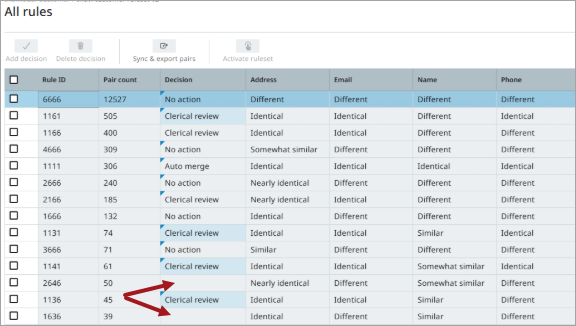
For the ‘Merge Golden Record’ match action, the ruleset decisions are 'Auto merge', 'Clerical review', and 'No action'. When the ruleset is active and matching happens, the 'Auto merge' decisions take precedence, followed by the 'Clerical review' decisions. The 'No action' decisions indicate to the matching algorithm that no action should be taken for the pair, that is, the pair is neither merged nor sent to clerical review. A 'No action' decision does not mark the pair as non-duplicates. Therefore, if the data changes, the pair is re-evaluated by the matching event processor.
In the example below, for Rule IDs 1261 and 6336, fallback rules are used as match result.
Matching Ruleset Scores
When matching is performed using an active ruleset, a final score in the range 0-100 is produced. The score is calculated as an average of all enabled Similarity matchers and then converted to fall within the configured match action thresholds.
For example, for the match action 'Merge Golden Record' with an 'Auto merge' threshold of 90 and a 'Clerical review' threshold of 70, the final score is:
-
'Auto merge' decision: 90.0 – 100.0
-
'Clerical review' decision: 70.0 – 89.9
-
'No action' decision: 0.0 – 69.9
-
No decision: Fallback rules score
Incremental Match Tuning
The Matching Ruleset setup entity is designed to support incremental match tuning over time, including directly in production systems. By duplicating an active ruleset, decisions can be added or changed, and when validated, this ruleset can be activated, which automatically deactivates the currently active ruleset.
Production vs. Development Considerations
'Match tuning using Matching Rulesets' typically involves two types of changes, each with different requirements for where they should be performed. Distinguishing between them is essential for maintaining production stability.

Incremental ruleset tuning (can be performed directly in production)
Incremental tuning improves outcomes without changing matcher output logic. It includes:
-
Duplicating the active ruleset to start from a known, validated baseline.
-
Adjusting thresholds and enabling classifications.
-
Adding or refining decisions for rule combinations.
-
Validating coverage and outcomes.
-
Activating the new ruleset so it becomes authoritative.
Algorithm changes that affect matcher output (validate in development)
Changes that can modify computed scores or classifications should be validated in a development environment outside production, for example:
-
Updating a normalizer or matcher configuration in match criteria.
-
Changing an underlying matcher implementation (for example, a JavaScript matcher).
-
Changing match code generators or match codes.
As a rule, if a change can alter matcher scores, treat it as an algorithm change and validate it in a development environment before promoting it to production.
'Match tuning using Matching Rulesets' operates on golden records that already exist in the system. Analysis is therefore based on existing golden record pairs that share match codes.
Environment guidance based on data characteristics
Because match tuning is based on existing golden records, it can be performed directly in production environments. However, if the data is known to contain a high degree of duplication, it is recommended to perform tuning first in a development environment and then promote the configuration to production.
This approach allows duplicates to be resolved during import, rather than creating a large number of duplicate golden records and cleaning them up afterward.