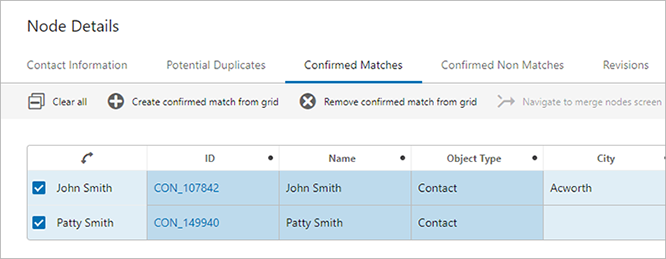
From the Confirmed Matches component screen, users can view all objects that have been confirmed as matches for the currently selected object, and may choose to either merge the selected object with one of the listed matches, or reject an object(s) as a viable match.
Important: The option to merge is not applicable to Golden Record configurations.
Matches listed on this screen must be confirmed via the Potential Duplicates List or Deduplication List screens before they can appear.
For more information on the Potential Duplicates List component, see the Potential Duplicates List section of the Web User Interfaces documentation here.
For more information on the Deduplication List component, see the Configuring a Deduplication Clerical Review section of the Web User Interfaces documentation here.
If applicable to the configuration, a merge nodes button can be added to the screen. To merge two matching nodes, select the relevant object from the list and click the 'Merge' ( ) icon. For more information, see the Merging Confirmed Matches section of the Web User Interfaces documentation here.
To reject a confirmed match, select the relevant object from the list and click the 'remove' ( ) icon. Doing so will send the selected object back to the Potential Duplicates List / Deduplication List screen.
It is expected that anyone configuring the Confirmed Matches component is familiar with the Web UI Designer, as basic concepts for working with the designer are not covered in this section. In addition, the user must have appropriate privileges to access the designer. Additional information can be found in the Designer Access section of the Web User Interfaces / Web UI Getting Started documentation here.
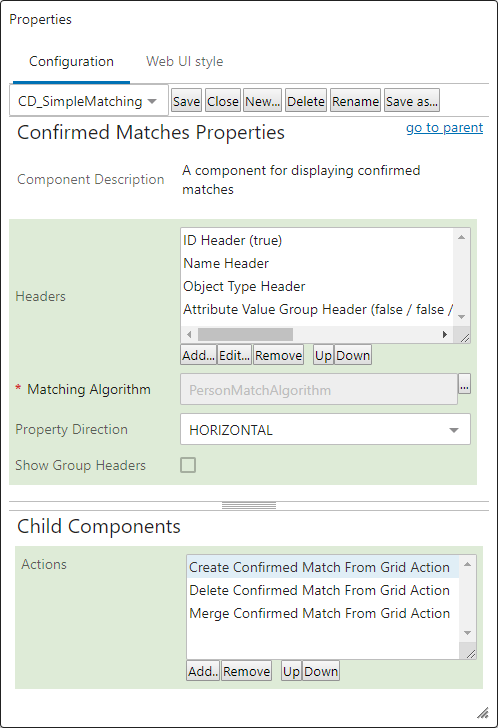
A number of configuration options are available for this component that allow users to customize how the table is formatted. Additionally, a matching algorithm and corresponding action button(s) must be configured.
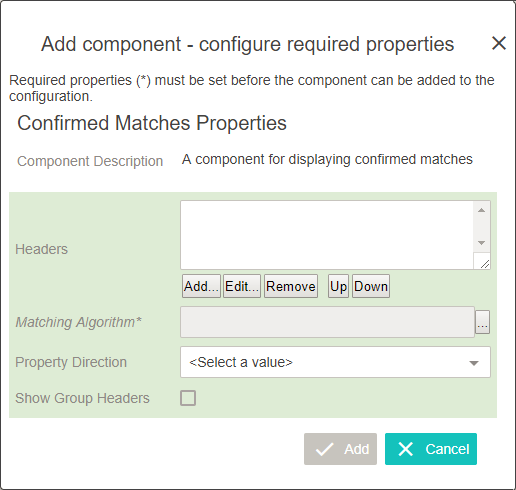
 ) and select the relevant matching algorithm.
 Once the tab has been created and configured, an additional field is made available as a child component:
2019, Stibo Systems – Confidential