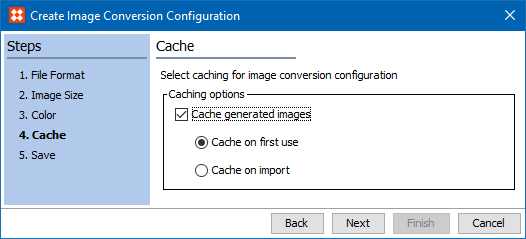
Image Cache allows the event processor to generate images for required conversions asynchronously, and saves the resulting files to the image cache. Common setup is for all STEP systems to use this event processor as a means of optimizing asset export time to external systems. Only image conversion configurations with the 'Cache generated images' option checked are handled by this event processor. It is recommended that all systems using image conversions have imaging caching processors set up. For more information, see the Image Conversion Configurations section of the Export Manager documentation here.
Although caching images is optional, a cache improves export performance, especially for those assets that are exported frequently. Image caching is automatically defined for STEP with no setup required. All image caching is controlled by the ImageCache.* properties in the sharedconfig.properties file. Contact Stibo Systems Technical Support for assistance when modifying the default settings to meet your needs.
The Parameters and Event Triggers sections below contain important information on settings that should be considered when creating an event processor for Image Cache.
This section of documentation describes configuration steps for a specific processor that is only one part of configuring an event processor. For instructions on configuring an event processor see the Event Processors documentation here.
An image conversion that uses caching must have been previously created. Only Image conversion configurations with the 'Cache generated images' option checked are handled by this event processor. For more information on creating these conversions, see the Image Conversion Configurations section of the Export Manager documentation here.
On the Event Processor Wizard 'Configure Processing Plugin' step, configure the processing plugin.
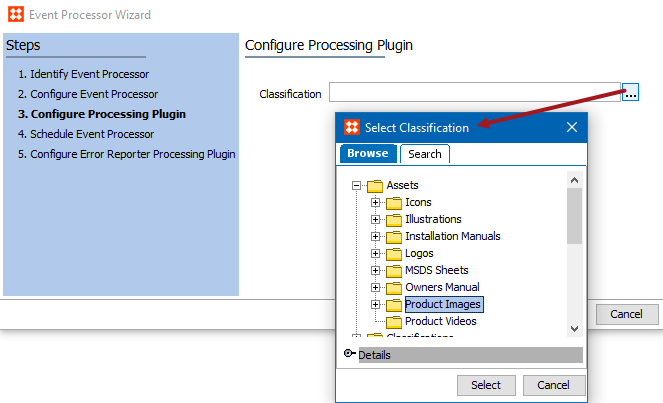
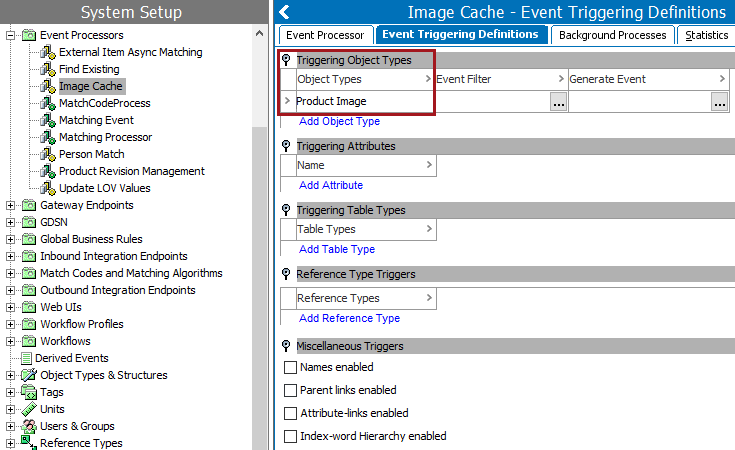
For the event processor to take effect, it must be configured to only listen for changes on asset type objects housed within the same previously selected classification folder.
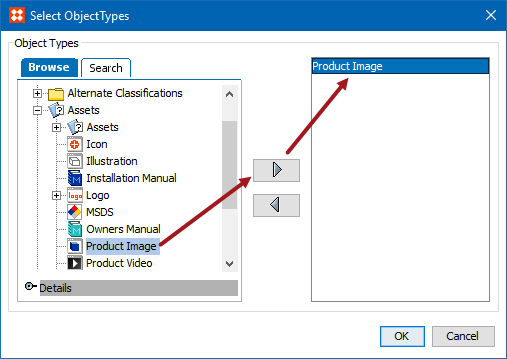
Important: You must select at least one asset type for Triggering Object Types or nothing will be processed by the event processor.
2017, Stibo Systems