Summary
The following enhancements and changes have been made as part of the 2026.3 update:
-
Consumer Model Context Protocol (MCP) Server and Data as a Service (DaaS) GraphQL schemas now support the @countByType query directive, enabling consuming applications to retrieve object counts for specific schema types. This capability supports data auditing, synchronization validation, and determining the volume of data available for retrieval. Optionally, counts can be filtered by modification timestamp, allowing applications to retrieve counts only for objects modified since a specified date and time.
For more information, refer to the documentation available from within the DaaS service. Also, refer to the Simplified Setup and Activation for Data as a Service and Consumer MCP Server update note.
-
The STEP 2026.3 Update adopts the Java platform default locale data, based on the Unicode Common Locale Data Repository (CLDR), in place of the legacy COMPAT locale data provider previously set by default in JVM arguments. This change aligns STEP with current Java platform standards and prepares the system for a planned future move from Java 21 to Java 25, where COMPAT locale data provider is not supported. This change applies to all environments, not only those with customized java.locale.providers. Formatting for dates, times, and numbers may change if it relied on Java’s default locale patterns. For details, refer to the Java Default Locale Provider topic in the System Setup documentation.
These enhancements and changes have also been made as part of the 2026.3 update and are described in the Details section that follows:
-
New REST API endpoints allow admins to retrieve information about STEP users and user groups including filtered lists for users who authenticate through STEP rather than an identity provider (IDP), users who are deactivated, or both; and identify users by type: read or write, supplier, and deactivated, and whether a user group has write permissions.
-
Support for dynamic scaling within the One Queue background process (BGP) execution mechanism has been added for Outbound Integration Endpoint (OIEP), event-based OIEPs, Matching Event Processor, and Match Code Generation background process types.
-
Source References can now be set for applications using the Application mapper in Web UI.
-
Support for channel-issued external product IDs for STEP-PDX integrations has been added.
Details
User data now available via REST API endpoints
The following new REST API endpoints are available to give programmatic access to user and user group information.
-
GET /users allows admins to retrieve STEP user IDs.
-
The step-authenticated filter parameter allows admins to identify users based on their use of an identity provider (IDP) for authentication. Previously, this metadata was only available from the workbench UI using the 'Externally Maintained' parameter on a user object.
-
The deactivated filter parameter allows admins to identify users based on their deactivation status. If needed, corrective actions can be performed in workbench, using a STEPXML import, or via existing APIs. For details, refer to the Modifying a User's 'Deactivated' Parameter section of the Working with Users topic in the System Setup documentation.
-
-
GET /users/{id}/adherence gives access to the 'effective type' (supplier, deactivated, and read or write) for STEP users. For 'write' users, the group(s), deduplicated action set(s), and their write action(s) are also returned to explain the source of the write permissions. This information is also made available for 'supplier' and 'deactivated' users with at least one 'write' permission.
-
GET /user-groups/{id}/adherence gives access to the 'effective type' (read or write) for STEP user groups. For 'write' user groups, the deduplicated action set(s) and their write action(s) are also returned to explain the source of the write permission(s).
These new capabilities improve security compliance monitoring (e.g., if using an IDP is mandatory for all users) and streamline user management at scale.
REST API is documented in the Technical Documentation, available at [URL]/sdk or accessible from the Start Page.
Dynamic scaling support for additional background process types
The following background process types now support dynamic scaling within the One Queue background process (BGP) execution mechanism:
-
Outbound Integration Endpoint (OIEP)
-
Matching Event Processor
-
Match Code Generation
This complements the existing dynamic scaling support already available for background process types such as Data Profiler Parallel and Inbound Integration Endpoint (IIEP).
Dynamic scaling enables One Queue to automatically adjust the number of parallel workers used by a background process based on workload demand. For event-based OIEPs, the 'Maximum Number of Threads' setting can be used to configure the maximum level of parallel processing available to the endpoint.
This enhancement provides administrators with greater control over the processing behavior and resource utilization of event-based outbound integration endpoints.
For more information, refer to the BGP Execution Management topic in the System Setup documentation. For details on parallel processing in One Queue, refer to the Parallel Processes section of the BGP One Queue topic in the System Setup documentation.
Create Source Reference for Application Mapping component
It is now possible to set a source reference for an application using the mapping framework. This allows for a direct link between the source application and the onboarded application. If a source already has a reference to a target, rather than deleting and replacing the target application, the link is simply updated. Establishing these references makes it easier for users to identify source applications and prevents the potential loss of data.
For more information, refer to the Application Mapping Plugin in the Solution Enablement: Product MDM for Automotive documentation.
PDX to STEP improvements for external ID-handling
Two important changes have been made to both streamline the configuration of STEP-to-PDX integrations, and simplify workflows when working in a STEP / PDX-integrated system. The two improvements are as follows:
-
Channel-issued external product IDs from PDX are now stored in STEP. When users update their STEP systems to 2026.3, PDX-STEP users will have a new attribute called 'External ID' on the 'PDS Status Data Container on the syndicated STEP product. This attribute displays as a new column in the 'PDS Status Data Container' data container table. Channel-issued external IDs now flow automatically from PDX to STEP when the PDX inbound integration endpoint (IIEP) is run.
For more information on this improvement, refer to the PDX Status Data Container Configuration topic.
-
For existing PDX users with a STEP integration, PDX channel-issued external IDs that have been issued prior to this update will not automatically be synchronized with STEP. However, those external IDs can now be synchronized between PDX and STEP using the new 'Synchronize external IDs' button on the PDX inbound integration endpoint (IIEP).
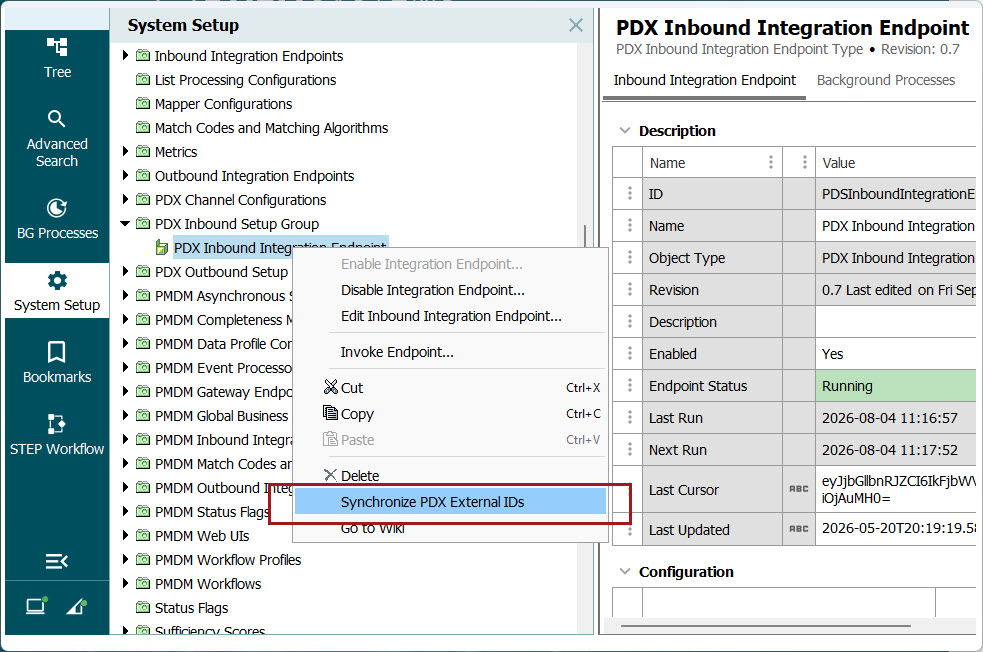
Doing so starts a background process (BGP) that automatically brings the external ID from the PDX product record into the PDX Status Data Container in STEP. If no synchronization is needed, the option will not display in the right-click menu on the PDX IIEP. Synchronizing external IDs between PDX and STEP is a one-time action for existing users because, going forward, synchronization of external IDs between systems will happen automatically.
For more information on synchronization, refer to the topic.