The External Receiver calls a modular service that receives and manages messages from an external source. Only modular services that implement the 'ReceiverPlugin<T>' interface and that are running are available for selection as an External Receiver in the workbench. Modular services are created using the 'Modular Service Platform' (MSP) API and deployed and managed in the 'Modular Services' page in the Self-Service UI (SSUI). Refer to the SSUI Modular Services topic in the SSUI documentation.
External modular services can be called by STEP in:
-
the inbound integration endpoint (IIEP) External Receiver (this topic) and/or the External pre-processor, which is defined in the IIEP - Configure Pre-processor topic.
-
the outbound integration endpoint (OIEP) External Delivery Method and/or the External post-processor, which is defined in the OIEP - Event-Based - Output Templates Section topic and the OIEP - Select Objects - Output Templates Section topic.
-
the External Business Operation in the Business Rules documentation.
Prerequisites
-
Develop a modular service as described in the 'Modular Service Platform API Guide' links in the 'Modular Service Platform' section of the Technical Documentation, available at [URL]/sdk or accessible from the Start Page.
-
Deploy the modular service through the 'Modular Services' page of the SSUI and set the status to RUNNING, as defined in the SSUI Modular Services topic of the SSUI documentation.
Configuration
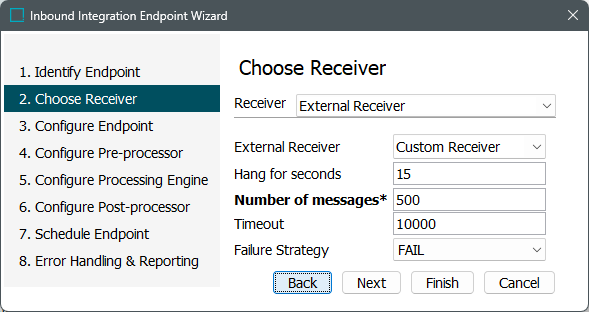
After completing the prerequisite steps, edit the receiver of the IIEP. Use the following parameters to configure the IIEP. For information on a parameter, hover over the parameter field to display help text.
-
For Receiver, choose External Receiver.
-
For External Receiver, select a modular service from the dropdown.
Important: The modular service must be running. Modular services are managed in the SSUI. Refer to the SSUI Modular Services topic in the SSUI documentation.
-
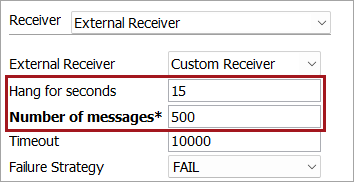
For custom parameters (shown in the red box below), depending on the modular service plugin code, parameters can be configured as optional or mandatory (indicated by an asterisk (*) and bold text).
-
For default parameters, set the following:
-
For Timeout, set the milliseconds to wait before triggering the defined Failure Strategy.
-
For Failure Strategy, select if the business function should 'Fail' or 'Retry' when the Timeout limit is reached.
-
-
Click the Next button to continue with the IIEP - Configure Endpoint and subsequent steps.