Summary
The following enhancements and changes have been made as part of the 2026.1 update:
-
Managing Stibo Systems customizations and SDK / API Extensions previously required performing a full environment restart for every change. This process was time‑consuming and could often significantly reduce development agility. Leveraging a process separation architecture enables application-only restarts, eliminating the need for In-Memory synchronization and thereby significantly reducing the overall startup time. A new endpoint that enables application-only restarts when applying extension changes in non-production environments has been added to the Remote System Administration REST API and Swagger UI, both documented in the 'System management API' section of the Technical Documentation, available at [URL]/sdk or accessible from the Start Page.
-
In the workbench, changes made by admin users to the user group parameter 'Multifactor Authentication Required' are now logged on the user group's 'Log' tab. This enhancement provides administrators with detailed audit trails for security configuration changes and aligns with the entries displayed in the 'Security events' section of the Environments tab in the Self-Service UI. For more information, refer to the Self-Service UI topic and the Multifactor Authentication topic in the System Setup documentation.
-
The initial load time for faceted search in the Web UI and search in the New UI has been optimized. Both search capabilities are powered by Elasticsearch.
-
The workbench icon displayed in the Taskbar (Windows) / Dock (Mac) now includes a colored badge with the abbreviated name of the environment, enabling users to quickly identify multiple environments, such as development, testing, and production instances. For details, refer to the STEP Workbench UI topic in the Getting Started documentation.
-
The Test Mapping button found on the Onboarding Mappings Details Screen in Web UI must now be configured before it can appear on the screen. For more information, refer to the Onboarding Mappings Details Screen topic in the Data Onboarding and Standardized Mapping documentation.
These enhancements and changes are also included in the 2026.1 update and are described in the Details section that follows:
-
Support for testing JavaScript business rules in STEP using Visual Studio Code (VS Code) is now available and provides an enhanced development experience.
-
The Control Service API improvements now provide REST methods to create, monitor, and manage extension services for the Modular Service Platform (MSP).
-
Basic e-signature support is now restored with external authentication functionality, including reauthentication as required. This enhancement addresses regulatory scenarios where organizations must maintain documented proof of identity verification for sensitive operations. The flexible authentication approach accommodates various security policies while maintaining workflow efficiency.
-
The One Queue background process execution mechanism now features improved process execution priorities. A new round-robin scheduling algorithm executes background processes (BGPs) in rotation, ensuring all process types receive execution opportunities, based on a combined prioritization that considers process priority, user, process type, and creation time.
-
The Performance Analysis tools have a new dedicated 'Calculated attributes' screen to help administrators identify optimization opportunities and an improved user experience when selecting time periods for analysis.
-
Enhancements to the asynchronous translation functionality have been made to improve automation, and to give users more flexibility when translating.
-
The Sustainability Data Management solution has been updated with automation enhancements to include automatic expiration date handling, automatic data sheet creation, and automatic recycling- and ISO-related logo posting on data cards.
Details
Testing STEP business rules with Visual Studio Code
From the STEP workbench, JavaScript business rules can now be tested using Visual Studio Code (VS Code). This capability allows developers to leverage the familiar VS Code environment when working with business rules. By enabling testing within VS Code, developers can more efficiently validate rule logic, identify issues, and iterate on rule configurations before deploying them to the system. This integration streamlines the development workflow and reduces the time required to create and maintain reliable business rules.
To implement this functionality, download and install the 'STEP Business Rule Test' VS Code plugin (a VSIX file), as outlined in the 'JavaScript Business Rule Test Functionality' section of the Technical Documentation, available at [URL]/sdk or accessible from the Start Page.
For more information, refer to the Editing and Testing a JavaScript Business Rule Externally topic in the Business Rules documentation.
Control Service API improvements
Improvements to the Control Service API enable developers to programmatically oversee custom service implementations, allowing for improved operational visibility and streamlined service lifecycle management. Organizations leveraging Modular Service Platform (MSP) for building custom integration solutions can now automate monitoring workflows and implement more sophisticated service management strategies through standard REST operations. This new functionality aligns with the available features in SaaS Self-Service UI.
For more information, refer to both the Control Service API section and the Modular Service Platform section of the Technical Documentation, available at [URL]/sdk or accessible from the Start Page.
Improved basic e-signature support
Basic e-Signature functionality, deprecated in 2024.4, is now reintroduced with enhanced authentication capabilities to support regulatory compliance requirements. This feature allows organizations to reaffirm user identity at critical workflow steps, ensuring that authorized personnel complete key operations.
The updated implementation supports both internal STEP-managed authentication and external authentication methods. When configured, the system prompts users to re-authenticate before completing designated workflow actions, providing an additional layer of verification. Organizations can configure the level of authentication security based on their specific compliance and operational requirements.
Administrators can designate which workflow steps require e-signature verification, allowing targeted application of enhanced security measures without impacting routine operations.
For more information, refer to the e-Signature topic in the Resource Materials online help documentation.
Improved One Queue background process execution mechanism
The One Queue background process execution mechanism has been enhanced to improve process execution priorities. This enhancement addresses operational challenges encountered in high-volume production environments where diverse background processes compete for system resources.
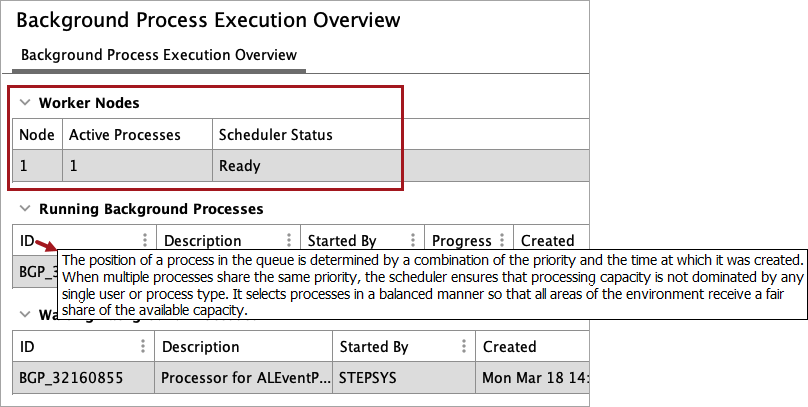
One Queue now implements a round-robin scheduling algorithm. Round-robin scheduling ensures both efficiency and fairness in background process (BGP) jobs by distributing processing time equitably across different users and task types, and by processing the oldest tasks in each group first. Specifically:
-
High-priority tasks are processed first. Tasks set with 'High' priority are run before tasks with 'Medium' or 'Low' priority.
-
Users and job types are processed equitably. When multiple tasks have the same priority, no single user or task type dominates the queue. Tasks are processed in a balanced manner to distribute the processing time fairly.
-
Within each group, the oldest tasks are processed first. Multiple tasks of the same type are processed in the order they were created, following a predictable first-in, first-out (FIFO) approach.
The workbench Background Process Execution Overview page now displays a 'Worker Nodes' section (replacing the previous 'Servers' section) that reflects data relevant for SaaS environments. The new 'Scheduler Status' column shows whether the system is 'Ready' or 'Awaiting processing capacity', along with the number of seconds it has been waiting. When the system is waiting on processing capacity, this can indicate constraints in available workers, heap memory, or CPU resources. Hover over the process ID column to display a tooltip that provides information on the processing order.
Organizations running complex production workflows with mixed process types will benefit from improved throughput and more balanced execution timing. The round-robin approach prevents process starvation scenarios where processes could be delayed excessively by continuous high-priority process submissions.
For information on One Queue, refer to the BGP One Queue topic in the System Setup documentation. For information on 'round-robin scheduling', search the web.
Enhancements for Performance Analysis tools
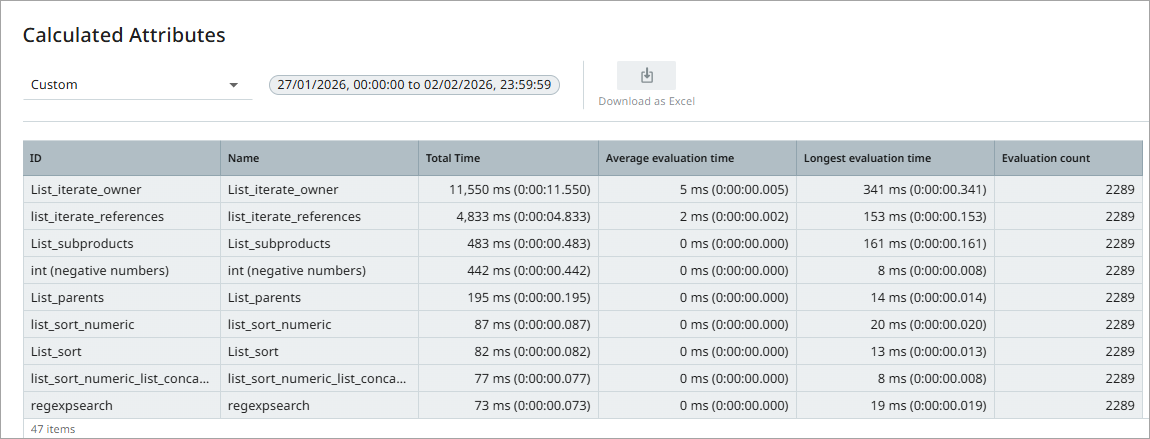
The Performance Analysis tools (available from the STEP Start page) now provide a new 'Calculated attributes' screen with performance metrics for calculated attributes across the system. This enhancement enables administrators to monitor and analyze calculated attribute performance in a centralized location, making it easier to identify optimization opportunities and improve overall system efficiency. The 'Calculated attributes' option provides key performance data including total execution time, number of evaluations, and average and longest evaluation times.
Additionally, users have an improved experience when selecting a fixed or a custom time period for analysis. Fixed time periods and the default selection have been updated to make the 'Activity Tree', 'Business Rules', and 'Event' screens more consistent with the associated data and to potentially reduce the need to use the 'Custom' option. When using the 'Custom' option in the 'Available time periods' selector, the system automatically sets the 'Start date' parameter to midnight and the 'End date' parameter to one minute before midnight. This enhancement eliminates the need to manually adjust time values, ensuring that analysis results consistently include complete days.
Refer to the Performance Analysis Tools topic in the Performance Analysis documentation.
Enhancements to asynchronous translation functionality
The asynchronous translation offering has improved in two key ways:
-
Language-dependent attributes configured with maximum lengths now automatically include the maximum length information when sent into the asynchronous translation process. This allows both translation agencies and AI services to return translated content compliant with the attribute's configured content restrictions. Previously, translated content sent back from agencies or AI services sometimes exceeded the set maximums, resulting in errors and slowdowns in the translation process. This improvement further streamlines asynchronous translation, allowing content stewards and product managers to benefit from a smoother, more automated translation process.
-
Users configuring an asynchronous translation now have the ability to determine whether to include only the selected objects when translating, or to translate the selected objects and all of their children objects. A new parameter called 'Selected node(s)' has been added as a configuration setting to the Asynchronous Translation configuration with the ability to select either 'Selected node(s) only' or 'Selected node and child nodes'. This change gives admin users the flexibility to fine-tune their translations and translate only those objects that need it. This change also affects structured translations. For more information on 'Include Selected Nodes Only,' refer to the Configuring an Asynchronous Translation Service and Starting a Structured Translation topics in the Translations documentation.
Automation updates for Sustainability solution
The Sustainability Data Management solution now includes significant automation improvements as part of the 2026.1 release.
Stibo Systems' Sustainability solution is designed to enable users to track products, manufacturing sites, and assessments in a single interface through the use of data cards. With the functionality introduced in this update, users will have the following improvements:
-
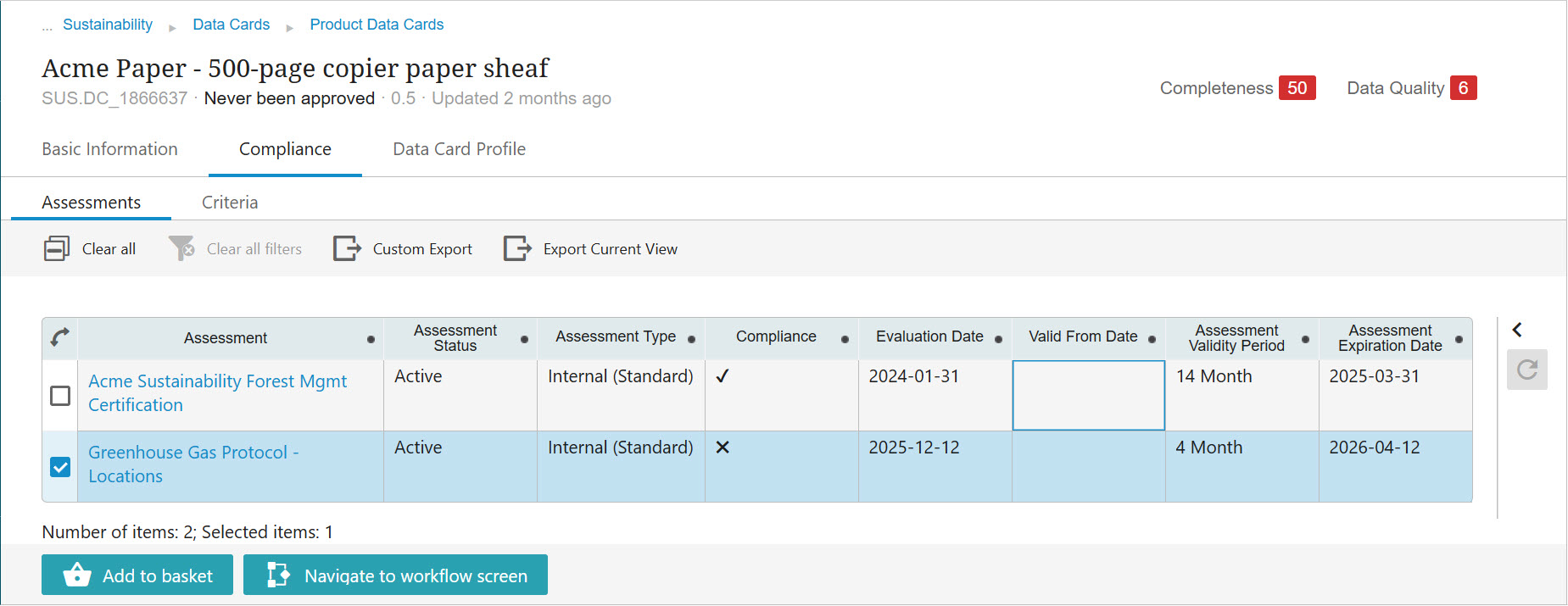
ISO certifications: When an assessment related to any ISO certification is added to a manufacturing site, for example, all data cards for products associated with the site are updated in bulk with the ISO-certification logo. Alternately, if a site fails an assessment they have previously passed, all products associated with that site will have the associated logo removed from their data cards.
-
Recycling certifications: When an assessment related to a recycling standard is added to a manufacturing site, for example, all data cards for products associated with the manufacturing site are updated in bulk with the recycling-related certification logo. Alternately, if a manufacturing site fails an assessment it has previously passed, all products associated with that site will have the associated logo removed from their data cards.
-
Mass data card creation via Excel: With some additional configuration, the Sustainability Data Management solution now supports mass creation of data cards through import of an Excel / CSV spreadsheet. When created via Excel import, the data cards are automatically approved and moved out of the workflow.
-
Automated processing of expired / expiring assessments: When assessments are set to expire in 30 days, new automation moves those assessments into a review workflow state and sends a notification email so users can manually review each assessment to determine next steps well before the assessment expires.
Though the business rules and other settings that enable this automation are designed for minimal configuration when setting up a solution, the Sustainability Data Management solution allows for considerable customization. For instance, users can determine which assessments should have the bulk update automation applied, or change when expiring assessments are surfaced for additional action. When fully configured, the Sustainability Data Management solution provides users with a complete picture of their environmental, social, and governance (ESG) status with the necessary framework and automation to keep it continually up-to-date.
For more information on this automation, refer to the Creating Data Cards in Bulk with Excel and Sustainability Logo Inheritance topics. For more information on the Sustainability Data Management solution, refer to the Sustainability Data Management Solution Enablement topic in the Solution Enablement: Sustainability documentation.