The result of matching may change when data changes. Updates result in events and matching allows for the generation / updating of match code values, as well as the option to run matching algorithms, whenever an event is processed on the objects acted on by the algorithm.
The Parameters and Event Triggers sections below contain important information on settings that should be considered when creating an event processor using this processing plugin.
Prerequisites
This section of documentation describes configuration steps for this specific processor, but that is only one part of configuring an event processor. For the full set of instructions on configuring an event processor, see the Event Processors documentation here.
The configuration requires selection of a matching algorithm, and that match codes are only updated for objects acted on by the algorithm and only when events are passed for those objects. For details about match codes and matching algorithms, see Matching, Linking, and Merging Elements in the Matching, Linking, and Merging documentation.
Important: The 'Run Matching Algorithm' functionality is controlled by System Setup > Action Sets > Setup Actions > Maintain Deduplication Configurations.
Parameters
Each of the relevant parameters for the Event Processor Wizard 'Configure Processing Plugin' step are described below. Any additional wizard parameters with importance for this plugin are also included in this topic.
To access the 'Configure Processing Plugin' parameters as shown below, the Matching processing plugin must be selected within the Select Processor parameter during the wizard step 'Configure Event Processor.'
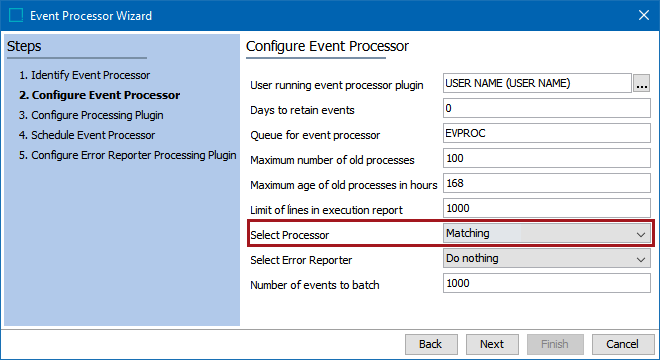
Once the Matching processing plugin has been selected, click the Next button, and the wizard step 'Configure Processing Plugin' displays.
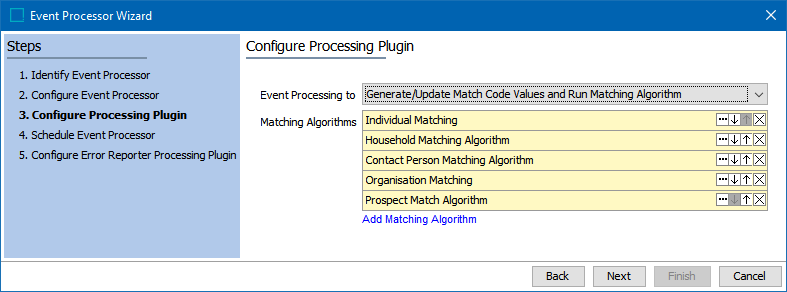
- Event Processing to: Select an option from the dropdown.
- Run Matching Algorithm Only: runs the selected algorithm(s) using the existing match codes.
- Generate / Update Match Code Values Only: creates missing match codes, deletes invalid match codes, but does not run the algorithm(s).
- Generate / Update Match Code Values and Run Matching Algorithm: this is the recommended option and does both of the first two options. If configured to generate / update match code values, only objects included in the matching algorithms specified on this step are affected.
- Matching Algorithms: Specify which matching algorithm(s) to run by clicking the Add Matching Algorithm link and use search or browse.
- When multiple algorithms are selected, they are processed in order, from top to bottom.
- When working in a golden record scenario, consider the order of algorithms when there are references between multiple golden records within multiple matching algorithms. Common setup is to match 'reference targets' before 'reference sources' to ensure optimal matching performance, and as complete an initial construction of golden records as possible.
Important: While it is possible to use the same Matching Algorithm across Event Processors, this scenario will usually result in an optimistic locking and/or unique constraint violation when the two processors conflict with one another. Optimistic locking is the implementation where objects are modified concurrently. The result of this is that the system cannot know which value should be represented. To avoid these issues, ensure that each algorithm on the system is run by a single Event Processor.
On the Schedule Event Processor step, select the desired schedule. The recommendation is every 1 minute.
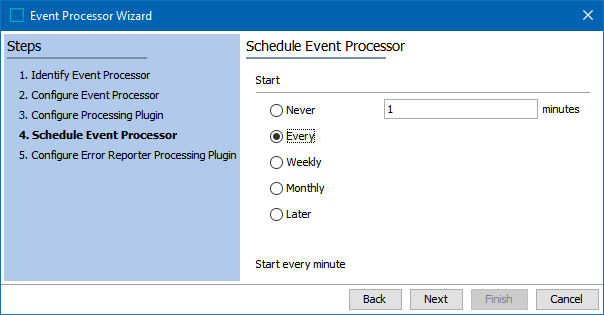
Note: The comparison run by a Matching event processor happens asynchronous to the actual import, leaving up to a minute between importing a record that should go into the clerical review workflow and making the record visible in the clerical review workflow.
Event Triggers
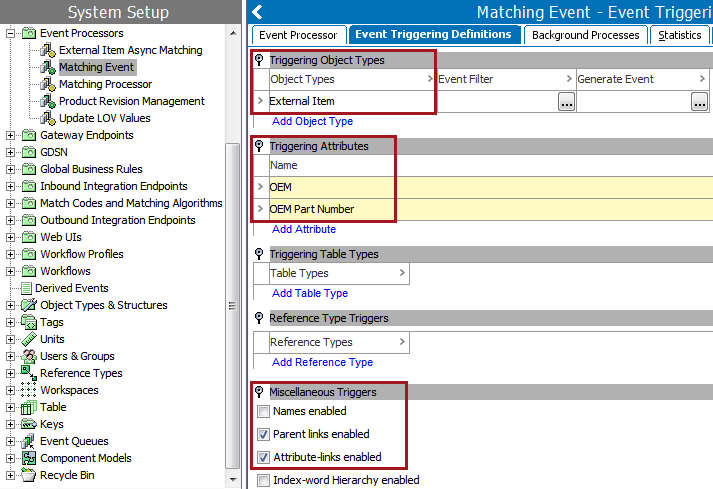
On the event processor's Event Triggering Definitions tab, use the Triggering Object Types, Triggering Attributes, and Miscellaneous Triggers flippers to configure the event processor to listen for changes on anything that the match code or matching algorithm needs to perform.
- If the event processor will update match code values, expand the Triggering Attributes flipper and click the Add Attribute link to select the attributes used by the Match Code definition.
- If the event processor will run a matching algorithm, select the respective object types, attributes, and links that are specified by the Matching Algorithm within the Global Binds or the Match Criteria flippers. These can include attribute values, IDs, names, attribute references, and parent links.
For a match and merge scenario, based on the selected algorithm, for existing golden records, the event processor performs a merge or initiates a clerical review. Add triggers for the following:
-
references defined by your Matching component model: Non-Duplicate Reference Types (here)
-
references defined by your Matching - Merge Golden Record References component model: Unmerged-From Relation Reference Types (here)
-
attributes, references, and data containers included in your Match Criteria (here)
Important: For accurate match and merge functionality, the event processor must trigger on updates that can change the outcome of the record comparisons. To accomplish this, the recommendation is to trigger on any attribute, reference, or data container that is used in the match criteria.
For a match and merge scenario, avoid triggers on the following attributes and reference types as defined by your component models:
-
Potential Duplicate Reference Type
-
Merged-Into Relation Reference Types
-
Source Relation Reference Type
-
Potential Duplicate Match Algorithm ID Attribute
-
Source Record ID Attribute
-
Deactivated Attribute
When configuration is complete, enable the matching event processor. For detailed steps, see the Enabling Event Processors section of the Running an Event Processors topic in the System Setup / Super User Guide documentation here.
Troubleshooting
The following logs and statistics provide information for troubleshooting the event process.
-
Review the event processor background process log to determine when events were processed and what actions were taken in response.
-
Review event processor performance measurements on the Statistics tab for both matching algorithms and match code configurations.