The match criteria are responsible for matching records against each other to find those that match. When users are only interested in exact matches, the match criteria are reasonably straightforward.
If the SSN (Social Security Number) for two customer objects or the EAN (European Article Number) for two product objects are identical, the records are likely duplicates and the matching criteria should return 100 percent. If the SSN or EAN does not match, the match criteria should probably return 0 percent.
In many cases you cannot work with exact matches; instead, you will deal with approximate matches or a combination of exact and approximate matches. For example, for a customer you do not have a SSN available so you will identify duplicates based on names, mailing addresses, phone numbers, and street addresses. For a product, you will identify duplicates based on the manufacturer and manufacturer part number.
This data can have variations, even in objects that represent the same real-world entity. Names and addresses can be spelled differently, middle names could be omitted, abbreviations can be used in names and addresses, the customers could be registered with different phone numbers or mailing addresses, and other options that introduce ambiguity to the records.
This complexity can be handled via a decision table in the match criteria logic, which further divides the functionality into normalizers, matchers, and rules.
Match Criteria Tab
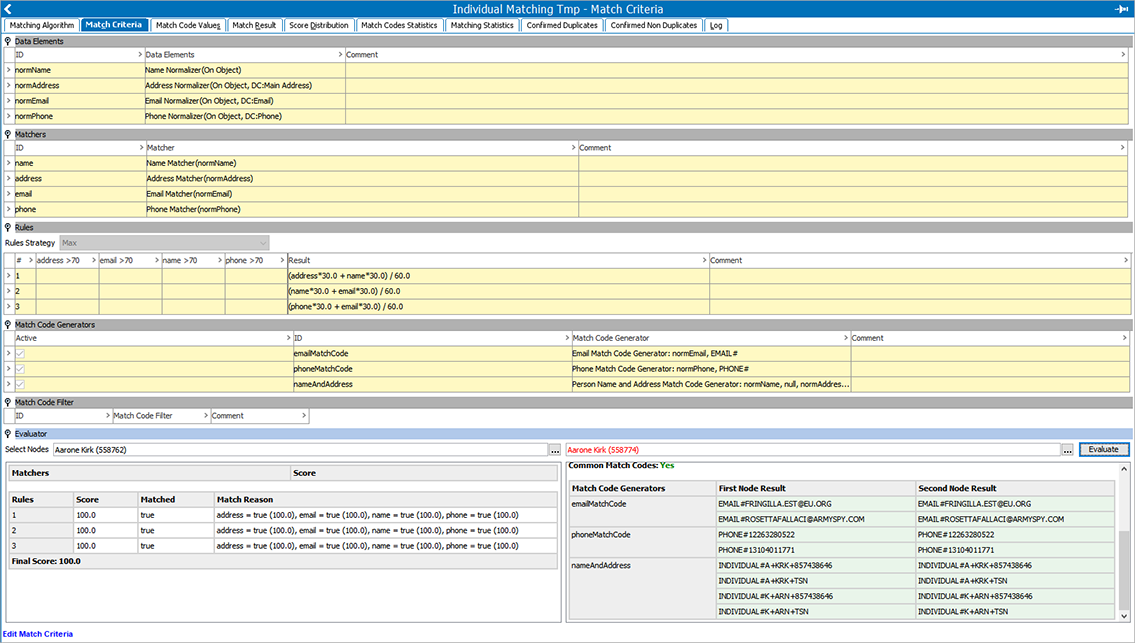
The Match Criteria tab defines how to compare two objects and evaluate to what degree they are similar.
Important: Create new match algorithms with embedded match codes as defined in the Configuring Matching Algorithms topic here.
The Match Criteria Tab is separated into the following flippers:
- Data Elements declare the input for the matchers and match code generators and allow data to be normalized to a format that is easy to compare.
- Matchers do the actual comparisons of values. A matcher compares one logical aspect of the objects, assigning a equality percentage to that aspect based on the related values.
- Rules combine the results of matchers into a final match score, which is a percentage that signifies if two objects are a match or are not a match.
- Match Code Generators identify the records that should be compared. Only records with at least one equal match code are passed through the match criteria for evaluation of a match score. This allows efficient matching on a dataset of millions of objects because it prevents comparing every object with every other object. For information on choosing match codes, see the Selecting Match Codes topic here.
- Match Code Filter allows users to remove specific match code values based on a Transformation Lookup Table.
- Evaluator is the user's test tool and allows a user to execute the entire match criteria setup on two select records.
Legacy Match Criteria Without Embedded Match Codes
For match algorithms without embedded match codes, see the Match Codes topic here.
A matching algorithm with the Match Criteria flipper displayed indicates it is a legacy algorithm where the match codes are not embedded and must be created manually.
Use the following steps to configure:
-
Click the Add Criterion link to display the 'Select Match Criterion' dialog.
-
Specify a Name.
-
Choose a match criterion from the Select Match Criterion dropdown.
-
Click the Add button.
-
Click into the Criterion field and then click the ellipsis button (
 ) to open the editor.
 -
Create the matching criterion and click OK.
-
Click into the Weight field and specify a weight for the criterion.

Match code generators are only available when match codes are not embedded into the matching algorithm.