Component Models
Component Models provide configuration instructions for functionalities that require multiple objects, references, or other elements to perform a specified operation. For example, to use Matching functionality (as shown below) the component model identifies the object types used for matching, the attributes used to hold justification and source information, as well as the reference types used to identify duplicates and non-duplicates.
Exporting component models with STEPXML contains references to the applicable reference types, object types, and attributes objects. Alternatively, exporting the definition of referenced objects is possible with the 'V1' setting on the 'Export.ComponentModel.Version' property. To export definitions, in the STEP application server sharedconfig.properties file, add the case-sensitive property as shown below:
Export.ComponentModel.Version=V1
By default, the value for this property is 'V2' and indicates that actual references are included in the export.
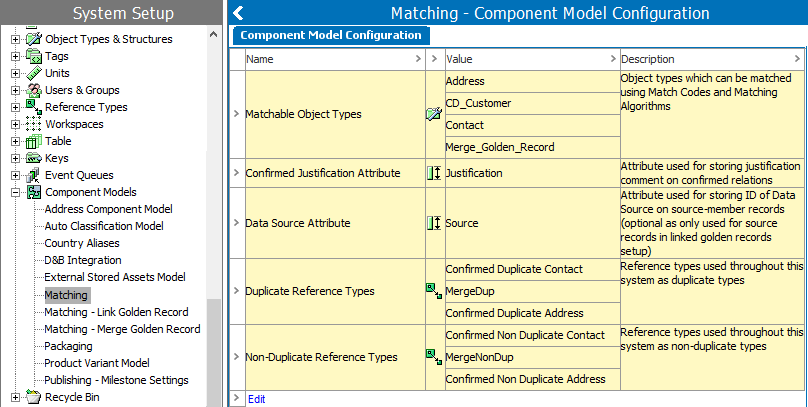
Generally, the available component models are explained within the applicable section of documentation. For information on the component models, see the following topics.
Automatic Classifications
- Auto Classification Model - in the Automatic Classification documentation (here)
Automotive
The following component models are defined in the Automotive Quick Start Guide (here).
- Automotive – Application Model
- Automotive – AutoCare Model
- Automotive – Import Flow Process
- Automotive – NAPA Model
- Automotive – TecDoc Model
The following component model is defined in the Automotive Reference Guide (here).
- Automotive – Country Model
Data Integrations
- Address Component Model - in the Loqate Integration section of the Data Integration documentation (here)
- CASS Address Component Model - in the Loqate Integration section of Data Integration documentation (here)
- D&B Integration - in the Dun & Bradstreet Integration section of the Data Integration documentation (here)
- Email Component Model - in the Experian Email Validation Integration section of the Data Integration documentation (here)
Digital Assets
- Asset Analyzer Component Model - in the Asset Analyzer section of the Digital Assets documentation (here)
- Asset Download Component Model - in the Asset Download section of the Digital Assets documentation (here)
- External Stored Assets Model - in the Storing Assets Externally documentation (here)
Matching, Linking, and Merging
The following component models are defined in the Matching, Linking, and Merging documentation.
- Matching
- Matching - Link Golden Record
- Matching - Merge Golden Record
Packaging
- Packaging - in the Packaging Hierarchy Editor topic within the Web User Interfaces / Web UI Setup and User Guide (here)
Product Variants
- Product Variant Model - in the Product Variants section of the System Setup / Super User Guide documentation (here)
Publishing
- Publishing – Milestone Settings - in the Flatplanner section of the STEP Publisher (InDesign) documentation (here)