Asset Analyzer
Asset Analyzer is an add-on component for STEP that leverages machine-learning capabilities to automatically tag image assets with keywords through visual analysis. This automated metadata enrichment enables enhanced search capabilities, improved categorization, and better search engine optimization (SEO) for web publishing.
The Asset Analyzer component integrates STEP directly with the Google Cloud Vision API. Users can easily send assets to the Google Cloud Vision API by performing bulk updates or executing business actions on assets and/or on products with referenced image assets. To simplify the setup, these bulk update and business action operations are installed, and largely pre-configured, when the Asset Analyzer is first installed.
The Google Cloud Vision API analyzes the images and automatically computes tags based on their visual characteristics. These tags are then stored in STEP and can be used to search images, export metadata about an image for the web, and improve the classification of products according to their referenced images. The Asset Analyzer can be used from within the Web UI, workbench, and during imports—i.e., any location where bulk updates and JavaScript business rules can be run.
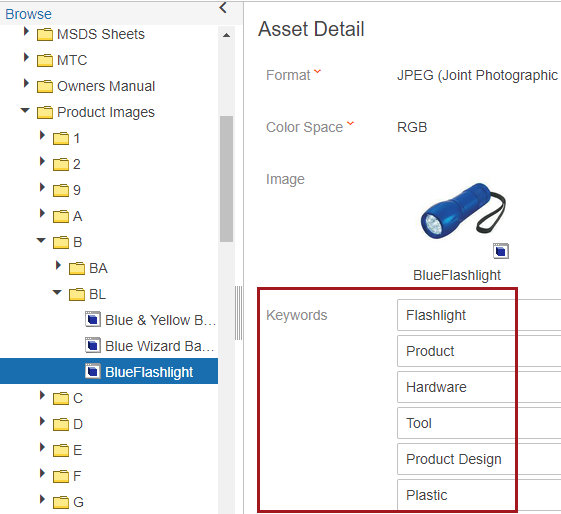
Additionally, the Asset Analyzer component helps users to:
- Enrich data-poor images by running images through an analytics algorithm to gather relevant metadata for each image, then assigning metadata values to that image based on the value’s certainty score
- Make newly enriched images more searchable
- Enhance matching and linking by using metadata on assets
Prerequisites for Using the Asset Analyzer
- Your STEP server must be able to communicate externally with the specified Google Cloud Vision API server
- A Google Cloud Vision API account and API key is required to use this functionality. For more information, contact your Stibo Systems representative. The following websites also provide instructions for enabling the Google Cloud Vision API: https://cloud.google.com/vision/docs/before-you-begin and https://cloud.google.com/vision/docs/auth.
- The executing user for Asset Analyzer business rules and bulk updates must have permissions to write values to the specified Keywords attribute
Topics Covered in This Guide
This guide / documentation section covers the following topics: