Dun & Bradstreet Matching
The Dun & Bradstreet (D&B) data integration allows for users to do a matching request on a customer record. The D&B Match Candidate Workflow allows users to keep track of the tasks, described below.
Prerequisites
Prior to starting the matching process, the setup for D&B integration must be complete. See the Dun & Bradstreet Integration topic here.
The D&B Integration Component Model is where you complete the setup and decide what data (i.e., attribute, object types, and reference types) you will use when performing a match. You are using values from your customer record to match against D&B records. If so desired, these attributes may be changed to calculated attributes based on other attributes in the organization entity. The Perform Match / Select Candidate tasks are described below.
D&B Match Candidate Workflow
Matching is initiated by initiation of the organization entity (as designated in the D&B Integration component model) in the D&B Match workflow. Initiation is done via standard methods, including upon entity creation or through manual initiation, or initiated by a variety of other actions or processes such as business rules, imports, and bulk updates.
Initiating customer records triggers an event that is then processed via an event processor. A business action tells the system to make a call to D&B and try to match the customer record data (determined during setup) to D&B records. A response is received and sent back to STEP to write into a D&B record or records. At this time, if multiple candidates are found and returned from D&B, then the customer record moves to the Select Candidate task. If only one match candidate is returned from D&B, then the customer record transitions through the D&B Match workflow seamlessly, with the D&B Organization reference being made at the end.
When multiple match candidates are returned, and a Select Candidate task needs to be completed, users evaluate the D&B records based on designated criteria to make a best-match choice, and select one of those candidate D&B records to reference. Until a selection is made, D&B Match Candidate references are made from the customer record to the possible D&B Record candidates. When the event processor picks up the event asynchronously, it uses a business action to call D&B and matches via an entity-to-entity reference. These references and non-match candidates are deleted once a match is selected, and the D&B record selected then becomes a reference of the customer record via an D&B Organization reference. The Select Candidate process is best done in Web UI and described below.
Important: The processes described above are performed asynchronously, creating a queue of actions. Users must allow time for each match request to process.
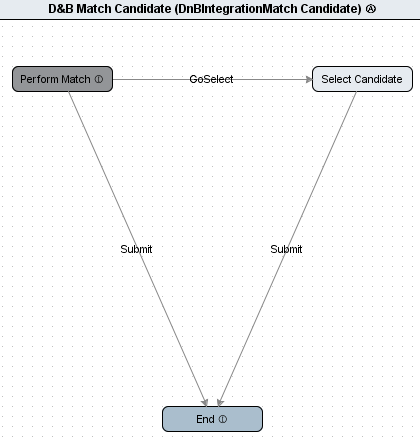
Perform Match
Matching can be done in the Web UI or in workbench. It does not matter where the initiation process begins.
A matching request is comprised of attributes mapped in the D&B Integration component model. As explained in the Dun & Bradstreet Integration topic (here), input for D&B Match requests is taken from a configurable set of attributes on the organization record. Those attribute values are part of the request sent to D&B, and each attribute has a match response returned from D&B. More details about configuring the component model can be found in that same topic. Each value has a description that describes what it is used for, and all but one attribute (the one mapped to D&B Company Profile DUNS Number) is used in the matching process.
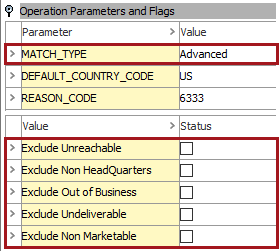
Also, the MATCH_TYPE parameter and exclusion values from System Setup > D&B > D&B Operations Configurations > D&B Match Candidate Operations is pulled into request to D&B.
- The MATCH_TYPE options are SBRI, Advanced, or Basic. When MatchTypeText is set as 'SBRI', this indicates that the match will be performed against the D&B Small Business repository. The difference between basic and advanced matching lies in the level of detail in explanation of why each candidate matches the customer.
- Five exclusions can be enabled. When enabled via workbench, these exclusion options are also honored (but configurable) when doing a 'Modify Search' action in Web UI.
Note: Matching candidates is based on the D&B Integration Matching Processor, found in the D&B folder that is created in the automatic setup. For information on maintaining event processors, see the Event Processor documentation here.
References and Match Candidates
When one match exists, no selection needs to be made and the D&B organization entity (D&B record) is automatically referenced by the organization entity (customer record). Again, initial setup is done via the D&B Organization Reference Type mapping in the component model.
When multiple match candidates are found, a D&B reference is made from the customer record (organization entity) to each candidate record (D&B record / D&B organization entity) based on the D&B Match Candidate Reference Type in the component model.


Select Candidate
For organization entities that have multiple match candidates, a single candidate must be selected. This is best done through the Web UI. Detailed information regarding how to configure and use Web UI for D&B purposes can be found in the Dun & Bradstreet Integration in Web UI topic in the Workflows in Web UI documentation here.
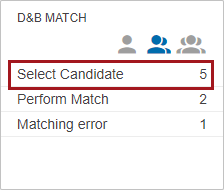
Users will make a selection based on the Task List that displays upon making a workflow task selection.
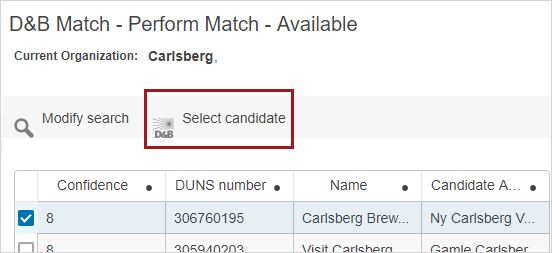
Now, the customer record and D&B record are linked via the D&B Organization Reference Type mapping in the component model.
It is important to note that if any matching errors occur during the process, a user must handle those tasks, accessible via the 'Matching error' state.