Monitoring an OIEP via Background Process
An active outbound integration endpoint uses an associated background process to handle the scheduled invocation of the endpoint. The execution report for this background process is integrated in the endpoint editor and includes invocation information as well as messages logged from the plugins. When using the standard STEP Exporter processing engine, the actual export is handled in separate background processes started by the endpoint, as illustrated below.
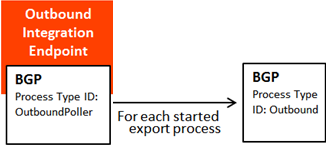
By default, the started integration endpoint background processes are displayed within the OIEP editor on the Background Processes tab, and are not visible on the BG Processes tab. Click the background process hyperlink to display details about the actual process. For more information, see Maintaining an Outbound Integration Endpoint here.
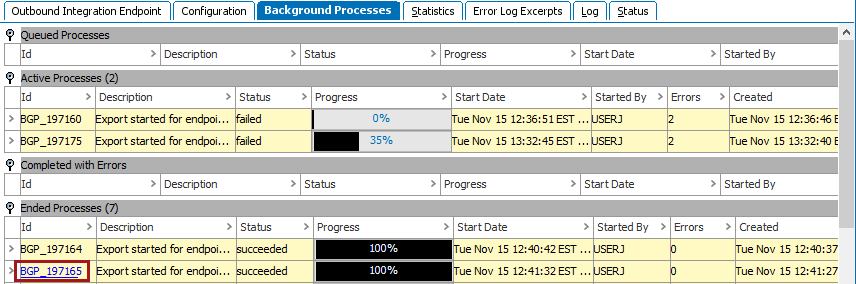
When configuring an outbound integration endpoint that uses the STEP Exporter processing engine, you will specify a background process queue to use for each of the two types of background processes:
- Queue for endpoint
- Queue for endpoint processes
Typically, all background processes of the same type (same process type ID) will use the same queue. However, integration endpoint processes can be tied to different integration endpoints and use different queues.
Selecting the Background Process Queue
The main background process uses the default OutboundQueue background process queue for OIEPs.
However, when you create an integration endpoint, you can specify that you want to use a different OIEP background process queue for the main OIEP background process queue. For more information about this setting, see the OIEP - Configuration Flipper documentation here.
Background Process Queue Size Property
The queue size setting can have great impact on processing. The background process queue size property determines the number of background processes can be executed in parallel on the queue. If the size is 1, only one background process can run at a time. If the size is 2, two processes can run in parallel, and so forth.
Important: Although the integration endpoint configuration wizards suggest the number of queues to use, beware that if you create multiple endpoints and do not change the default queue suggestions, your setup could include endpoints that block each other since the queues have a default size of 1.
This is not a big concern for the endpoint processes that, most of the time, are idle and only take up a slot on the queue briefly when the endpoint is invoked. However, it can be an issue for the generated background processes that perform the actual export processing. The decision as to whether different endpoints should use the same or different processing queues and the size of the queues should therefore be an informed one.
Overwriting default values for a queue causes a new queue to be created with the queue size of 1. Use the following sharedconfig.properties entry to modify the default queue size value:
BackgroundProcess.Queue.[name of queue].Size = [number of allowed parallel processes]