Attribute Values: Set Value Operation
Sets the value of the selected attribute based on a value entered manually or via a function.
For more information on the Bulk Update wizard, see the Creating a Bulk Update topic
This operation is similar to one in the business rules functionality, as described in the Business Action: Set Attribute Value topic in the Business Rules documentation here.
Configuration
- Select Set Value from the dropdown.
- For the first parameter, click the manual (
 ) button or the function (
 ) button and then click the ellipsis button (
 ).
).
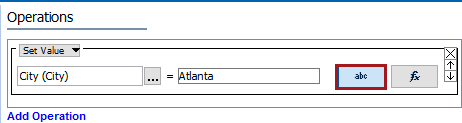
Note: The selected object dictates the label on the manual button. If the selected object requires a text value, the label is 'abc.' If the selected object is numeric, '123' is displayed, and so on for each validation base type.
- For manual selection, the Select Attribute dialog is displayed, select an attribute, and click Select.
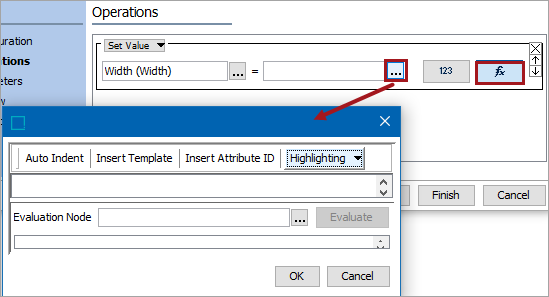
- For function selection, click the ellipsis button () displayed near the text field to display the Function Editor dialog. Add a function and evaluate, the click OK. See the Using Function Editor topic within the Resource Materials online help
- For the second parameter (=), click the manual () button or the function () button.
- For manual selection, type the value required for the selected attribute into the text field.
- For function selection, click the ellipsis button () displayed near the text field to display the Function Editor dialog. Add a function and evaluate, the click OK. See the Using Function Editor topic within the Resource Materials online help