The following standard root object types cannot be deleted: Assets, Classifications, Entities, Products. All new user defined object types must be defined below these.
New object types are created via the parent object type menu as shown in the steps below. As with all STEP objects, the new object types must be given an ID and a display name.
Create an Object Type
-
Go to System Setup > Expand Object Types & Structures > Select the relevant standard object type > Right-click the relevant standard object type > Click the New Object Type selection.
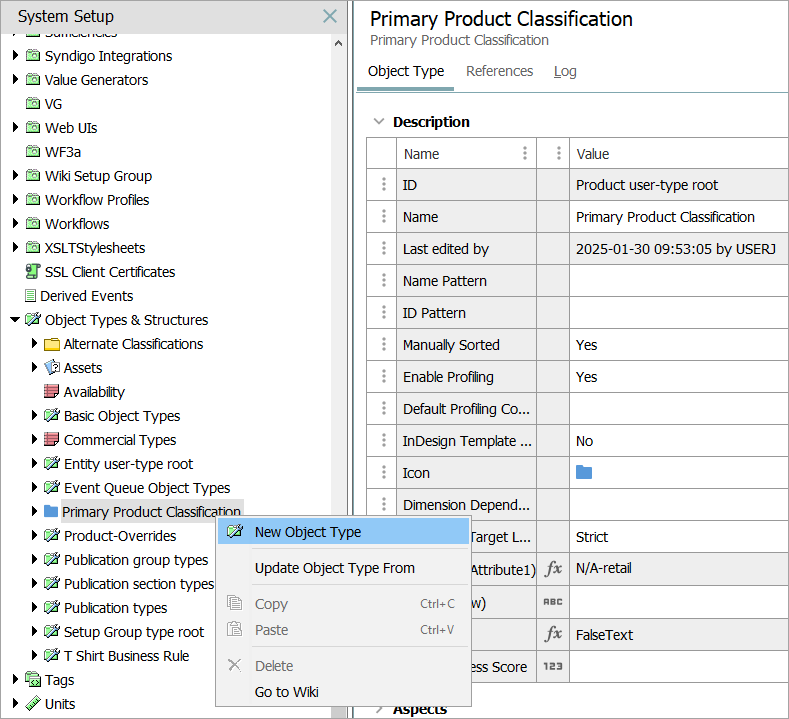
Note: Standard objects (provided automatically in STEP) can be easily identified in the workbench, because their ID will contain 'user-type root' (as shown in the example above).
-
The Create Object Type dialog will display.
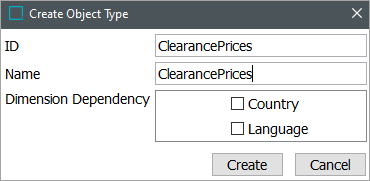
Note: If the Product root object type has an ID Pattern enabled, then the ID will display auto populated, and not editable. For more information refer to the topic Autogenerate Using Name Pattern and ID Pattern.
-
Enter an ID for the new object type. If ID and Name should be identical, press either the Enter or Tab keys to move the cursor to the Name parameter and automatically display the ID value. Otherwise, enter a name within the Name parameter.
Note: The following restrictions apply to the ID for all objects:
-
Maximum 40 characters.
-
Only the standard ASCII printable characters in the range of 32-126 are allowed.
-
-
If necessary, select one or more dimension dependencies. For more information, refer to the topic Maintaining Dimension Dependent Object Types.
-
Click the Create button, and the Object Type Editor will display with the newly created object type. The new object type will also be in the list of options when creating a new object of this type.
-
On the Object Type editor, References tab, use the Parents section to define which object types can hold the newly created object type. For more information, refer to the topic Object Type Hierarchy.
-
A desired hierarchy of objects can now be created using the new object type, and instantiating the objects in the Tree Tab. For more information, refer to the section Object Types and Structures.