In a traditional relational database model, with concepts such as tables, columns, and rows to form a normalized data model, STEP uses the concept of objects to achieve the same goal.
In a STEP system, all entered items are modeled as objects with properties; the properties being metadata like IDs, attributes with values, and references / links to other objects.
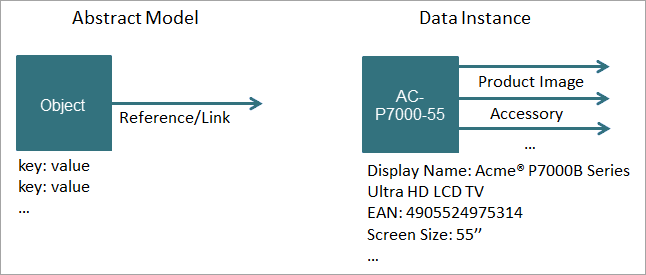
Object Types allow a user to define the type of system or product data that can be stored in a node. Grouping items with similar characteristics in a node enables a user to identify a required item more easily. This object model is used throughout STEP and applies to objects themselves, configurations, attribute definitions, and reference type definitions.
Object Type Facts in STEP
- All objects in a STEP system are instances of an 'Object Type' that constrains the behavior of the instances. For example, via the object type, a user decides which attributes and references should be legal for the instantiated objects.
- STEP comes with a number of predefined, but still is to some degree configurable, object types for modeling configuration objects like attributes. However, it is up to the system designer to determine data modeling, to define the required object types, and apply the desired behavior.
- The user defined object types that are listed below, are super types / node types used for modeling data.
|
Super Type / Node Type |
Explanation |
User-Defined Object Type Example |
Instance Example |
|---|---|---|---|
|
Products |
Super type for modeling product data |
|
AC-P70900-55 HD TV |
|
Entities |
Super type for modeling non-product data |
|
|
|
Assets |
Super type for modeling digital data |
|
AC-P7000-ee User Manual |
|
Classification |
Super type for modeling product and asset classification hierarchies |
|
Televisions |
|
Super type for modeling hierarchies and objects used for print publishing solutions. |
|
Winter Sale Catalog |
Object Type Location in STEP
Object Types are maintained on the System Setup tab under the Object Types & Structures node.
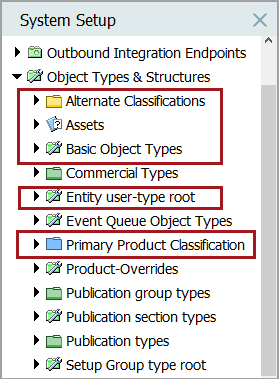
There are two kinds of object types:
|
Object Type kind |
Description |
|---|---|
|
Basic Object Type / System Setup Object Type |
A Basic Object Type is applied to nodes that are used for structuring the system data. There are many Basic Object Types including:
When an object of any basic object type is created, the relevant object type is automatically applied. New basic object types cannot be created. For the complete list of basic object types and more information, refer to the section Basic Object Types. |
|
Non-Basic Object Type / Tree Object Type |
A non-basic object type applies to nodes that are used for structuring the product data hierarchies including:
When creating an object of these types you must manually apply the relevant object type. For more information, refer to the section Object Types. |