In the SSUI, the 'STEP IP access control list' tab enables users to maintain the Internet Protocols (IP) and IP ranges that are permitted to access a given STEP environment. A Classless Inter-Domain Routing (CIDR) notation and a mask must be used to input a new IP or IP range.
For more information about constructing the appropriate CIDR value, review the tools available at https://www.ipaddressguide.com/cidr. An optional description can be supplied for each access control list (ACL) entry to help establish clarity regarding where an IP range originates; as this can affect which IPs are selected, any changes made on this tab may require up to 10 minutes to take effect.
The 'STEP IP access control list' tab gives access to 'Environment access control list' and 'Excluded Web UIs'.
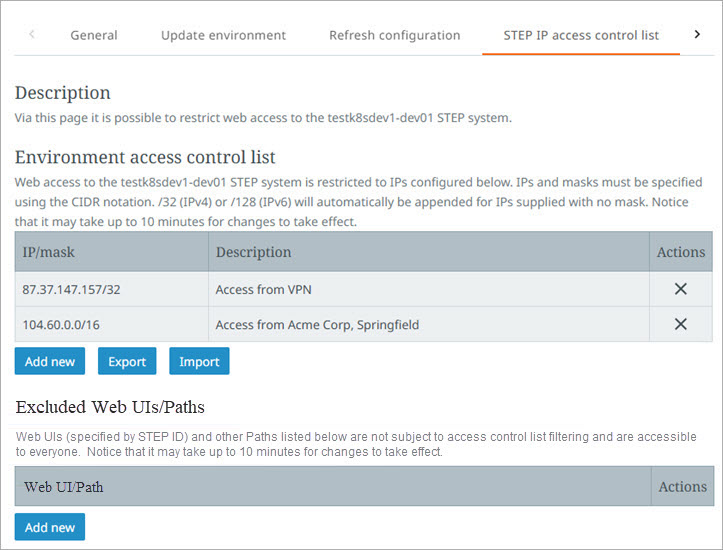
Environment Access Control List
Manage and maintain which IPs and IP ranges have access to the STEP environment in the 'Environment access control list'. Private IP addresses are not allowed.
-
To remove an entry, click the delete button (
 ) button in the Actions column.
 -
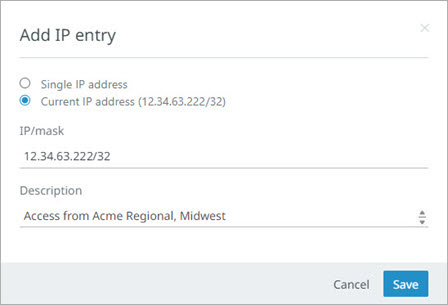
Add new - Add a single IP that can access the selected STEP environment. Click the 'Add new' button to display the 'Add IP entry' dialog.
-
'Single IP address' – allows manual entry of an 'IP/mask' and description.
In the 'IP/mask' field, enter the desired IP and mask using CIDR notation. If an IP is provided without a mask, the system automatically appends '/32' to the IP, which means only the IP submitted in this field will be allowed. Check with your networking team for the full list of IP ranges for your network.
-
'Current IP address' – automatically fills the 'IP/mask' field for the current IP. Duplicate entries are not allowed.
-
'Description' field – add instructive text about the IP or IP ranges. For example, information about where the IPs originate. Click the 'Save' button to update the list.
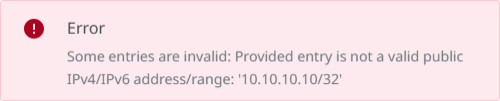
The following error displays when an invalid public IP address or a private IP address is used:
-
-
Export – Entries in the table are output as JSON, for example:
[
    {
        "ip": "87.37.147.157/32",
        "description": "Access from VPN"
    },
    {
        "ip": "104.60.0.0/16",
        "description": "Access from Acme Corp, Springfield"
    }
 ]
For the downloaded file, choose to open the file or save it.
-
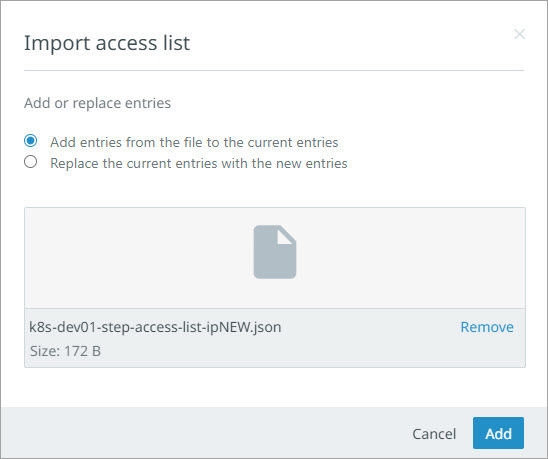
Import – Upload a JSON file that includes IP/mask and optional description text as shown in the previous Export example.
On the 'Import access list' dialog, choose to add entries to the current list or replace the current entries. Select the JSON file by drag-and-drop or click to display a file selection window and click Add.
Invalid entries are not allowed, are reported as errors on the 'Import access list' dialog and must be removed from the file before the import can succeed. Duplicate IP/mask entries update the description text column.
Excluded Web UIs
If a Web UI or API path is listed as excluded, it is available to external users. If it is not listed, it is restricted to internal users only. This ensures that sensitive or internal resources are protected and only accessible by internal users. This option is beneficial when external users need access to a specific Web UI or an API path without needing access to other STEP endpoints.
-
To remove an entry, click the delete button (
) button in the Actions column. -
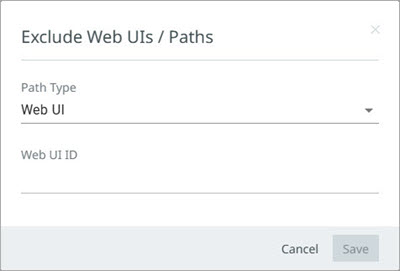
To add a Web UI or an API path to this list, click the 'Add new' button.
On the 'Exclude Web UIs / Paths' dialog, select the Path Type (Web UI, GraphQL API, REST API V1, REST API V2, SOAP WS, SOAP Matching WS) and the Web UI ID if required. Click the 'Save' button.
Important: An environment can be configured to be publicly accessible by adding IP/mask 0.0.0.0/0. Be aware that public access comes with additional risk and instead it is recommended to use this for specific Web UIs only.
Note: All outbound connections from STEP environments are using an external gateway. When IP access control on incoming connections (for example coming from a STEP outbound integration) is required, the following IP addresses should be whitelisted. The list of IP addresses depends on the region in which the STEP environments are hosted:
-
Asia – 52.185.164.176/28, 20.210.210.128/28
-
Asia Pacific – 4.197.13.128/28, 52.147.6.112/28
-
Europe (Amsterdam) – 20.16.79.192/28, 172.201.144.240/28, 172.201.146.128/28, 20.16.222.240/28
-
Europe (Frankfurt) – 4.184.71.96/28, 51.116.115.16/28
-
United States (Virginia) – 20.51.159.48/28, 20.51.153.48/28, 20.51.159.112/28, 20.42.42.176/28
-
United States (Iowa) – 40.67.183.208/28, 52.165.211.112/28
All IP addresses within the CIDR ranges for the region should be whitelisted, including the first and last address (as those are not reserved for the network identifier or broadcast address). The region on which your STEP environments are hosted is available on the Calendar page in the 'Planned maintenance - Email notifications' section.