A competitor number refers to the part number used by a competitor. Whereas an OE number refers to the original parts used by the original equipment manufacturer to assemble a vehicle at the factory. This number is only unique within parts from that manufacturer. For example, an OE number should always be displayed with the OEM (Original Equipment Manufacturer) name behind the number. This means that ABC123 AUDI will usually not be the same part as ABC123 BMW. But on the other hand, they could be the same part if both manufacturers acquired their part from the same supplier.
With the automotive solution, it is easy to maintain data related to both the competitor part number and OE number. The automotive solution not only helps users more easily view, edit, and create competitor and/or OE part number references for specific parts, but also suggest potential matches. In other words, when configured, STEP can suggest potential matches for competitor and/or OE part numbers based on existing competitor and/or OE part number references and/or matching part numbers within STEP. This occurs when a part is selected, STEP looks at the configured Reference Types and displays their targets, attribute values, and/or metadata via configurations within the 'Part Number References' Node Editor component.
When the Part Number References and/or Part Number Suggestions components are configured as shown below, Web UI users can:
- View existing competitor and/or OE part number references and related data.
- View competitor and/or OE part number reference suggestions and related data.
- View information about the suggested part number.
- Add competitor and/or OE part number references manually.
- Add competitor and/or OE part number references from suggestions.
- Remove existing competitor and/or OE part number references.
- Remove competitor and/or OE part number references from suggestions.
Note: The components used for this solution are extremely flexible and can be configured to display both the competitor and OE numbers on the same screen. Also, additional column headers can be added to the components to display more information than is shown in this example.
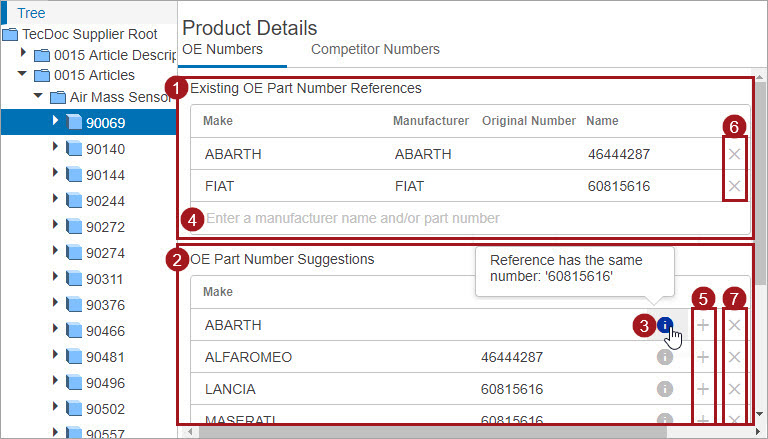
In the example above, part 90069 is selected within a Web UI Tree, and a Web UI screen (Product Details) is configured to display the competitor and OE numbers on separate tabs (OE Numbers, Competitor Numbers). Though only the content for the 'OE Numbers' tab is displayed below, the layout and features on both tabs are the same.
This section addresses:
- Prerequisites
- Adding Part Number References Manually
- Adding Part Number References from Suggestions
- Removing Existing Part Number References
- Removing Part Number Reference Suggestions
- Creating and Referencing New Competitor and OE Part Numbers
- Configuring the Part Number References Component
- Configuring the Part Number Suggestions Component
-
Configuring the Data Model for Application Competitor or OE Part Numbers Table Header
-
Configuring the Application Competitor or OE Part Numbers Table Header Component
- Configuring the Metadata Attribute References Component
Prerequisites
When implementing this solution, it is suggested to create a 'Product Details' screen within a Web UI and configure it to display when a product is selected within the Tree navigator. The Product Details screen should be created via a Node Details screen with a Tab Control that is configured to display a 'Competitor Numbers' and an 'OE Numbers' Tab Page. Within each of these Tab Pages a Node Editor can be configured with 'Part Number References' and/or 'Part Number Suggestions' components. The 'Part Number References' component can be configured to display competitor and/or OE number data. Whereas, the 'Part Number Suggestions' component can be configured to display suggested competitor and/or OE part numbers.
For more details on configuring screen mappings so that a 'Product Details' screen will display when a product is selected within the Tree navigator, refer to the Mappings topic within Web User Interfaces documentation.