Oracle Advanced Queuing (Oracle AQ) enables messages to be exchanged between two systems.
Prerequisites
Note: The following functionality is managed by configuration properties that are not available in the Self-Service UI. Contact Stibo Systems Support for assistance.
-
Prior to configuration, clicking the Connection URL dropdown parameter displays the required property name. Provide a selection for the dropdown parameter using the OracleAQReceiverConnectionURL configuration property. For example, two URLs are displayed with the following property setting:
OracleAQReceiverConnectionURL=1=ConnectionURL1,2=ConnectionURL2
-
Prior to configuration, clicking the Queue Name dropdown parameter displays the required property name. Provide a selection for the dropdown parameter using the OracleAQReceiverQueueName configuration property. For example, a single URL is displayed with the following property setting:
OracleAQReceiverQueueName=1=QueueName
Configuration
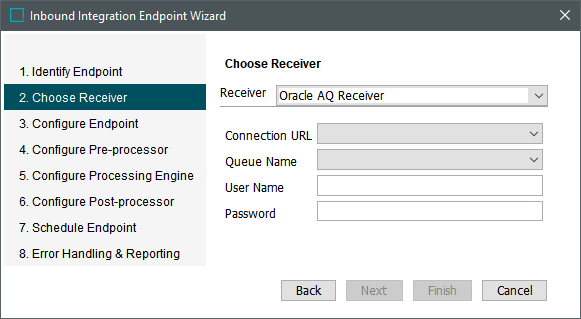
After completing the prerequisite steps, edit the receiver of the IIEP. Use the following parameters to configure the IIEP. For information on a parameter, hover over the parameter field to display help text.
-
For Receiver, choose Oracle AQ Receiver.
-
For Connection URL, select a URL pointing to Oracle AQ.
-
For Queue name, select an Oracle AQ queue name.
-
For User Name, enter a user name to be used to log on Oracle.
-
For Password, enter a password to be used to log on Oracle.
-
Click the Next button to continue with the IIEP - Configure Endpoint and subsequent steps.