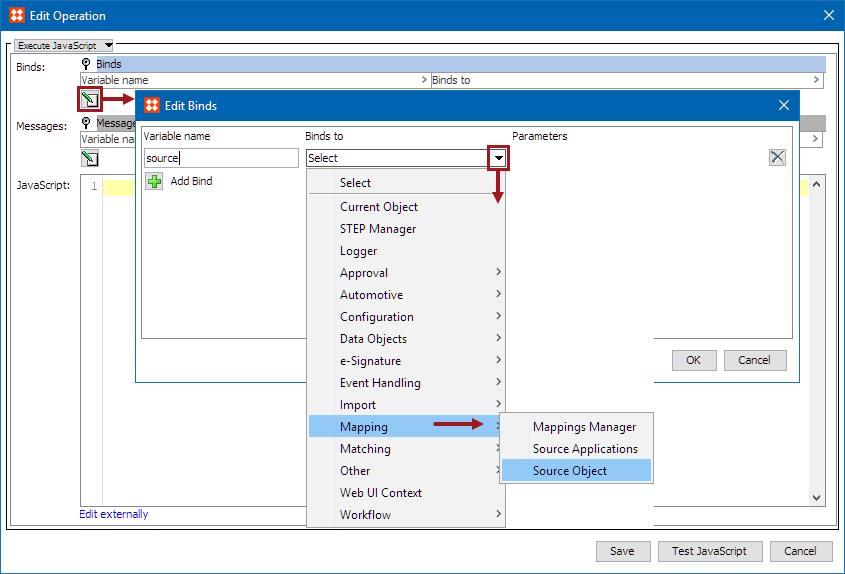
The Source Object bind gives access to the STEP object (Source object) that the business rule is being evaluated (via condition) or executed (via action) against. The bind can be found within the 'Binds to' dropdown, as shown below.
This bind is intended for use with the PMDM for Automotive solution.
Configuration
To use any bind:
Example
The following is an example JavaScript that uses this bind.
Important: The example scripts should not be used as-is without thorough testing, including updating the script to match object and link types that exist on your system. Javascript variable names are case-sensitive.
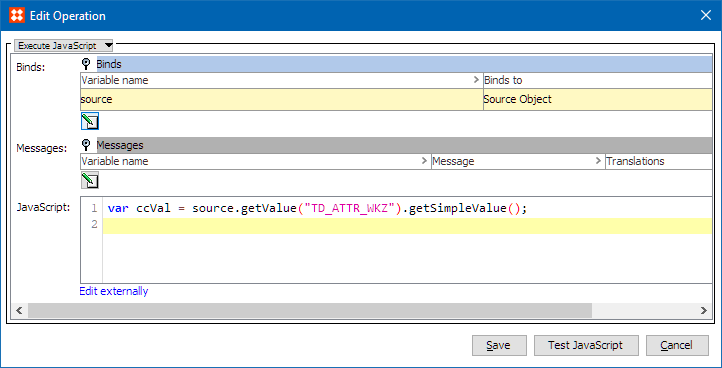
This sample code above expects a bind to the 'source' variable, gets the value of the 'TD_ATTR_WKZ' attribute on the source object, and stores it in the variable 'ccVal'.
Business Action Example
The following business action sample contains a bind to Source Object with the variable 'source', a bind to Current Object with the variable 'target', a bind of Logger to the variable 'log', and a bind of Attribute to the variable 'CurrencyCode' (for attribute 'TD_ATTR_WKZ'). The output could be achieved as:
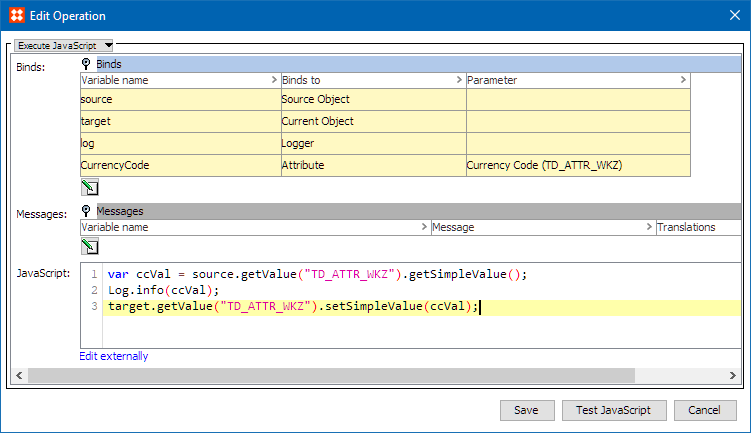
This action retrieves the value of the attribute 'TD_ATTR_WKZ' from the source object and sets the attribute value in the attribute 'TD_ATTR_WKZ' of the target object.
2020, Stibo Systems – Confidential