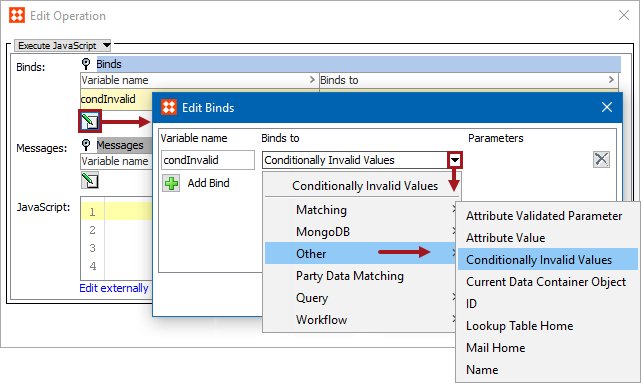
Business rules can use any of the following 'Other' binds to access a variety of objects:
The binds can be found within the 'Binds to' dropdown, as shown below.
Each bind is defined in the sections below.
Configuration
To use any bind:
Important: The example scripts should not be used as-is without thorough testing, including updating the script to match object and link types that exist on your system.
For more information, see the Parameterized Business Actions in Web UI section of the Web UI Getting Started documentation
The value of the selected attribute is bound directly as a String variable. Primarily used for Web UI live validation of conditions and when defining Match Codes.
Note: This variable also works in the Web UI.
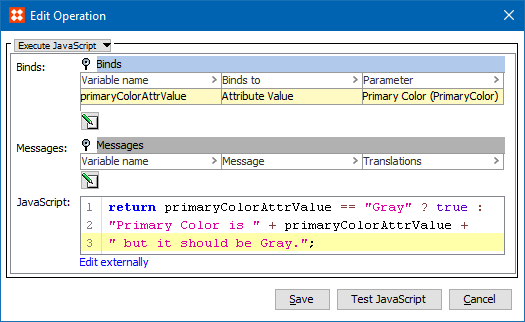
In this example, the Variable Name is 'primaryColorAttrValue', the Binds to field is Attribute Value, and the Parameters field displays the Primary Color attribute.
return primaryColorAttrValue == "Gray" ? true : "Primary Color is " + primaryColorAttrValue + " but it should be Gray.";
This bind is used with Conditional Attributes. For more information, see the Business Rules with Conditional Attributes documentation here.
For information about creating conditional attributes, see the Conditional Attribute Display section of the System Setup / Super User Guide here.
This bind is used in the 'Update Data Containers' Bulk Update operation, in the related JavaScript business conditions and actions. The selected data container is bound to the variable. For more information, see the Data Containers section of the System Setup / Super User Guide documentation here.
Condition
This JavaScript business condition is used to find entities with Data Containers that have an attribute 'City' with the value 'New York'.
var cityname = dc.getValue("City").getSimpleValue();
var fixedname = "New York";
    if (cityname == fixedname) {
        return true;
}
Action
This JavaScript business action is then used to manipulate specified attributes on the Data Containers found.
dc.getValue("Street").setSimpleValue("(" + dc.getValue("Street").getSimpleValue() + ")");
This bind resolves to the ID of current object (Java String).
The following code checks if the ID is not ‘Product hierarchy root’ then sets the ID to attribute NODEID.
//node = bind to current node
if (!id.equals(“Product hierarchy root”)) { node.getValue("NODEID").setSimpleValue(id);}
When bound to a variable, the variable will hold an object that allows you to work with transformation lookup tables from the script. The interface has a single public method that returns a String containing either the lookup value or the original value if no match could be made:
getLookupTableValue(String assetID, String value)
For more information, see the Using JavaScript with Lookup Tables topic
This bind allows the JavaScript to send emails. The bound class is the API Mail Home object.
Binds to the MailHome domain interface available for actions and conditions (although typically used with actions). After mail server settings are configured on STEP, this bind allows sending of emails that support full HTML.
In this example, 'Mail Home' is bound to the variable 'mailHome'.
mailHome.mail()
.from("Address of Sender").addTo("Address of Recipient", "Common Name").htmlMessage("Full HTML message:).subject("Subject of Email").send();
This bind resolves to the name of current object (Java String or null if no name).
In this example, 'Name' is bound to the variable 'name'. The code checks if there is a name.
//node = bind to current node
if (name) { node.getValue("NODENAME").setSimpleValue(name);}
2019, Stibo Systems – Confidential