Open topic with navigation
Data Containers
This documentation provides guidance on how to represent and structure complex entity or product data within STEP through the use of composite attribute objects, called data containers. This topic provides an overview of complex data modeling as well as basic information regarding data container functionality available within workbench and Web UI.
Composite Attribute Concept
A data container type allows modeling complex data with a single record that comprises many different pieces of information. Composite attribute objects have many benefits, including simplified revision handling, a collective process to save and approve data, and easier management of composite attribute data in workflows.
For example, a composite attribute object for a customer record could use entity data containers for addresses (e.g., main / physical, shipping), contact names, contact information, email addresses, phone numbers, etc., with relevant attributes and references. The customer record acts as a 'composite attribute,' which is a data structure that is composed of other data structures that need to be viewed and treated as a whole. While this type of complex data can be modeled using references, it provides challenges with various STEP actions and processes. The following image shows an entity data container that allows multiple instances (the 'Allow multiple data containers' parameter is set to 'Yes'), so the individual data container attributes / references are displayed as columns.

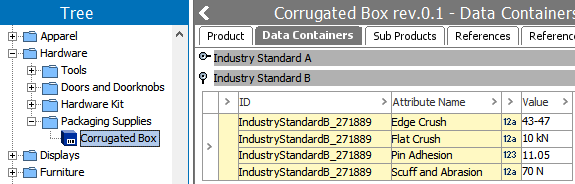
Another example is a composite attribute object that captures data for multiple tests on a single product. Each data container holds values for a single industry standard test (e.g., tensile strength, specific gravity, water absorption). All tests must pass before the product can be approved. Data containers allow a value to indicate pass / fail for each test to be recorded, and workflows / business rules can be used to verify that the product is not approved until all tests pass. The following image shows a product data container that does not allow multiple instances (The 'Allow multiple data containers' parameter is set to No.), so the individual data container attributes are displayed as rows.
Using Data Containers
Once basic setup is complete, users can begin working with data containers and their associated attributes and references. Data container modeling is intended to ensure that all create, read, update, and delete operations can succeed or fail as a whole since the operations are being performed on an object holding the data container.
The following rules apply to data containers:
- Data Container Type is a Basic Object Type found under System Setup > Basic Object Types.
- New Data Container Types are created in workbench within System Setup > Attribute Groups and are distinguished via the
 icon. One data container can reside in multiple attribute groups.
- Data container types can only contain description attributes and references, and these attributes / references can be used in multiple data container types.
- Data container types have four tabs when viewed in workbench: Data Container Type, References, Validity, and Log.
- Once the data container type validity is set in System Setup, selecting a valid object from the Tree displays a Data Containers tab in the editor. Data containers configured in workbench are then available for configuration in the Web UI designer, allowing users to add, edit, delete, or just view data container values in Web UI.
Support for Data Containers
- Data container setups are transferable through change packages.
- Attribute values in data containers are searchable, and the entities or products are returned as results. The workbench Search tab, the Web UI Advanced Search functionality, and the Query API include a Data Containers search criteria. The workbench Search and Web UI simple search allows for searching via attribute values in Data Containers.
- Matching can be done for objects that use data containers via the survivorship rules for data containers ('Data Container: Trusted Source' and 'Data Container: Most Recent').
- Data containers are supported in calculated functions.
- Event handling is supported for data containers.
- The API supports access to data containers in JavaScript business rules.
- Data Containers are supported in the Address Component Model, as well the Loqate, CASS, and Trillium integrations used for address standardization.
- Completeness statistics take into account the attributes in the data containers.
- Revisions made to data containers are created on the applicable entity or product object, including creating, deleting, and editing attributes / references.
- Data containers can be maintained in Web UI by using one of the Data Container components.
Considerations and Limitations
Review the following items while working with data containers:
- Data containers can be made valid for either entities or products, and can only include description attributes and references.
- Product and entity data containers can be imported and exported using STEPXML, Advanced STEPXML, CSV, and Excel.
- Only product data containers allow inheritance, restriction to specified hierarchy structures, and the ability to made the data container mandatory.
- An entity or product can only contain 1000 data container records.
- Data containers cannot be externally maintained.
- Data containers are not dimension dependent; however, the individual attributes in data containers do support dimension dependencies.
- Data containers are not supported for product overrides.
- Data containers cannot be translated via the standard translation tools.
- Data containers cannot be initiated into workflows; they follow the workflow of their owning objects.
- Data containers are not supported in REST / SOAP calls (web services).
- Importing a product data container completely replaces the data container records, instead of making updates.
- Data containers are not supported for print output.
- Some business actions cannot run on data inside a data container. In general, when mapping to an attribute, it must be read directly from the node it runs on, not from the data container on the node.
- Data container sort order cannot changed for viewing in Workbench. It is, however, possible to change the sorting order that is displayed in Web UI by changing the data container to manually sort the attributes in Workbench. For more information, see the Additional Web UI Functionality section of Data Containers in Web UI topic in this documentation here.
- Keys are not allowed for data containers.
- There is no support for searching for inherited data containers and attributes.
For information on using data containers in workbench, see the Adding and Maintaining Data Container Instances topic in this guide here.
For information on configuring data containers and using data containers in Web UI, see the following topics:
- Setting up Data Container Types in Workbench
here
- Data Containers in Web UI
here
in the Web User Interfaces documentation
Additional information can be found in the relevant STEP documentation for a particular functionality (i.e., Data Exchange, Navigation and Searches / Advanced Search (Web UI), Data Profiling, and more). In online help, search for 'Data Container' to review the available topics.
2019, Stibo Systems – Confidential