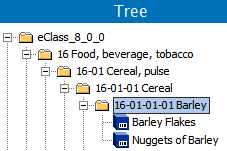
eCl@ss® is a hierarchical classification and product description system for grouping materials, products, and services. This includes a logical structure with a level of detail that corresponds to product-specific attributes. These classifications and standardized attributes are an international standard and can be used for reliable information exchange between suppliers and their customers. For detailed information about eCl@ss, search the web.
eCl@ss is an add-on component. Contact your Stibo Systems representative to activate ‘eclassimporter’ on your STEP system.
With eCl@ss you can import the Basic CSV and XML formats for any language using versions 7.0, 7.1, 8.0, 8.1, 9.0, and 9.1 and 10.0.1. For more information on the eCl@ss license, contact your Stibo Systems account manager.
In STEP, eCl@ss classifications are linked to objects (materials, products, and/or services) via a 'product-to-classification link type' reference type. This displays objects within the eCl@ss folder as shown in the image below.
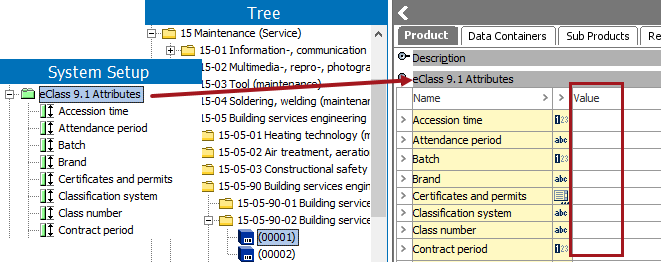
When a product is linked to an eCl@ss classification, via a product-to-classification link type with 'Inheritance of Specification Attributes / Data Container Types' set to 'Yes,' the eCl@ss attribute links are inherited from the classification to the linked products, and the attributes are displayed and maintained on the product tab under a flipper that indicates the version. For more information on link inheritance, see the Inheritance Example for a Product to Classification Link Type topic in the System Setup / Super User Guide documentation here.
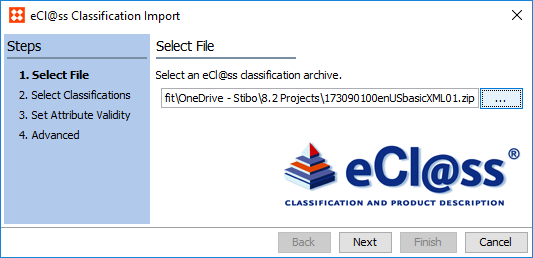
eCl@ss import format is available for selection only in the eCl@ss Classification Import wizard. For details, see eCl@ss Classification Import here.
When using eCl@ss attributes that have been created by an eCl@ss CSV import file, there is no need to recreate attributes already in STEP to gain the benefits of using standard eCl@ss attributes. After importing an eCl@ss classification hierarchy from CSV, you can map each eCl@ss attribute to a STEP attribute to merge the attributes and delete the eCl@ss attribute. Mapping functionality is not available with eCl@ss XML imports. For details, see Map eCl@ss Attributes to STEP Attributes here.
Important: Typically, industry standard attributes should not be altered, so limiting access to edit eCl@ss attributes via user privileges is recommended.
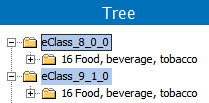
The eCl@ss classification data is delivered in a .ZIP file, where the file name indicates the version. The import wizard uses a background process to create attributes (if necessary), and classification folders that include the version number. This allows you to access multiple versions of eCl@ss within the same system.
Update objects to a newer classification version
If you want to update existing objects to a newer eCl@ss classification version, you can re-classify them using the Bulk Update operation 'Industry Classification Synchronization.' For more information, see the References and Links: Industry Classification Synchronization Operation topic of the Bulk Update documentation here.
Version-specific classification object types
To create a version-specific object type structure, select 'Version specific object types' on the Advanced step of the eCl@ss Classification Importer.
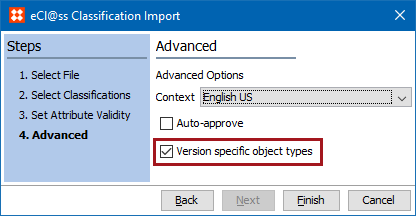
Selecting this option during import will automatically create a new version-specific object type structure for eCl@ss classifications if one does not already exist for that version.
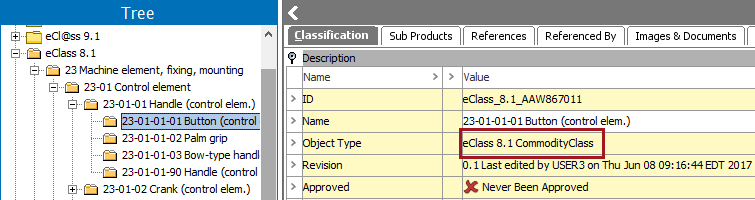
For more information, see the eCl@ss Classification Importer section of the documentation here.
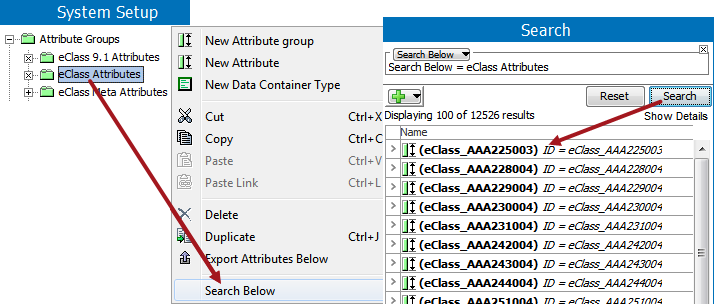
Depending on the number of classifications imported, System Setup may not allow browsing through the attributes created. However, you can view a portion of them, or find a particular one, using the right-click 'Search Below' functionality.
Any units or LOVs created upon import of an eCl@ss XML file will also be stored in their own unit / LOV groups labeled 'eCl@ss', with the version specified as a metadata attribute on the object.
Important: Units and LOVs can only be imported via eCl@ss XML files, not CSV.
Running the eCl@ss Classification Import wizard creates three attribute groups (if they do not already exist):
eCl@ss Classification Import
2019, Stibo Systems – Confidential