The Fold Table transformation enables you to split a table into two or more equal table columns. The transformation breaks the table so that the content flows from one column to the next. This is useful if you have a very tall table and would like to convert it to a shorter, more horizontally defined table.
Important: Rows in the table align over the folded table and space in between rows is divided evenly. If the number of rows does not divide fully with the number of folds, empty rows are added at the end of the last fold. This means that if there is an uneven number of rows, Fold 2 will have one less row than Fold 1.
The instructions in this topic assume that you have already added the transformation to your table by following the instructions in the Add a Transformation to a Table or Table Type subsection of the Table Transformations topic here.
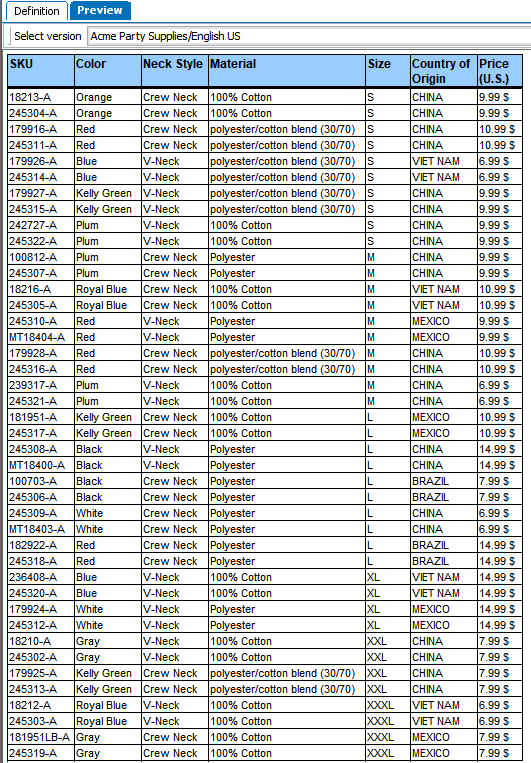
Before
Before the Fold transformation is applied, the table is very tall and vertically oriented.
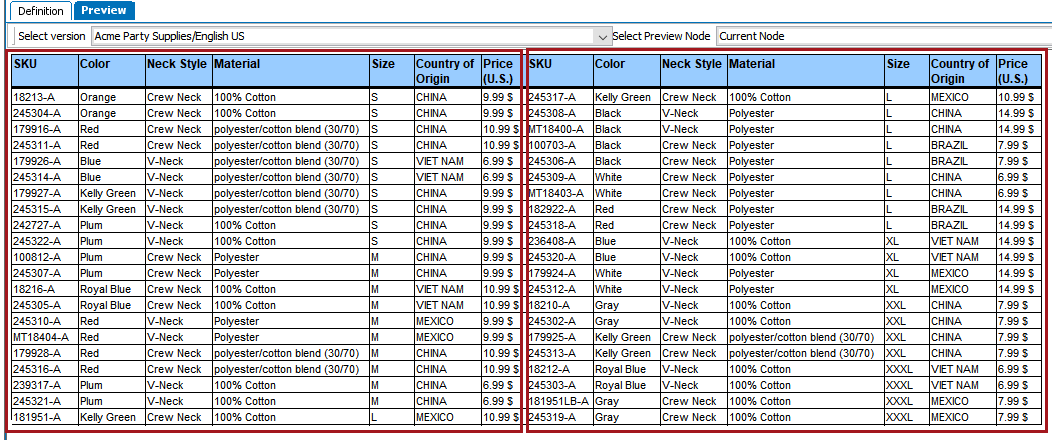
After
After the Fold transformation is applied, the table is horizontally oriented, with two folds.
 ). The Fold Table dialog displays.
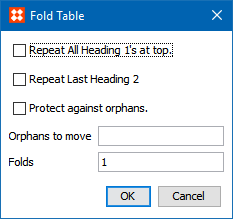
Check 'Protect against orphans' to move any orphaned rows, and in the 'Orphans to move' field, enter the number of orphans that should be moved.
2018, Stibo Systems – Confidential