Open topic with navigation
Business Action: Send Republish Event
This action sends a 'republish' event to an event queue. This allows events to be generated on demand.
For example, events are required for an external system to initially publish an entire hierarchy. This can be achieved by running a business action with this operation on the hierarchy. The generated events are sent to the specified queue.
Prerequisites
Before using this action:
- Ensure the event queue is enabled and set to Read Event.
- Create a business rule as defined in the Creating a Business Rule or Library topic here.
Configuration
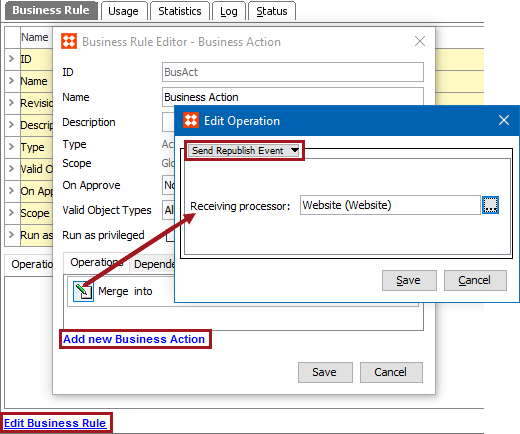
- On the Edit Operation dialog, select the Send Republish Event option from the dropdown.
- For the Receiving Processor parameter, click the ellipsis button (…) to display the Select Processor for Events dialog, choose an OIEP or Event Processor that has an event queue, or choose an actual event queue object. Click the Select button.
- Click the Save button to add the operation to the business rule editor.
2018, Stibo Systems