Open topic with navigation
Business Action: Remove Reference
This action removes a reference to a specific target or all references of a specific type.
For example, the ‘free_objects’ reference type is used to indicate a seasonal sales offer items. When the sale period has ended, removal of all ‘free_objects’ references must be removed. This can be achieved by creating a collection of all nodes that include the reference, and then running a bulk update with the Remove Reference business action.
Prerequisites
Before using this action:
- Create a business rule as defined in the Creating a Business Rule or Library topic here.
Configuration
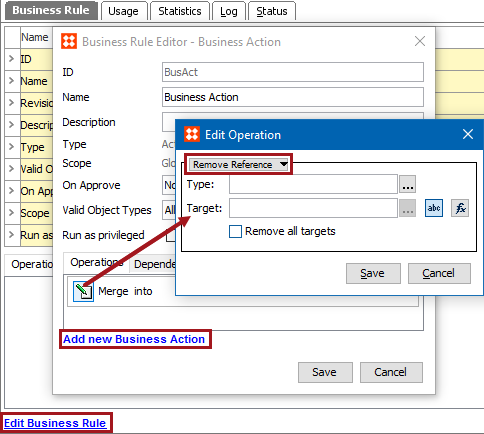
- On the Edit Operation dialog, select the References and Links > Remove Reference option from the dropdown.
- For the Type parameter, click the ellipsis button (…) to display the Select Reference Type dialog, choose the reference type that should be removed and click the Select button.
- For the Target parameter, use one of these methods to select the relevant target. Leave this parameter blank to remove all references of a specific type without limiting removal to a node. The target must be in accordance with the selected type, otherwise an error is displayed.
- Click the 'abc' button (
 ), click the ellipsis button (…) to display the Select Reference Target picker, select a valid target, and click the Select button.
- Click the 'fx' button (
 ), click the ellipsis button (…) to display the Function Editor dialog, write a calculation to select a valid target, and click the Select button. For more information, see the Using Function Editor topic in the System Setup / Super User Guide documentation here.
- For the Remove all targets parameter, set the checkbox as follows:
- Checked with a blank Target parameter means all references of the specified type are removed from the objects on which the business rule runs.
- Unchecked means references of the specified type are removed from the object on which the business rule runs.
- Click the Save button to add the operation to the business rule editor.
2018, Stibo Systems