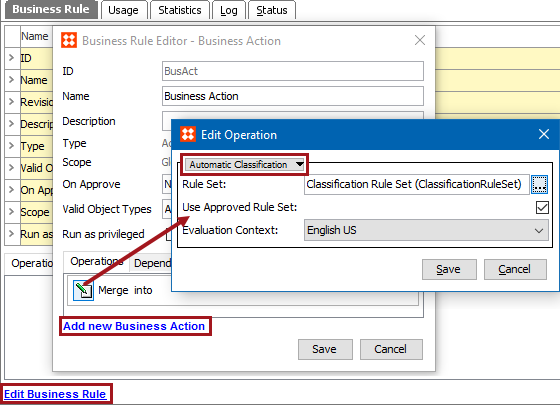
Business Action: Automatic Classification

This action can, upon approval, invoke a rule set on the object to create or maintain the reference, or move the object to a different hierarchy. the selected objects automatically according to a set of rules.

For example, upon import, executing this business action can automatically classify object in a website hierarchy or a classification hierarchy, based on a standard taxonomy like ETIM or UNSPSC. Additionally, when executing this business action, objects can be classified or reparented based on an attribute value.

For more information about automatic classification, see the Using Automatic Classification with Business Actions topic in the Automatic Classification documentation here.

Prerequisites

Before using this action:

  1. Ensure the Automatic Classification license is installed.
  2. Ensure a rule set configuration for automatic classification exists, as defined in the Initial Setup for Automatic Classification topic here.
  3. Create a business rule as defined in the Creating a Business Rule or Library topic here.

Configuration

  1. On the Edit Operation dialog, select References and Link > Automatic Classification option from the dropdown.
  1. For Rule Set, click the ellipsis button (…), and select the rule set to be executed.
  2. For Use Approved Rule Set, check the checkbox to use the approved version of the rule set.
  3. For Evaluation Context, select the context where the action should occur.
  4. Click the Save button to add the operation to the business rule editor.

2018, Stibo Systems