Open topic with navigation
Business Action: Add Reference
This action can create a reference / link to an object with a specific target and a type. This allows you to add an entry on the References tab of the editor for the selected object.
For example, a business action can be used to reference the object to another object automatically, based on specified type and target. Additionally, it can automatically link the products to particular classification on import by adding an Add Reference business action to Import Manager.
Prerequisites
Before using this action:
- Ensure a valid reference type with the necessary target object exists, and that the target object is valid for the source object. For more information, see the Reference and Link Types topic in the System Setup / Super User Guide documentation here.
- Create a business rule as defined in the Creating a Business Rule or Library topic here.
Configuration
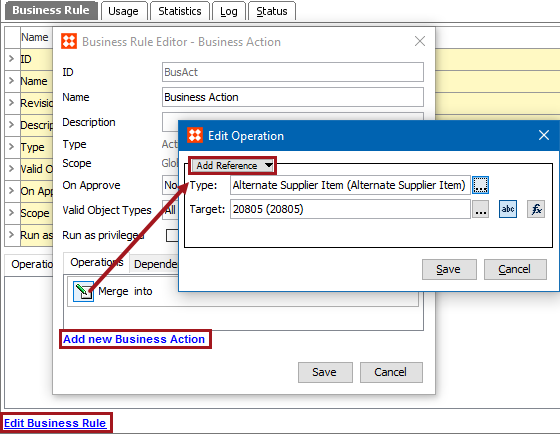
- On the Edit Operation dialog, select the References and Links > Add Reference option from the dropdown.
- In the Type parameter, click the ellipsis button (…) to display the Select Reference Type dialog, select a reference type, and click the Select button.
- In the Target parameter, use one of these methods to select the relevant target. The target must be in accordance with the selected type, otherwise an error is displayed.
- Click the 'abc' button (
 ), click the ellipsis button (…) to display the Select Reference Target dialog, select a valid target, and click the Select button.
- Click the 'fx' button (
 ), click the ellipsis button (…) to display the Function Editor dialog, write a calculation to select a valid target, and click the Select button. For more information, see the Using Function Editor topic in the System Setup / Super User Guide documentation here.
- Click the Save button to add the operation to the business rule editor.
Configuration Notes
- Attempting to add a target which already exists on the object causes the action to fail with the message 'Reference already exists :< reference type>'
- When the calculated function cannot return the specific Target Type ID, the 'Could not get the reference target.' is returned.
2018, Stibo Systems