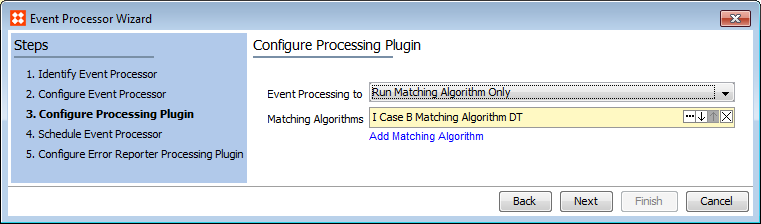
Matching allows for the generation / updating of match code values, as well as the option to run matching algorithms, whenever an event is processed on the objects acted on by the algorithm. Note that
The Parameters and Event Triggers sections below contain important information on settings that should be considered when creating an event processor for matching.
This section of documentation describes configuration steps for a specific processor that is only one part of configuring an event processor. For instructions on configuring an event processor see the Event Processors documentation here.
The configuration requires selection of a matching algorithm, and that match codes are only updated for objects acted on by the algorithm and only when events are passed for those objects. For details about match codes and matching algorithms, see Matching and Linking Components in the Matching and Linking documentation here.
Important: The 'Run Matching Algorithm' functionality is controlled by System Setup > Action Sets > Setup Actions > Maintain Deduplication Configurations.
On the Event Processor Wizard 'Configure Processing Plugin' step, configure the processing plugin.
When working in a golden record scenario, consider the order of algorithms when there are references between multiple golden records within multiple matching algorithms. Common setup is to match 'reference targets' before 'reference sources' to ensure optimal matching performance, and as complete an initial construction of golden records as possible.
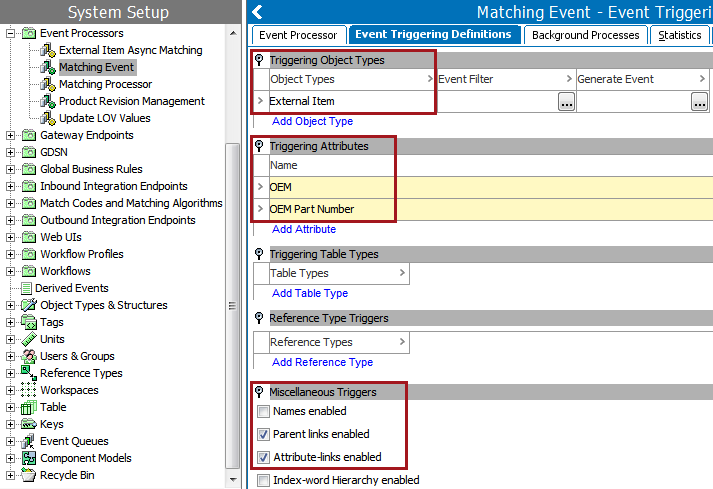
On the Event Processor's Event Triggering Definitions tab, use the Triggering Object Types, Triggering Attributes, and Miscellaneous Triggers flippers to configure the event processor to listen for changes on anything that the match code or matching algorithm needs to perform.
2017, Stibo Systems