Open topic with navigation
CSV Format
The comma-separated values (CSV) file format is available for inbound and outbound data exchanges. Using CSV requires creating a data map between STEP and the data being processed, and may also include data transformations.
The following sample CSV data import file shows that the first row is a header, and the remaining data is delimited by a comma. Exported CSV files always include a header row, though this is optional for imports.
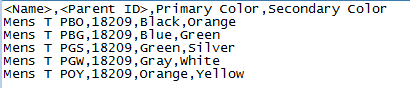
Keep the following points in mind when working with STEP data using CSV format:
- The following node types / super types can be imported and exported via CSV format: products, classifications, entities, assets (objects, not content), and attributes (objects and definitions).
- A CSV import or export file will include data in the same arrangement as relational database tables. This means that each object is displayed as a single row in the file and each object property item is displayed as a single column.
- Imports and exports are context and workspace specific. By default, data is imported to or extracted from the context and workspace in use when the process is started.
- When planning to import data back into STEP, include STEP ID in the export.
Format Availability
CSV is available for selection in:
- IIEP - see Creating an Inbound Integration Endpoint (here)
- Import Manager - see Creating a Data Import (here)
- Export Manager - see Creating a Data Export (here)
- OIEP - see Creating an Outbound Integration Endpoint (here)
Mapping
This format requires creating a data map between STEP and the data being processed, and may also include data transformations. For details, see Mapping here.
Inbound Data
CSV import allows creation of and updates to products, classifications, entities, attribute values and references. However, system setup objects (for example, attributes, LOVs, users, reference types, and so on), cannot be created or modified via import.
Because the Map Data process allows selection of only a single node type, only one node type / super type (products, entities, etc.) can be imported at a time. When multiple super types exist in the same import file, a separate import is required to successfully import each type of object, starting with classification data, then product data, and finally, entity data. When the inbound file includes data for node types other than the one selected, two things may happen: 1) assuming none of the data prevents the import, new objects are created using the supplied information and the selected super type, 2) the execution report details the skipped records when included data, like parent ID, is not found in the selected super type hierarchy. Alternately, split the inbound data file by super type and process accordingly.
The following character sets are supported by the Import Manager for CSV files: UTF-8, UTF-16, Windows-1252, or ISO 8859-1 (Latin-1).
For information on parallel imports involving multiple references on object types, see Reference Target Lock Policy on Object Types here.
Inbound Parameters
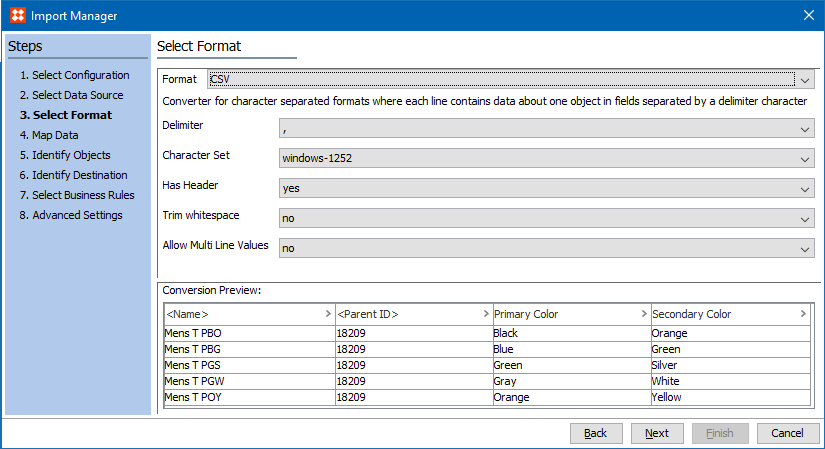
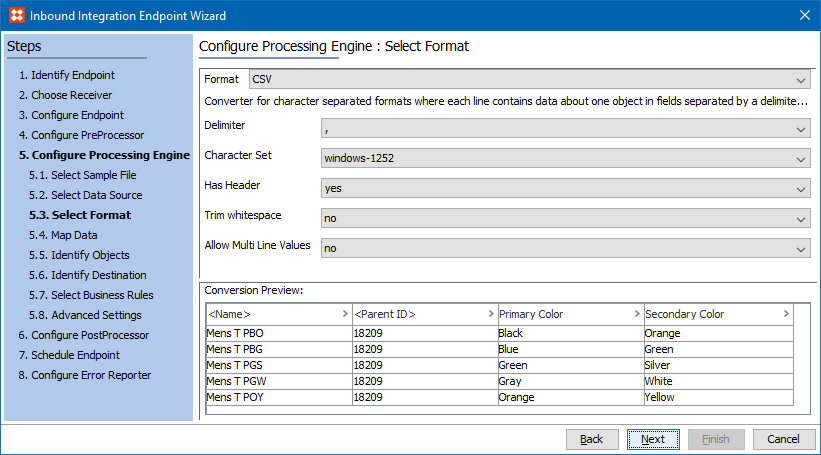
The following parameters are available in both Import Manager and IIEP.
- Allow Multi Line Values - select 'yes' if the file includes data with double quoted values that split over several lines. Typically, the newline character is interpreted as the end of data, delimiting a data record. However, sometimes data spans more than one line–that is, includes newline characters. In such cases, values must be quoted with the double quote character (") to be imported correctly, and the Allow Multi Line Values must be set to yes.
- Character Set - select the desired character set to determine the characters that can be successfully imported. Options include Windows-1252, ISO-8859-1 (also known as the Latin-1 character set), UTF-8, or UTF-16. The recommended setting is UTF-8, unless you have a reason to do otherwise.
Note: If the file contains special symbols, like trademark symbols, Unicode character set UTF-8 or UTF-16 is required to import correctly.
- Conversion Preview - a sample of the first few lines of the file is displayed to allow verification that the selected options are correct.
- Delimiter - from the dropdown, select the character to use as delimiter: semi-colon (;), comma (,), the tab character, the pipe symbol (|), or colon (:). The recommended setting is tab to avoid splitting the data on printable characters that may occur within the values.
Note: Only the delimiters in the dropdown are allowed. If the file uses a different delimiter, before importing, first convert the file outside of STEP.
- Has Header - select Yes if the file has a header line. If the first line (row) of the CSV file has header information, such as attribute names that match STEP, the Auto Map feature is available to map the columns of data to the appropriate object in STEP. Although a header row is not required, without it the user must be able to identify the data for manual mapping.
- Trim whitespace - select 'yes' to remove leading and trailing spaces in values, or select 'no' to leave leading and trailing spaces in values.
Import Manager
IIEP
Outbound Data
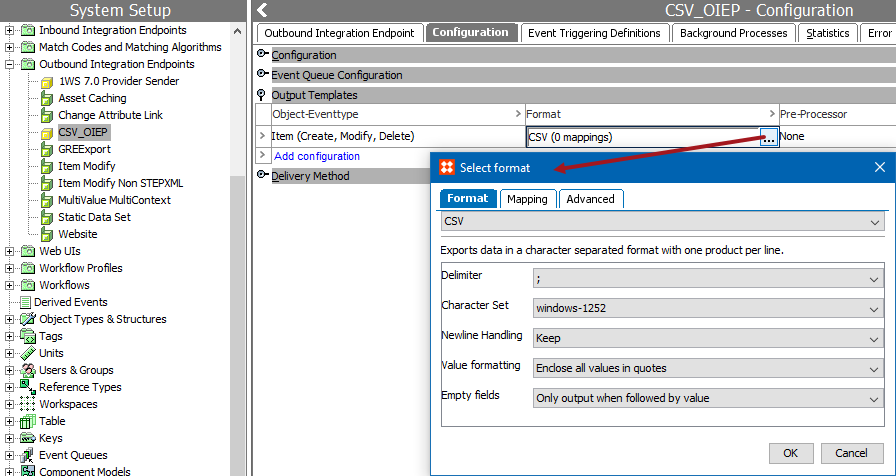
When data leaves STEP via CSV format, several options are available to customize the output.
Outbound Parameters
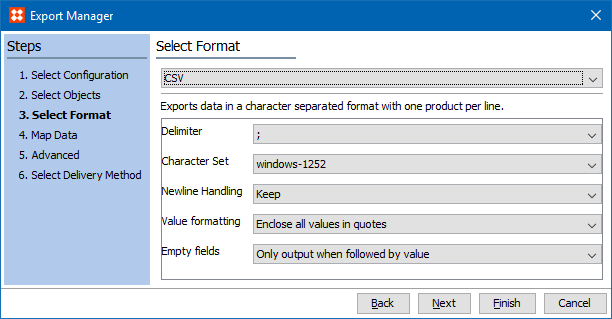
The following parameters are available in both Export Manager and OIEP.
- Character Set - select the desired character set to determine the characters that can be successfully imported. Options include Windows-1252, ISO-8859-1 (also known as the Latin-1 character set), UTF-8, or UTF-16. The recommended setting is UTF-8, unless you have a reason to do otherwise. This Character Set text is also under the Inbound Data Exchange Parameters section above.
Note: If the file contains special symbols, like trademark symbols, Unicode character set UTF-8 or UTF-16 is required to import correctly.
- Delimiter - from the dropdown, select the character to use as delimiter: semi-colon (;), comma (,), the tab character, the pipe symbol (|), or colon (:). The recommended setting is tab to avoid splitting the data on printable characters that may occur within the values.
Note: Only the delimiters in the dropdown are allowed. If the file uses a different delimiter, before importing, first convert the file outside of STEP.
- Empty fields - select 'Only output when followed by value' or 'Always output'.
- Newline Handling - select to Keep the new line or Convert to Space. The recommended setting is Convert to Space. If new lines (return codes) exist in the data being exported, selecting Keep can cause issues with data integrity, since character-separated files do not expect new lines within a record. However, if the file recipient can handle these new lines, Keep allows them to be included.
- Value formatting - select either 'Enclose all values in quotes' or 'Export without quotes unless value contains delimiter character(s)'.
Export Manager
OIEP
2017, Stibo Systems