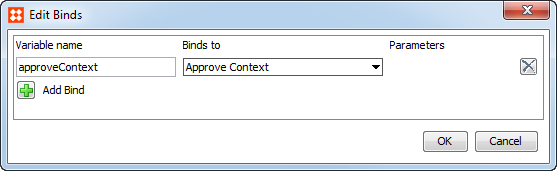
Business rules tested / executed during approval have access to the Approve Context binding. For conditions hooked into the approval process and business rules hooked into event based outbound integration endpoints, this bind gives access to the methods of the ApprovePlugin.ApproveContext interface.
The Approve Context bind is applicable before approval or on approval. Its use varies between Business Actions and Business Conditions.
The interface has the following methods:
getApprovedManager()
getApprovedNode()
getMainManager()
getMainNode()
getPartObjects()
Using these methods, you can compare data in Main and Approved workspaces and also access the set of part objects to be synchronized.
When used in a Business Condition On Approval, the bound class is 'ApprovePlugin.ApproveContext'.
When called Before Approval, the following code checks if the current node is already in the approved workspace. It evaluates to false if the node is not in the approved workspace.
In this example, Approve Context is bound to the JavaScript variable approveContext.
if(approveContext.getApprovedManager().getProductHome().getProductByID(node.getID())) {return true;}
else {return "Node not in Approved Workspace";}
Be aware that the condition After Approval check is carried out in the Approved workspace after data has been synchronized, so for this case the getApprovedNode() method would return the object post synchronization.
For standard approval condition checks, you will likely not have to use the Approve Context at all. Thus, for a simple value check, like the Current Object bound as 'node' below, will automatically resolve to the Main node Before Approval and the Approved node (post synchonization) After Approval.
When used in a Business Action, the bound class is 'ApproveTrigger.ApproveTriggerContext' and can be used when running On Approve.
In actions executed during approval, the Approve Context binding gives access to a super type specific sub-interface, for example, for products: ApproveProductTrigger.ApproveProductTriggerContext. Using these sub-interfaces you can add part objects changed by an action during approval to the set of part objects to be approved as shown below:
var valObj = node.getValue("ReadyForWebsite");valObj.setSimpleValue("Yes");approveContext.approveValue(valObj);
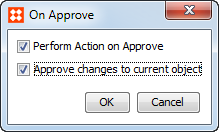
Note that actions executed On Approval can have changes synchronized automatically by setting the Business Rule Editor 'On Approve' field to select the 'Approve changes to current object' checkbox for the action.
2017, Stibo Systems