To increase performance when exporting from an event-based outbound integration endpoint (OIEP) you can implement 'multithreading' by increasing the number of threads for a given OIEP with the 'Maximum Number of Threads' parameter. Common setup is to use multithreading when there is a large amount of data going to a downstream system on a regular basis, and when the downstream system is capable of handling it.
Multithreading uses more than one thread within a single background process (BGP), for example, in an export, multiple processes do the work of exporting data while the BGP produces one file / delivery more quickly than a BGP using a single thread.
Multithreading is different from parallel processing, where a BGP runs on a queue with a size greater than one (1), which allows for more than one BGP to run at the same time. For example, multiple import processes working on different files / deliveries or multiple exports that produce different files / deliveries complete the backlog more quickly than a queue with a size of one (1).
Note: Managing the queue size is not applicable when using the 'One Queue' BGP mechanism (defined in the BGP One Queue topic of the System Setup documentation) since the system manages the number of BGPs running concurrently based on overall load on the server.
Consider the following points before increasing the number of threads to more than one:
-
The STEP system should have enough resources to perform with multithreading. Enabling multithreading provides no benefit if the environment is already being fully utilized.
-
While multithreading can improve STEP performance, if that results in overloading a downstream (receiving) system, the improvement may not be generally advantageous.
-
Before implementing in your production system, determine the best performance gain by running the settings in a similarly sized non-production environment with similar overall load. Start with a small number of threads and a small amount of data and increase each to determine the best performance gain.
Multithreading Setup
Although the 'Maximum Number of Threads' setting is available on the Configuration tab for both static and event-based OIEPs, the setting only affects event-based processes.
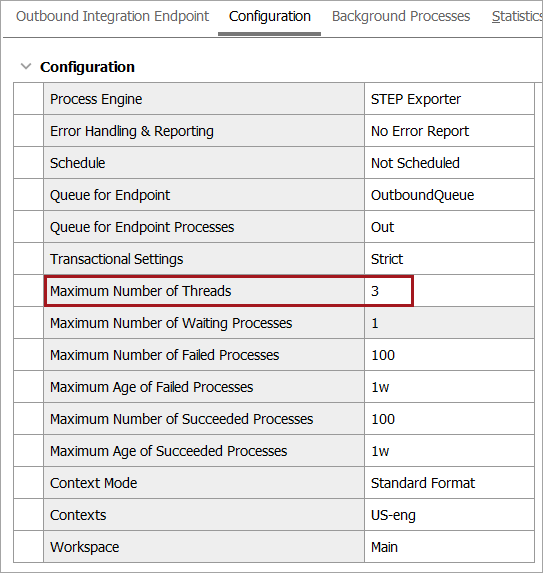
The default 'Maximum Number of Threads' setting is one (1), which means the endpoint processes a batch serially.
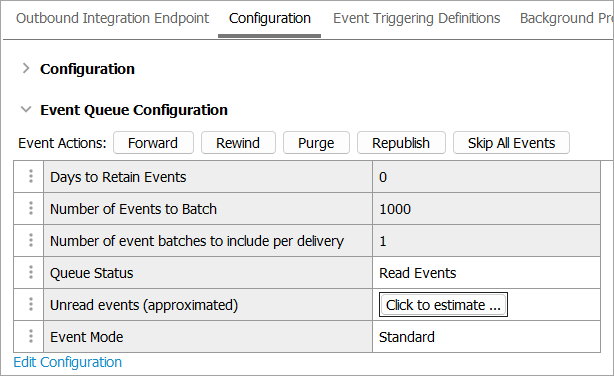
Increasing the 'Maximum Number of Threads' number will slice the batch and process these in parallel. This will also force 'Number of event batches to include per delivery' parameter in the OIEP to one (1). Refer to the Increasing the Batch Size section below.
The following warning is included in the BGP execution report and also in the system log: Number of threads are [x]. Number of batches per delivery will be set to 1 for integration endpoint [ID] as this is the only allowed value when multiple threads are used. Requested number of batches were [y].
Batch Slicing
The batch is divided into parts where the size of a part is determined by this formula:
Part size = max(1, batch size / parallel degree)
-
The batch size is set in the ‘Number of Events to Batch’ parameter. Refer to the Increasing the Batch Size section below.
-
The parallel degree is based on resources available on the system. For example, if the parallel degree is 2, the batch is divided into 2 parts, and each is handled by its own thread. Therefore, the higher parallel degree, the more parts.
-
Each part is handled in its own thread, as described below. If a batch is divided into 3 parts, each part is processed in parallel and will finally be delivered in part order for the batch.
Important: While a single threaded export delivers one (1) file, the multi threaded option can deliver multiple files for a single batch and will split the batch into parts.
For example, consider an OIEP with 10 events and a batch size of 8:
-
Using a single threaded setup (Maximum number of threads = 1):
2 deliveries
-
one delivery has 8 objects
-
one delivery has 2 objects
-
-
Using a multi threaded setup of 2 (Maximum number of threads = 2) and a part size of 4:
3 deliveries
-
two deliveries have 4 objects
-
one delivery has 2 objects
-
'Maximum number of threads' is typically increased for particularly critical information where the speed with which the deliveries are produced is key. However, increasing the setting beyond the capabilities of the system will impede the overall performance of the system , so take care when adjusting the maximum number of threads.
Increasing the Batch Size
When increasing the number of threads running, the size of the batch (managed by the ‘Number of Events to Batch’ parameter) will decrease proportionally (e.g., a batch size of 1,000 using two threads will be split into two batches of 500). When adjusting the number of threads, it is therefore worthwhile to experiment with increasing the batch size, so that each working thread has a reasonable amount of data to process.
Serialized and Parallelized
The batch-fetching of the events is run serially, and the data is distributed as evenly as possible to each thread. From fetching the batch through the delivery stage, the pre-processing, main processing, and post-processing take place in parallel. Following post-processing (if applicable), the data is handed over to the delivery stage which is run serially. Events are therefore delivered as if everything was executed serially. With this in mind, it is important to consider the schedule of the endpoint and ensure that it is set to check for events as frequently as if the endpoint were single-threaded.
The execution report of the endpoint records when a batch is processed in parallel (via multiple threads).