This section covers Mapping functions tailored to hierarchical channels, such as 1WorldSync and Configured Channels with multiple receivers. For the purpose of this documentation, mapping is applied in the Atomic Oven Bakery & Cafe channel. Users are advised to review Mapping Attributes as a prerequisite to this topic as an understanding of mapping basics is essential to effectively utilizing the content in this topic.
Navigation Between Channel Levels
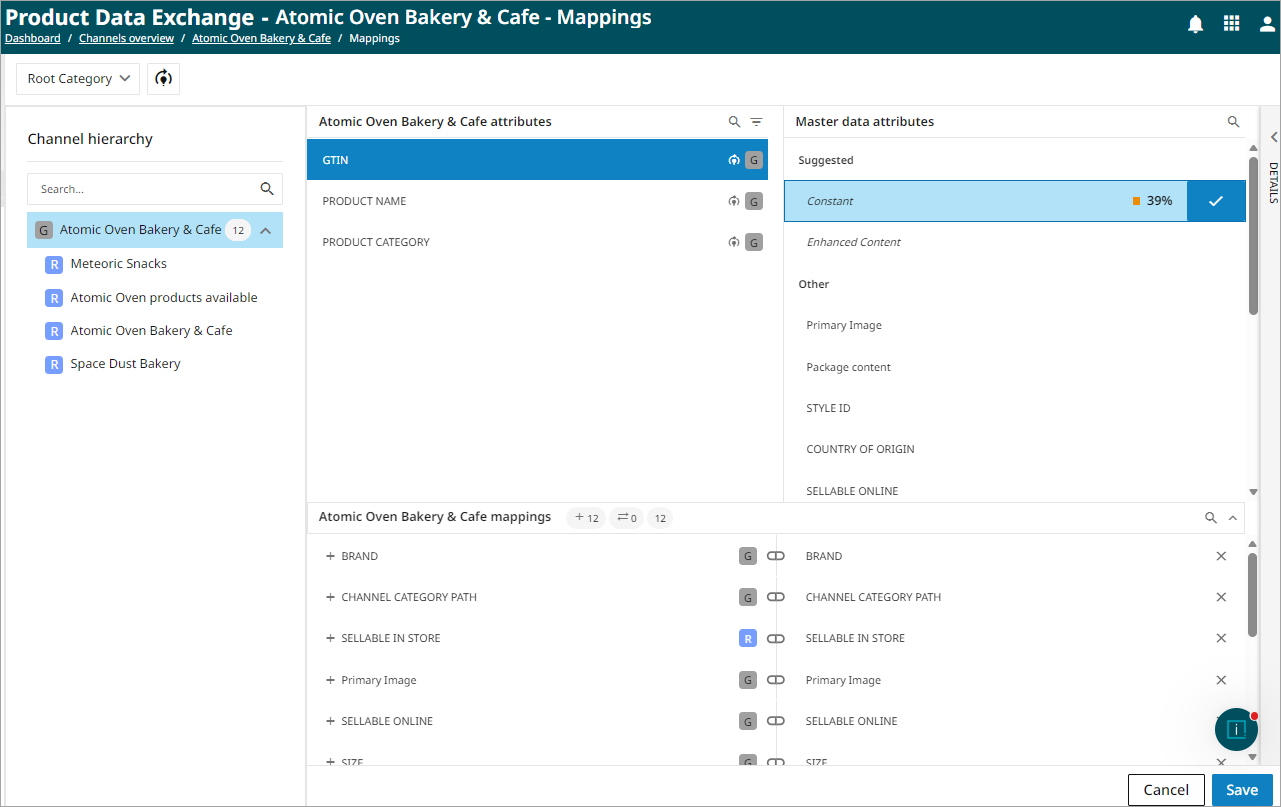
The Channel hierarchy pane provides quick access to mapping at different hierarchy levels. Use the Channel hierarchy pane to navigate between channel hierarchy levels. When the channel node is selected, the mapping page displays mappings created at the channel level. These mappings are inherited by the receivers beneath the channel, unless a receiver-level mapping overrides an inherited mapping. In this example, the Atomic Oven Bakery & Cafe channel node is selected, and the mapping page displays the mappings maintained at the channel level.
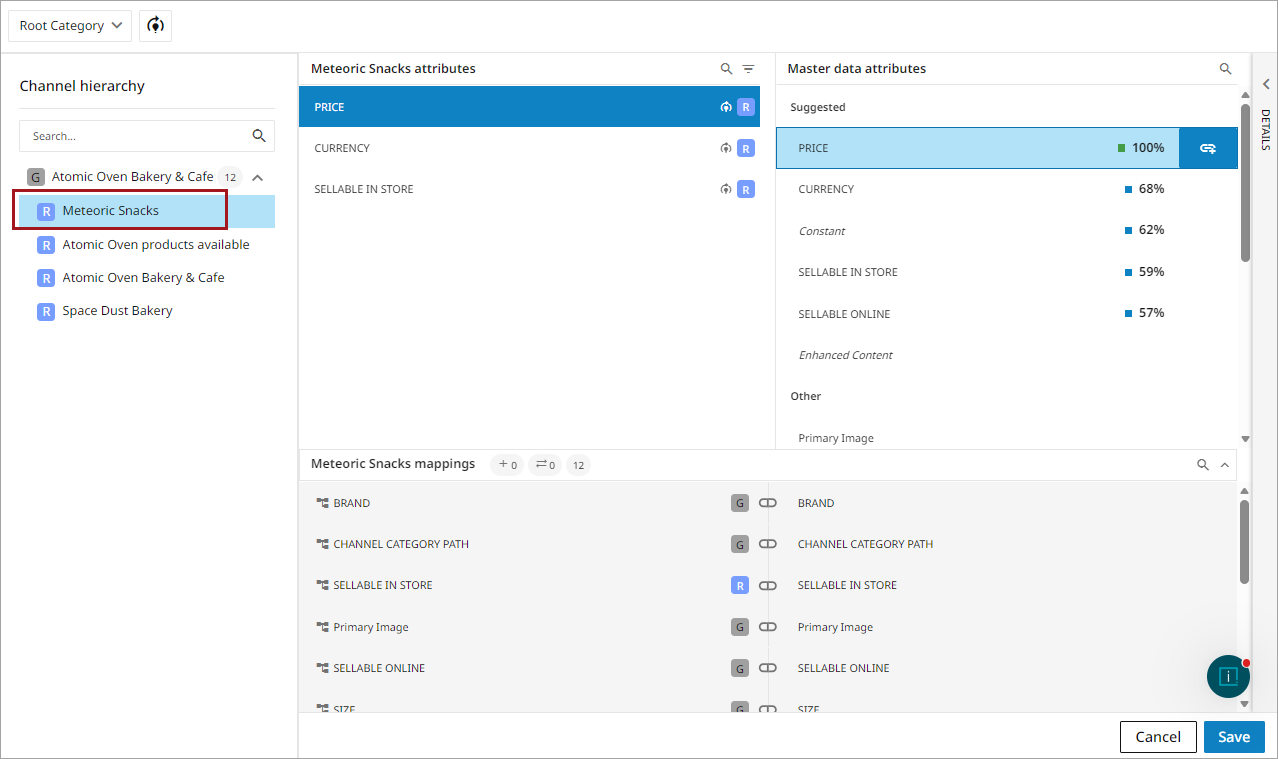
To configure mappings for a specific receiver, select the receiver node in the Channel hierarchy pane to view and manage receiver-level mappings. In this example, the Meteoric Snacks receiver is selected, and the mapping page displays mappings that apply to that receiver.
Mapping Level Indicators
Channel attributes display an icon that indicates the lowest hierarchy level at which the attribute can be mapped. The Atomic Oven Bakery & Cafe channel contains multiple receivers and both Global (channel) and Receiver-level attributes, which are defined below.
| Term | Definition | Example |
|---|---|---|
|
Global attribute |
An attribute mapped at the channel level that is available throughout the channel hierarchy. |
If Brand is mapped as a global attribute, all receivers in the channel hierarchy can use that mapping unless a receiver-specific mapping overrides it. |
|
Receiver-level attribute |
An attribute mapped for a specific receiver that applies only to that receiver. |
If Price is mapped for the Meteoric Snacks receiver, the mapping applies only to that receiver and not to other receivers in the hierarchy. |
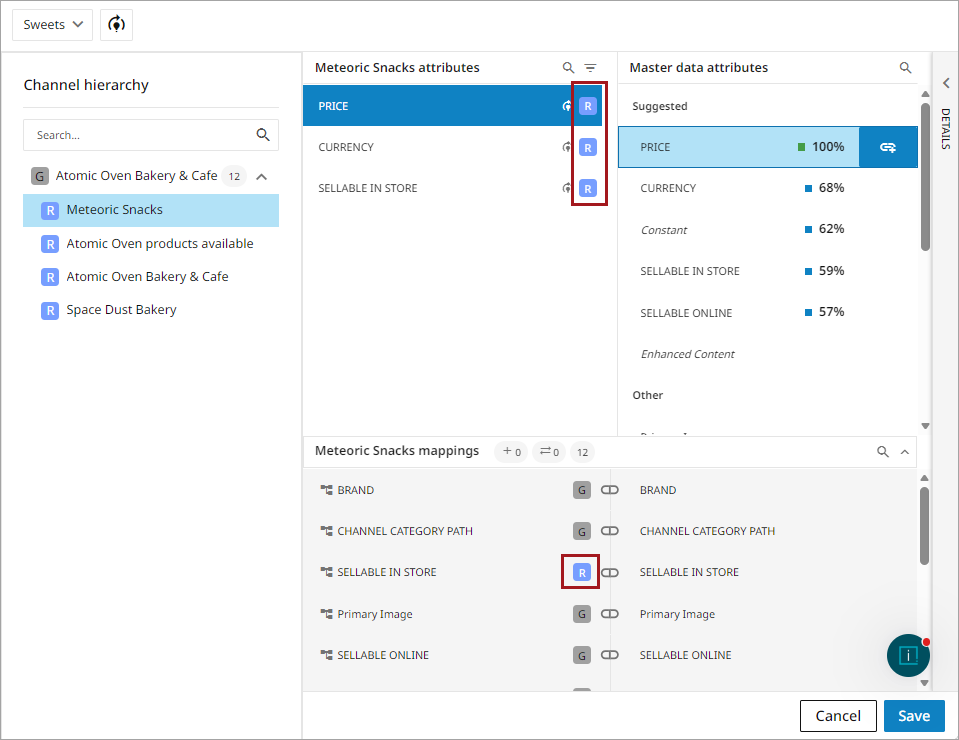
G icon: The attribute can only be mapped at the channel level. These attributes are inherited by receivers and cannot be mapped independently at the receiver level.
R icon: The attribute can be mapped at either the channel level or the receiver level. When mapped at the channel level, the mapping is inherited by receivers. Receiver-level mappings can be used to create mapping overrides or net new mappings when receiver-specific requirements exist.
Effective Mappings
The mapping page uses visual indicators to help identify whether a mapping is inherited from the channel level, overrides an inherited mapping, or is created specifically for a receiver.
Inherited Mappings
Inherited mappings are mappings configured at a higher level in the channel hierarchy that automatically apply to lower levels. Receivers use these inherited mappings by default and can override any of them with receiver-specific mappings as needed.
In PDX, inherited mappings are visually distinct from receiver-specific mappings, allowing users to quickly identify the source of each mapping.
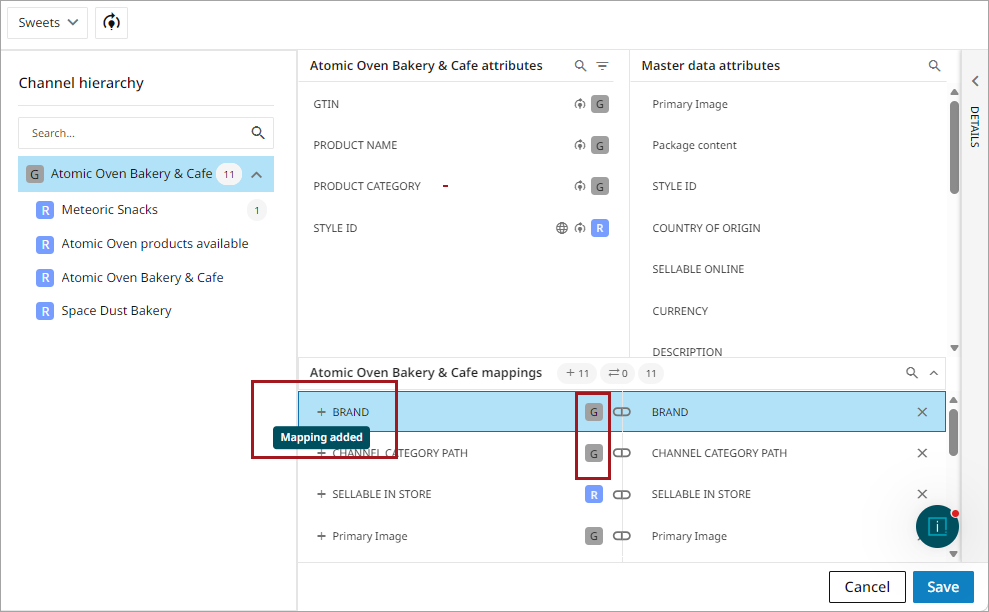
In the below screenshot, the channel Atomic Oven Bakery & Cafe contains a number of attributes mapped at the channel level. Attributes mapped at the channel level are identified with a  icon. The + indicates that the mapping has been added and is maintained at this level.
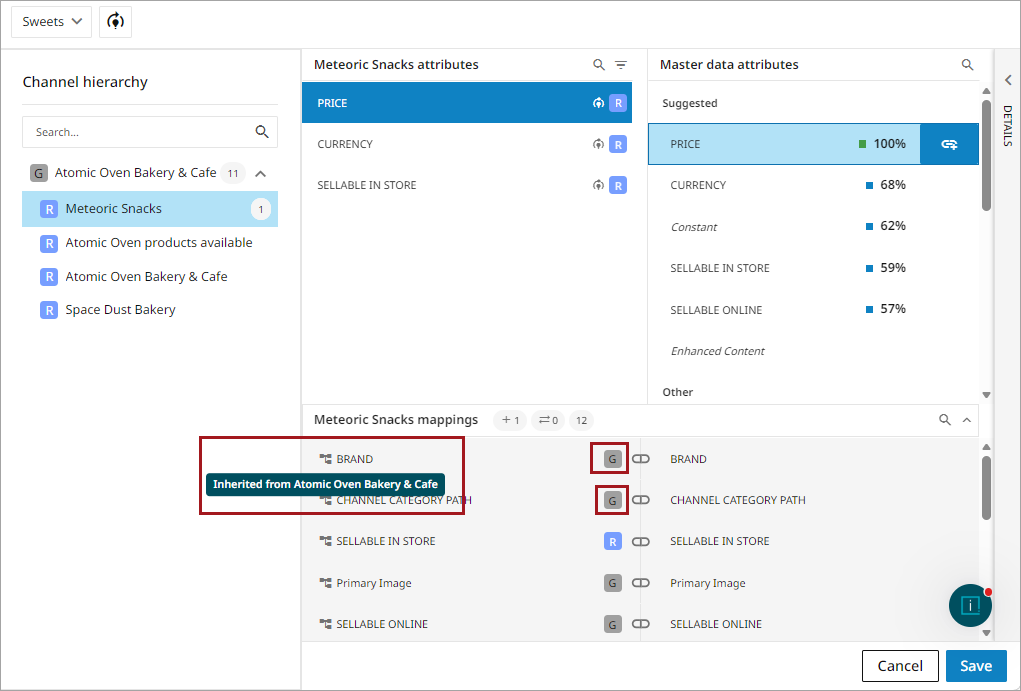
The following screenshot shows the receiver Meteoric Snacks. Several mappings are inherited from the channel level and are available in the receiver without requiring additional configuration. The inherited mapping icon  indicates that the mapping originates from the channel level and has not been overridden for this receiver.
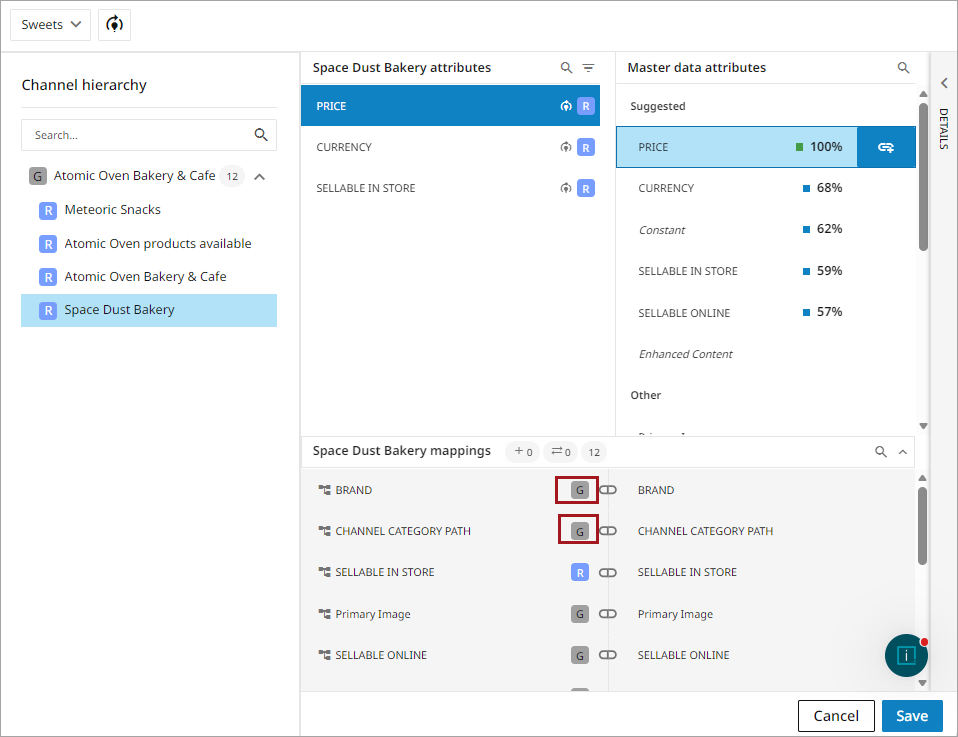
The following screenshot shows the receiver Space Dust Bakery. The displayed mappings are inherited from the channel level and have not been overridden. Because these mappings are maintained at the channel level, any updates made to the channel mapping are automatically reflected in receivers that inherit them, helping ensure consistency across the channel hierarchy.
Mapping Overrides
A mapping override is a receiver-level mapping that replaces an inherited channel-level mapping for a specific receiver. Overrides allow a receiver to use a different source attribute or different value transformations while other receivers continue to inherit the channel-level mapping.
In the screenshot below, the Meteoric Snacks receiver contains mappings maintained at the receiver level. These mappings either override mappings inherited from the channel level or were created specifically for this receiver.
Using a price attribute as a starting point, an MSRP is a solid example. For the MSRP value, there are two clear cases in which an override becomes relevant:
-
If a receiver should be getting attribute values from a different master data attribute than the one in the inherited mapping
-
If the master data attribute needs a different set of value transformations than those applied to the inherited mapping.
For the first instance, assume the brand has two attributes in master data for MSRP: MSRP NA and MSRP EU. If most receivers are retailers and marketplaces in North America, the logical mapping to create would be a global mapping from the MSRP NA master data attribute to the MSRP channel attribute. Then, for the few receivers representing European retailers, a mapping override could be created to instead populate the channel attribute MSRP with the values of the MSRP EU master data attribute.
For the second instance, assume the MSRP master data value is in USD. However, the value should be in EUR for European retailers. Thus, a receiver-level mapping can be created that overrides the global attribute mapping and applies a number of value transformations, converting the value in USD to EUR while keeping the global mapping with no transformations.
Net New Mappings
A net new mapping is created specifically for a receiver. It is created at the receiver level when no inherited mapping exists. The attribute and its mapping will only exist on the receiver level and will not appear in globally mapped attributes.
The screenshot below shows the channel mapping for the channel Atomic Oven & Bakery. The attribute 'Style ID' is not mapped at the channel level.
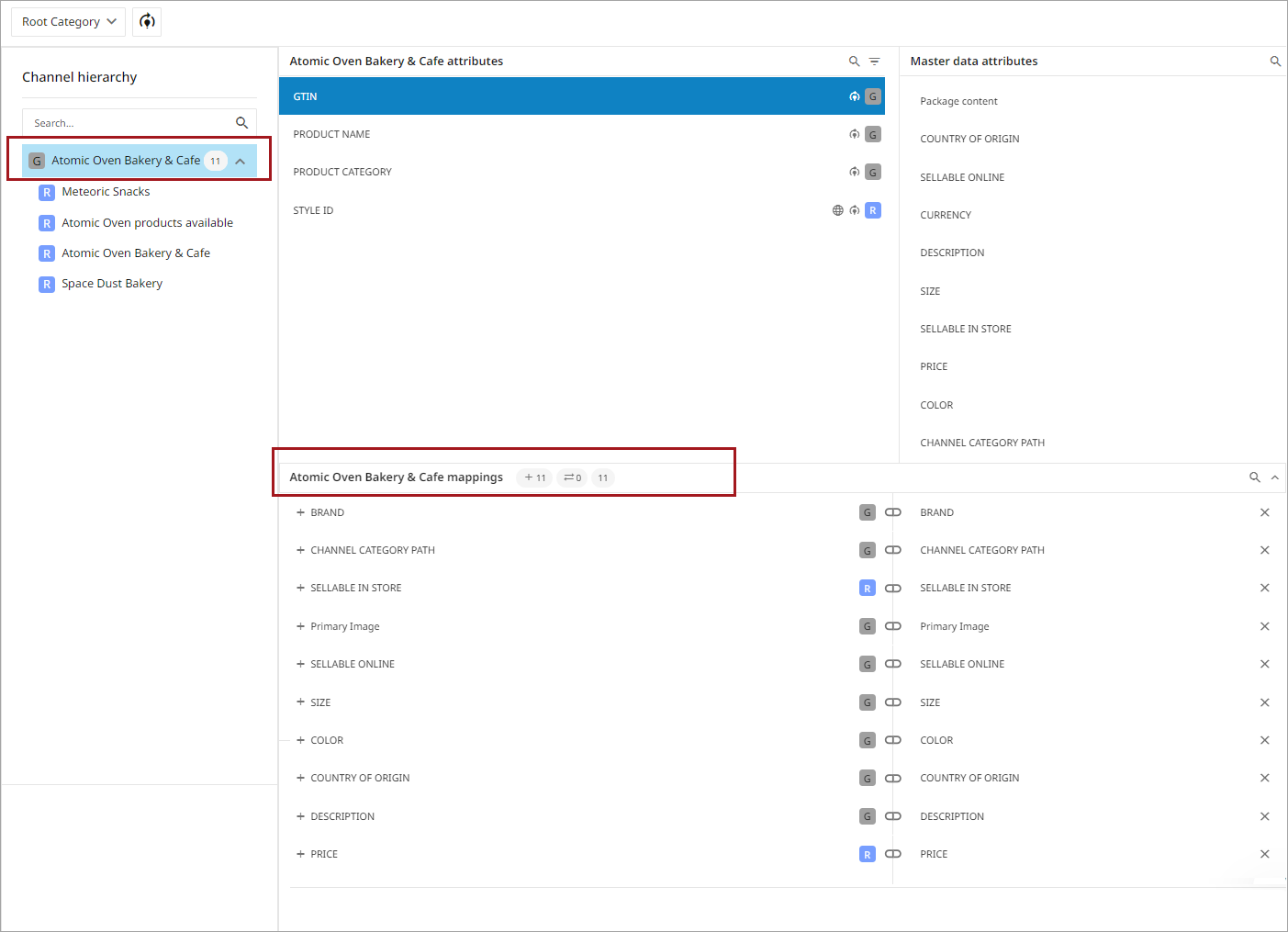
The global icon next to STYLE ID indicates the attribute is language specific.

The 'R' icon indicates the attribute can be mapped at the receiver level.

The below image shows the receiver Meteoric Snacks. The attribute 'STYLE ID' is not mapped, but it is available and can be mapped to the receiver.
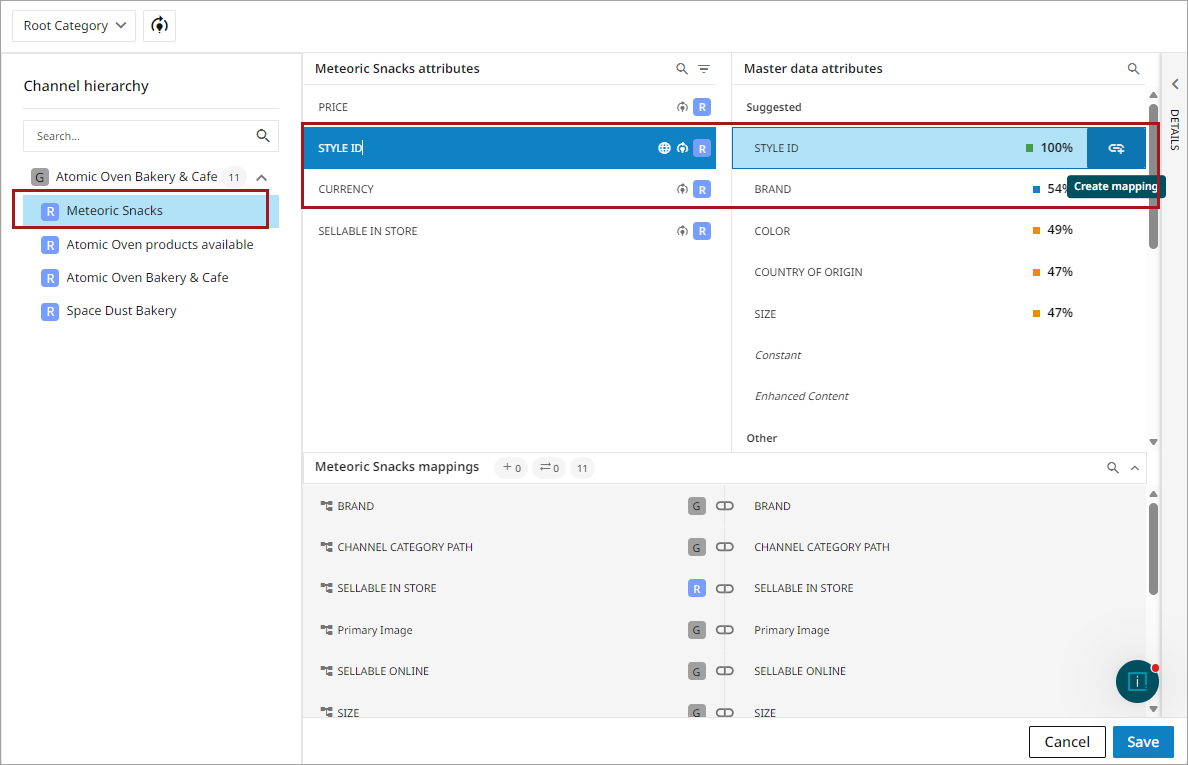
Once the attribute has been mapped at the receiver level, it will appear in the receiver's mappings.
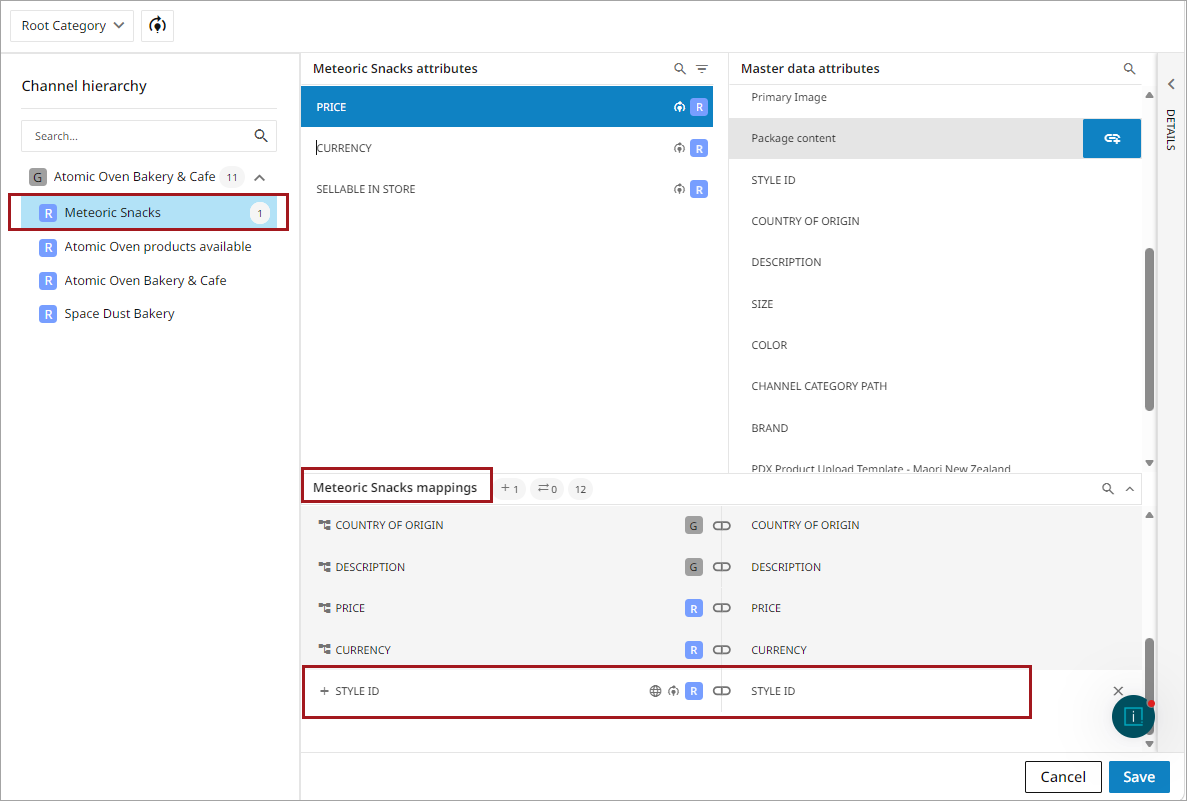
Note: A net new mapping must be mapped independently in each receiver where it should appear. Mapping must be created individually in each separate receiver for the mapping to appear in the receiver.
Best Practice: Create Mapping at Highest Level
Whenever possible, users should create the initial mapping at the highest hierarchy level that meets the channel's business requirements — this reduces overall mapping maintenance in the channel and its receivers.
When a mapping is created at the channel level, it is inherited by receivers throughout the channel hierarchy. Maintaining shared mappings at the channel level ensures consistency across receivers and allows updates to be made in a single location.
Create receiver-level mappings only when a receiver requires behavior that differs from the inherited channel-level mapping, such as a different source attribute or different value.