The ‘ProductGen AI monitoring’ option is relevant for implementations that make use of Stibo Systems’ ProductGen AI solution. Users who make use of one or multiple parts of the solution can use this option to view how many AI credits have been used through operation of the solution.
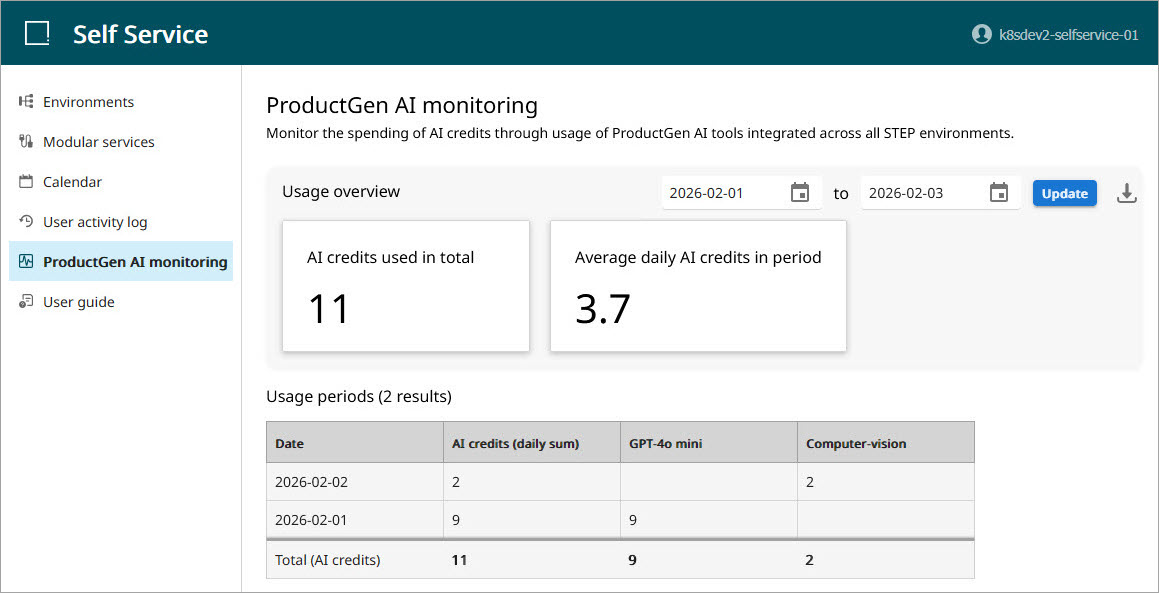
To view historic AI credit usage data, specify the period of time you wish to review. To do this, select a beginning and an ending date from the date pickers located in the upper right-hand corner of the screen.

Once a period of time has been specified, AI usage information displays in two sections on the page, the ‘Usage overview’ and ‘Usage periods’ sections.
Usage overview
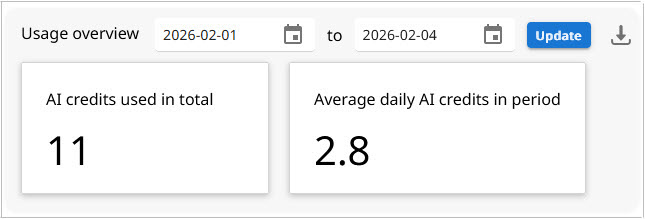
The ‘Usage overview’ section includes four elements:
-
The date pickers (referenced above) allow users to specify the desired period of time to review usage data. This includes the ‘Update’ button that prompts the system to display the data for the selected dates.
-
A download button that allows users to download a version of the table displayed in the ‘Usage periods’ section.
-
An ‘AI credits used in total’ card that displays a single number that represents all AI credits used during the specified time period.
-
An ‘Average daily AI credits in period’ card that displays a single number that represents the average number of AI credits used per day during the specified time period.
Usage periods
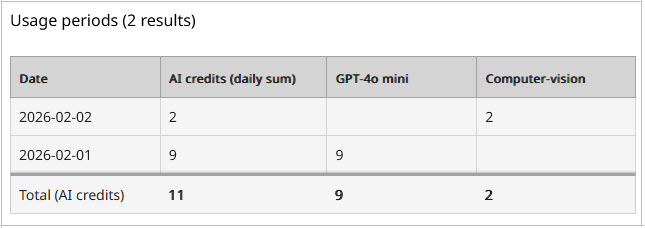
The ‘Usage periods’ section features a table that displays more granular information about AI credit usage during the specified time period. In the table are the following columns:
-
Date – The date within the specified time period where one or more AI credits were used. Only dates where one or more AI credits were used will display in the table.
-
AI credits (daily sum) – Total AI credits used during the specific date to include all AI services used.
-
AI credits used per AI service – The remaining columns in the table represent the AI services (e.g., GPT-4o mini, Computer-vision, etc.) used to power the ProductGen AI solution, one column for each service. In these columns, the total ‘AI credits used (daily sum),’ displayed in the first column, is broken down by service, and a number is displayed for each service AI credits were used towards. If no credits were used by that service on that date, no number will display.