The 'Background Process Search' provides users with multiple options for finding relevant background processes (BGPs) based on metadata on the BGP. BGPs are reported on the BG Processes tab, as described in the BGP Execution Management topic in the System Setup documentation.
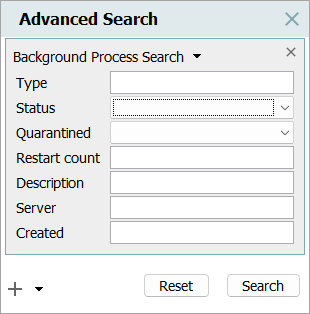
For information on a parameter, hover over the parameter field to display help text.
The 'Background Process Search' filter parameters are described below. When a value is added to a filter parameter, the value will be included as part of the filtered search. Multiple parameters can be used at the same time to filter search results. Click the Search button with all parameters blank to return all BGPs available on the system.
-
Type - Refers to object types that begin with stibo.. Enter a case-sensitive BGP type, such as BulkUpdate, Importer, Exporter, Inbound, Outbound, InboundPoller, or DataProfiler. BGP types are displayed in the Search Result Profiling section of the Advanced Search under the 'Special Types' heading.
-
Status - Enter the status of the BGP, which is reported in the Status parameter on the Background Process tab in the Properties section. The options are: aborted, completed with errors, failed, running, succeeded, suspended, unexpected, and waiting.
-
Quarantined - Enter the quarantine status reported in the Quarantine Status parameter on the Background Process tab in the Properties section. The options are: Previously Quarantined, Quarantined, and Restart Acknowledged.
-
Restart count - Refers to the number of restarts that have occurred after a crash of a given BGP. Restarts are reported in the Execution Report section of the BGP, and the restart count number is only incremented when a crash occurs. The restart count is cleared once a quarantined BGP completes successfully. Enter a search value, such as *, 1, >2, or <=3.
Note: Searching for * in 'Restart count' finds all BGPs that have been restarted due to a planned shutdown or a crash.
-
Description - Enter the case-sensitive text reported in the Description parameter on the Background Process tab in the Properties section. Wildcards are allowed.
-
Server - Enter the IP address reported in the Execution Server parameter on the Background Process tab in the Properties section.
-
Created - Enter the date reported in the Created parameter on the Background Process tab in the Properties section. Enter a value using the format yyyy:MM:dd:hh:mm:ss. Wildcards are allowed. For example, 2026:05:06*, finds all BGPs that were created anytime on 6 May.